Alcatel IP1020 Administrator Guide ed1.0 18/58
By default, your handset and all handsets in the system will receive calls through all sip
lines, and will use Account1 to make outgoing calls.
You can change these settings. As said above, the procedure to do so is relevant if you
have more than one handset in the system, or more than one active sip account.
3.1.2.1 Call routes setting
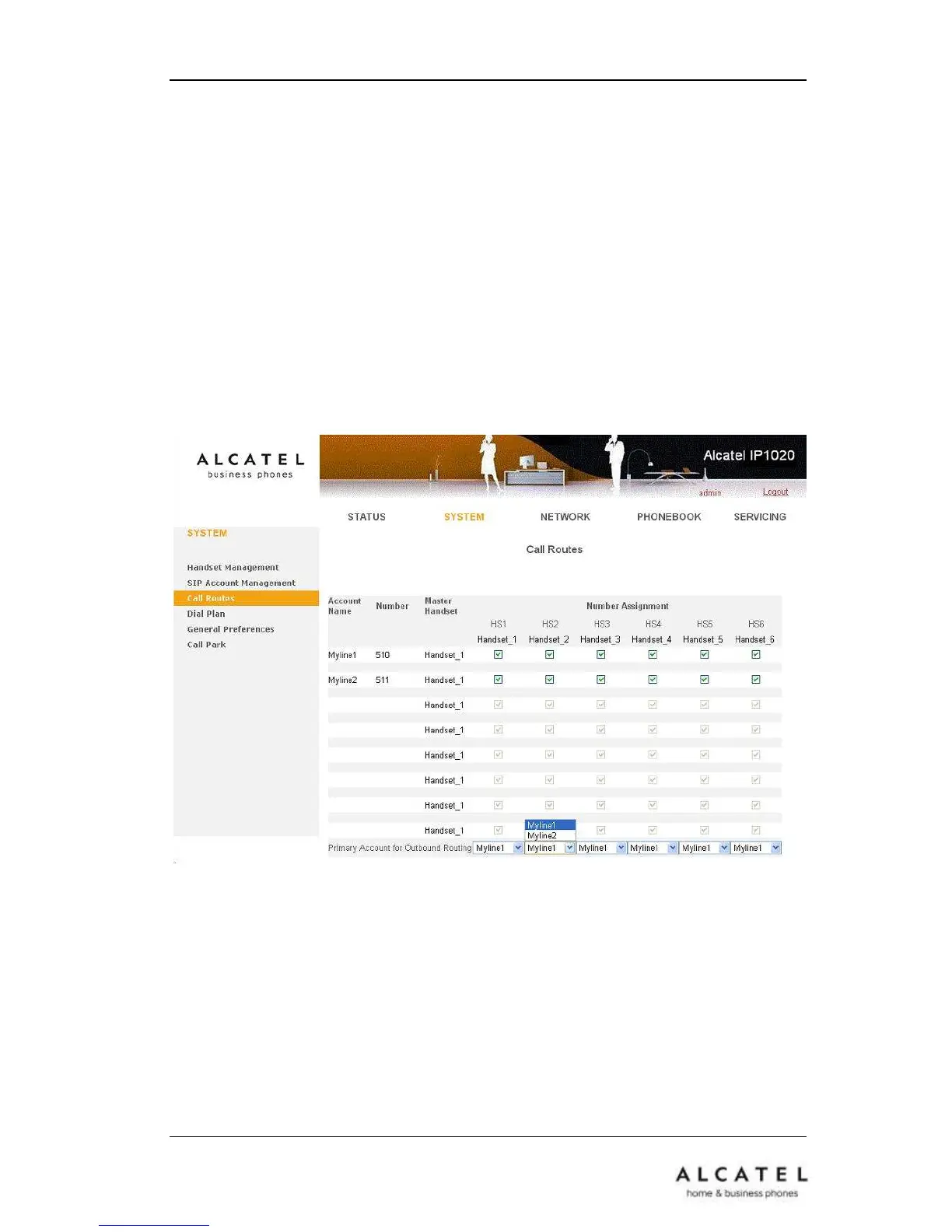
In the WUI Go to SystemCall Routes. Tick or untick the handsets you want to be
able to use with the different sip lines.
When a handset is ticked for a certain account, it will be able to make and receive calls
using that account.
3.1.2.2 Default line setting
As depicted above, SystemCall Routes page also allows you to choose the default
line each handset will be using for outgoing calls, among active calls.
This means that calls will be sent using this default account unless the user manually
selects a different line for a particular call.
Default line setting can also be performed using the phone interface. Go to
MenuSettingsTelephony.
Scroll down to Default line and use right/left arrows to choose among accounts
assigned to your handset. Then press Save softkey to store the setting.











 To Next Page