Alcatel IP1020 Administrator Guide ed1.0 30/58
Press the green key to dial a highlighted entry, or press Options softkey to View
details or Predial one among the different numbers assigned to this contact.
You can also navigate through the XML Phonebook with up/down keys and then view or
dial out a highlighted entry as explained above.
Note:
1. IP1020 can support up to 5 xml phonebooks.
2. Each contact in the remote phonebook can have up to three phone numbers.
3. Ask your technical support for more detailed information.
3.3.3.2 LDAP
With LDAP phonebook you can perform search operations, and have dial-out or
incoming call lookup. The latter can be enabled/disabled using the WUI or configuration
files.
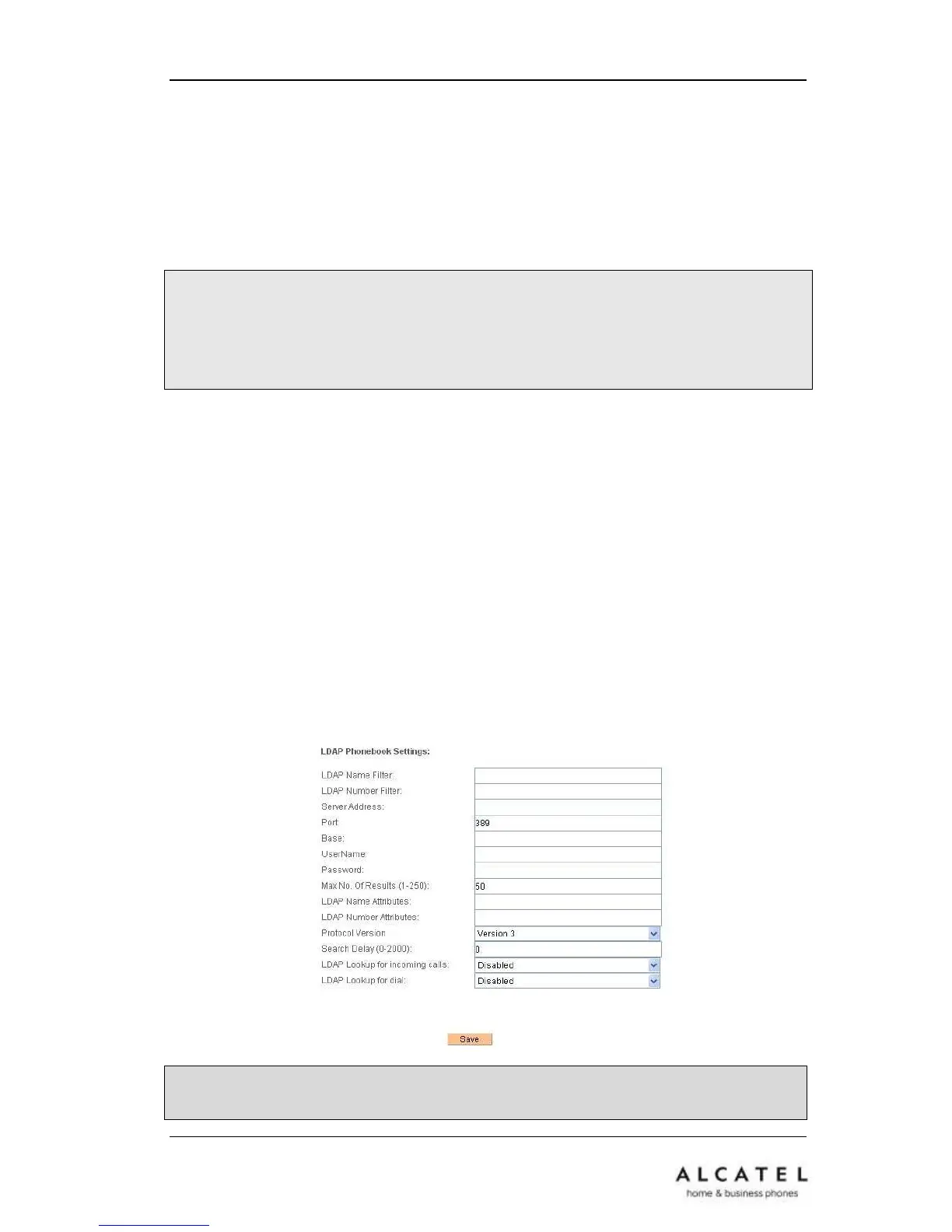
To set LDAP via Web interface, go to Phonebook Network Phonebook LDAP
Phonebook Settings.
Configure the corresponding options: server address, attributes, filters, etc.
Remember to enable “LDAP Lookup for incoming calls” and/or “LDAP lookup for dial” if
you want the system to look for matches when you have an incoming call or you are
dialing out, and display the corresponding name.
Click Save button to store your changes.











 To Next Page