Alcatel IP1020 Administrator Guide ed1.0 49/58
4.4.3 Call Hold
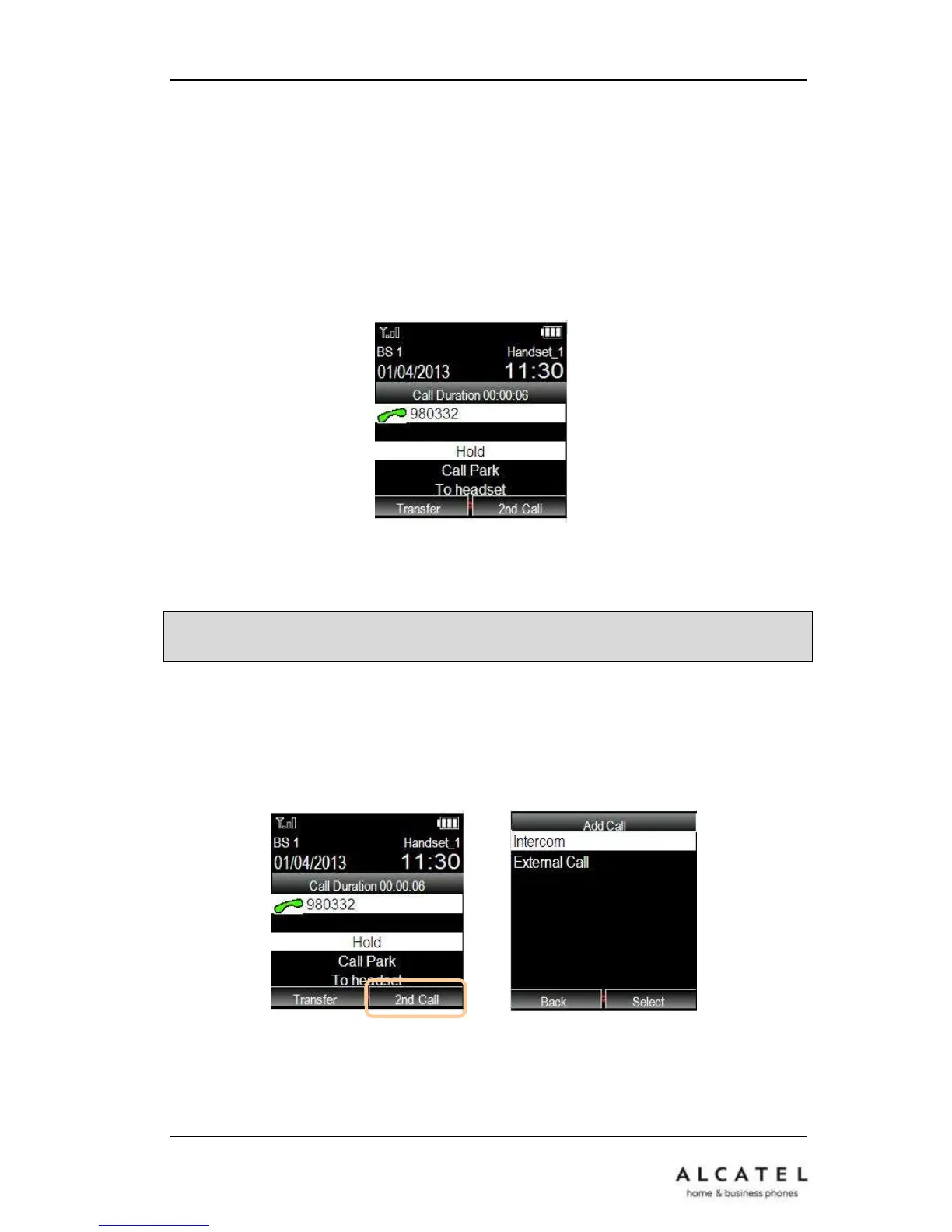
This call function allows you to place an active call on hold. In this case your IP PBX
might play a melody or message to the other party while waiting. You can make or
receive another call can while having a call on hold, as well as initiate a call transfer.
To hold/resume a call via Phone Interface:
Use the navigator up/down keys to have Hold option highlighted on the in-call menu.
Then press the OK key.
To retrieve your call, simply select Unhold from the in-call menu and press OK key.
Note: It is not necessary to press Hold function first to perform a second call or call
transfer. It is done automatically.
4.4.4 Consultation Call (2
nd
Call)
To dial out a second call with your IP20 handset while there is already an ongoing call,
please press 2
nd
Call softkey. Select whether your call will be internal (intercom) or
external.
For internal consultation calls, please select the handset from the list you will be offered.
If you choose to make an external call, then select the line to be used for this call and
dial the number. Please note you can use your contact list or call logs as well to select











 To Next Page