19
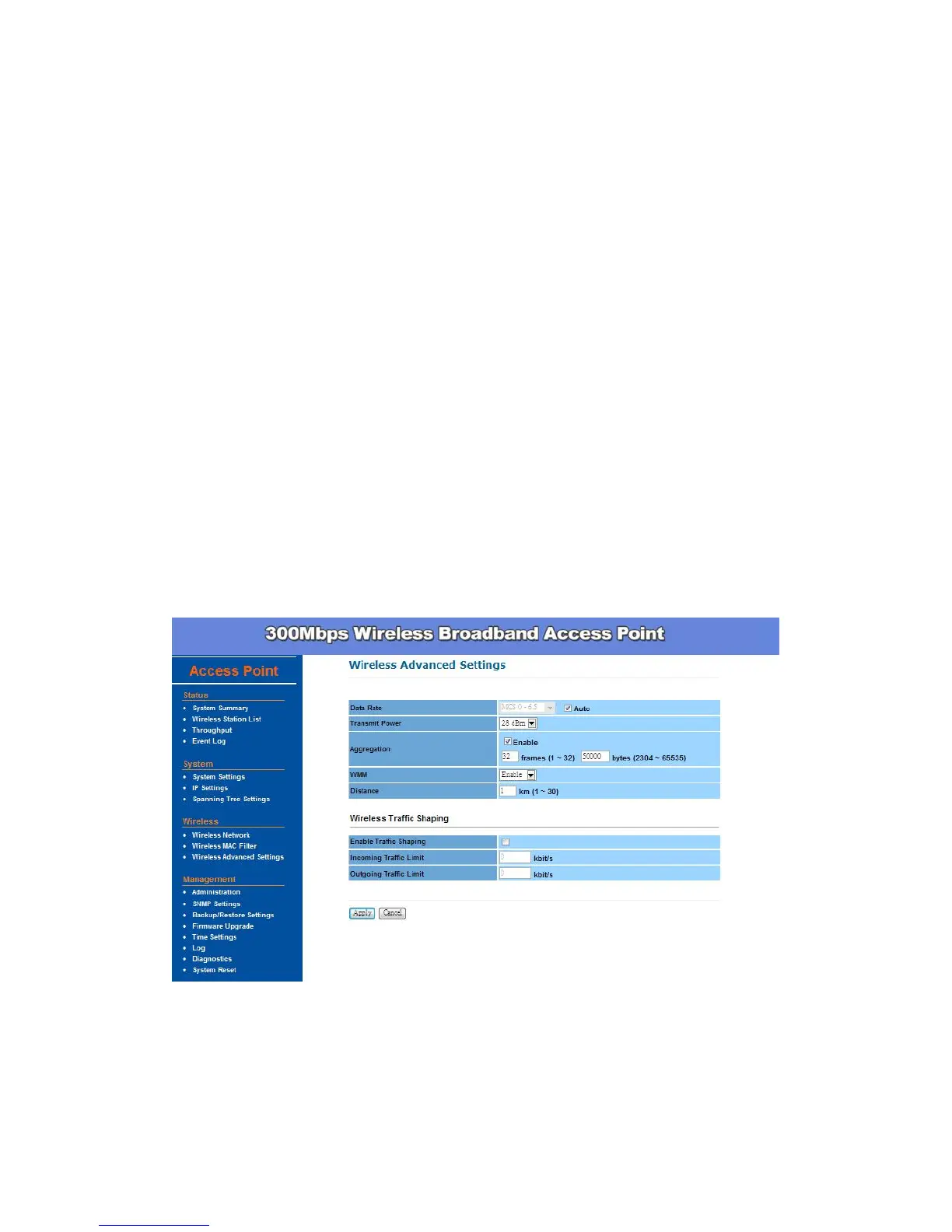
Transmit Power – You can reduce RF output power by selecting
adjustable transmit power by 1dBm step from 28 to 3 dBm. Changing
transmit power may decrease your wireless signal coverage. This feature
can be helpful in restricting the coverage area of the wireless network. You
can arrange the different data rate in distance in Access Point mode.
Please refer below table.
Aggregation – When you enable this function, the device will combine
several packets and then transmit them as one. This is to reduce the
overhead when there are large packets to be transmitted.
WMM – Choose to Enable or Disable wireless multimedia mode.
Distance (1-30km) – Setup this parameter according to the longest link
distance between the point to point, or point to multi-point in the network.
The input needs to be greater than or equal to the real distance. The
range can be from 1km to 30km.
Wireless Traffic Shaping – Choose to enable or disable wireless traffic
shaping, specify the incoming and outgoing transmission limit kbit/s.
Remember to click Apply to make sure all changes are made before leaving
this page.


 To Next Page