35
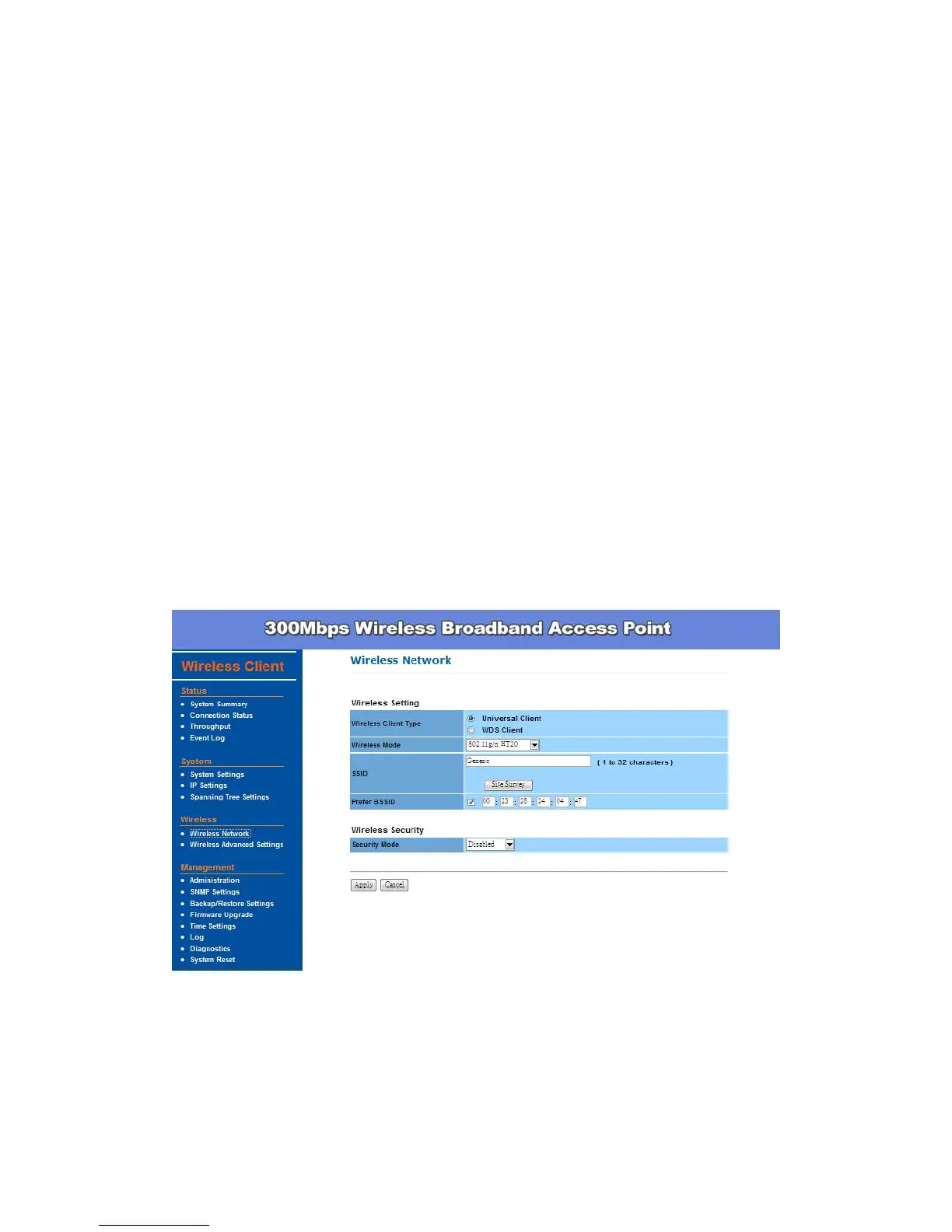
Wireless Setting
Wireless Client Type – Default setting is Universal Client which will
send out the MAC address of this device. The WDS Client, on the other
hand, will send out the MAC address which connected to the device.
SSID - The SSID is the unique name shared among all points in a wireless
network. The SSID must be identical for all points in the wireless network.
It is case-sensitive and must not exceed 32 alphanumeric characters,
which may be any keyboard character. You can also click Site Survey
and choose any available AP; system will determine the Access Point
currently available and establish connection with that Access Point. If you
already understand your wireless environment well, you can enter the
SSID in manually.
In Wireless Network page, you can find Site Survey button as shown below.
You can click on it to find all wireless networks available in your current
environment.
The Site Survey page can help you identify all the APs currently working in
your environment. Just click on the BSSID column, the system will join you to
the SSID you specify. In Site Survey page, you can also see the details of all
SSIDs currently available.


 To Next Page