44
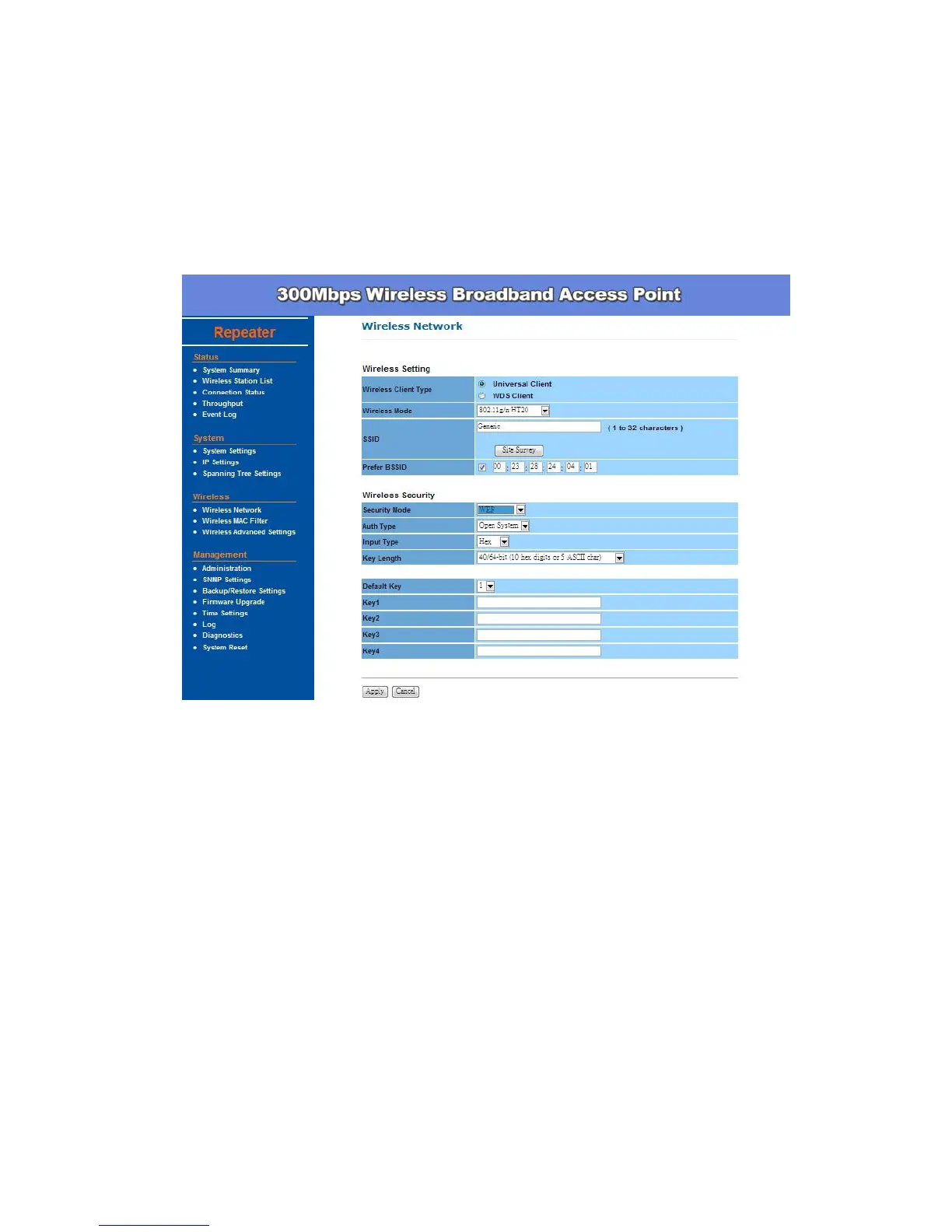
Default Key: You may use up to four different keys for four different
networks. Select the current key that will be used.
Key table – You can enter 4 different WEP encryption keys into the
table and by choosing the radio button to decide which one is valid now.
The AP supports 64, 128 and 152bit key length. The longer key we
choose usually means the encryption is stronger.
Be sure to click Apply to save all changes.
WPA-PSK / WPA2-PSK stands for Wi-Fi Protected Access – Pre-Shared Key.
WPA-PSK is design for home users who do not have RADIUS server in their
network environment. WPA can provide better security level than WEP without
difficult setting procedure.
Encryption - WPA gives you three encryption methods: Auto, TKIP and
AES, with dynamic encryption keys.
PassPhrase - Enter a WPA Shared Key of 8-63 characters. The Shared
Key should be also applying the clients work in the same wireless
network.
Group Key Update Interval - Enter a number of seconds which instructs
the Access point how often it should change the encryption keys. Usually
the security level will be higher if you set the period shorter to change


 To Next Page