- 18 -
4.3 Quick Setup
Please refer to Section 3.2: "Quick Installation Guide".
4.4 WPS
This section will help guide you into adding a new wireless device to an existing network quickly
with the WPS (Wi-Fi Protect Setup) function.
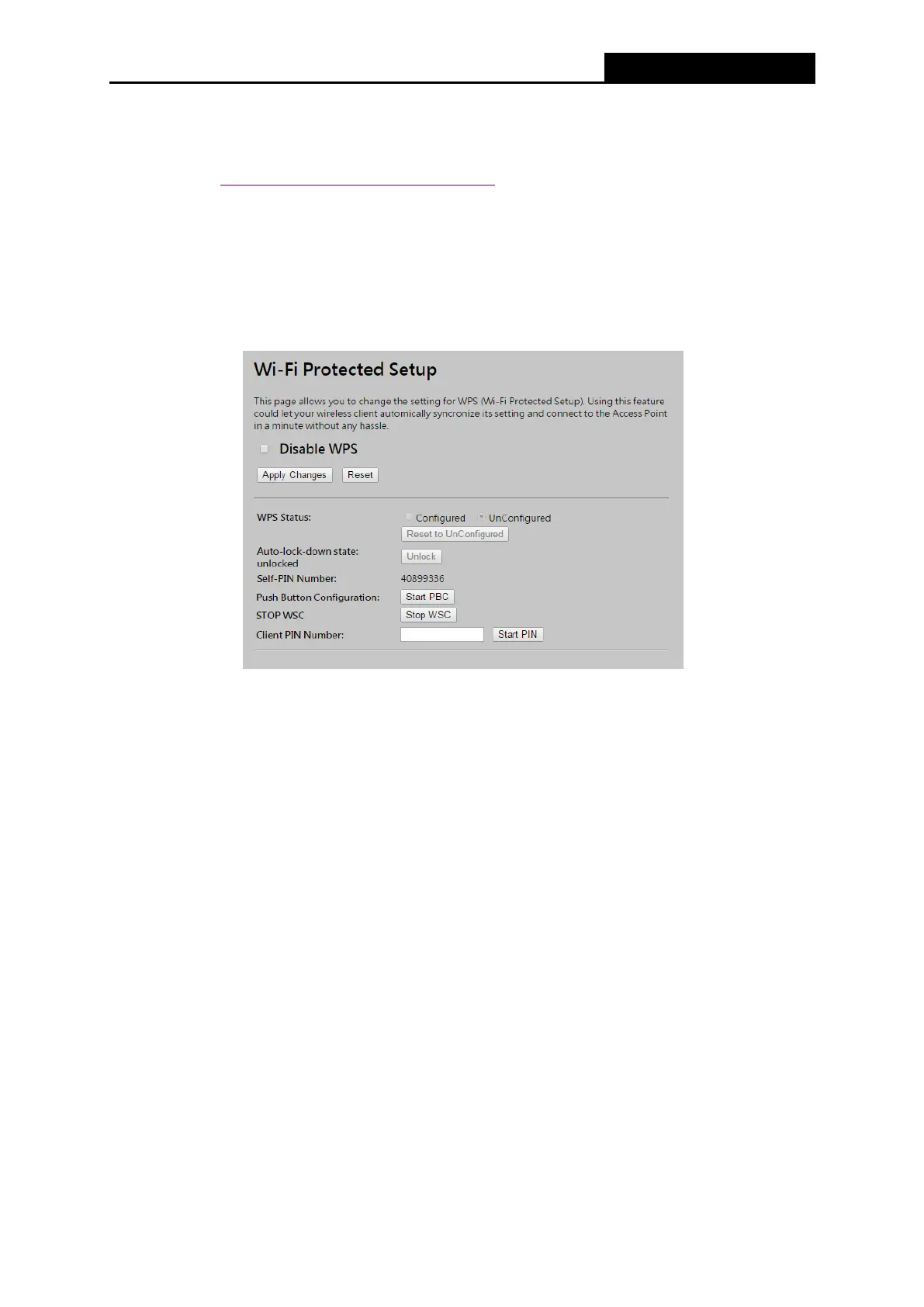
a) Choose WPS from the Security menu in the next screen (shown in Figure 4-3 ).
Figure 4-3 WPS
WPS Status - Configure or Unconfigure the WPS function here.
Self-PIN Number - The current value of the Router's PIN is displayed here.
Push Button Configuration – Push this button to synchronize the Router and your Wi-Fi
adapter
Client PIN Number – To synchronize the Wi-Fi adapter by entering adapter’s PIN.
b) To add a new device:
If the wireless adapter supports Wi-Fi Protected Setup (WPS), you can establish a wireless
connection between the wireless adapter and Router using either Push Button Configuration (PBC)
method or PIN method.
Note:
To build a successful connection by WPS, you should also do the corresponding configuration of
the new device for WPS function.
Configuring a new device (ex. AWUS036NHR), please follow the steps below.



 To Next Page