- 36 -
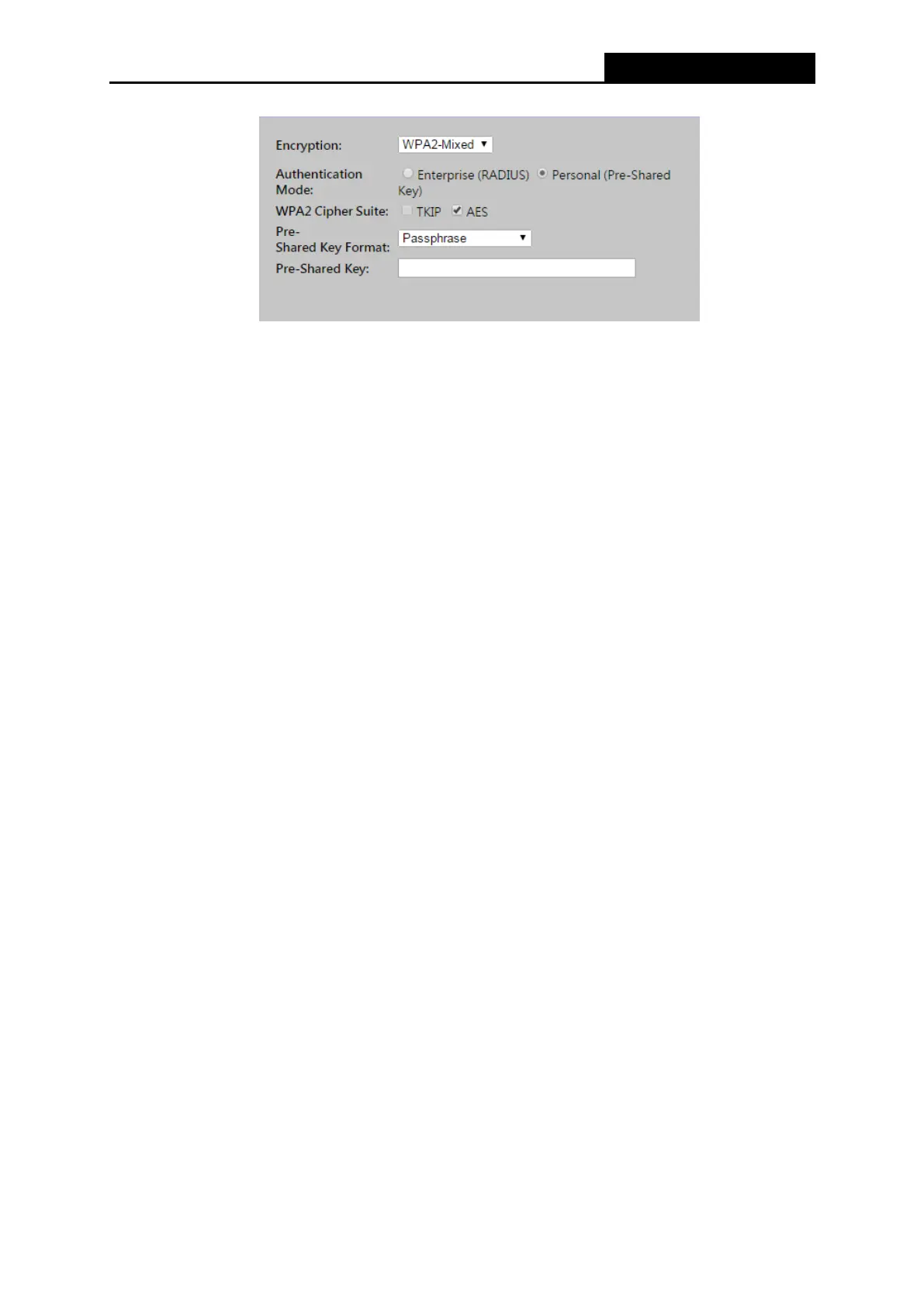
Figure 4-22
Authentication Mode - You can choose either Enterprise (RADIUS) or Personal
(Pre-Shared Key). The default setting is Personal (Pre-Share Key), it is a passphrase
between 8 and 63 characters. Enterprise (RADIUS) is an authentication via RADIUS
server.
WPA Cipher Suite - When WPA is set as the Authentication Type, you can select either
TKIP or AES as Encryption.
WPA2 Cipher Suite - When WPA2 is set as the Authentication Type, you can select either
TKIP or AES as Encryption.
Pre-Shared Key Format - You can enter either Passphrase (8 ~ 63 characters) or HEX
(64 Characters).
Pre-Shared Key - Enter the matching WEP key that you have create. Make sure these
values are identical on all the wireless stations in your network.
Radius Server IP Address - Enter the IP address of the Radius server, if Enterprise
(RADIUS) is selected.
Radius Server Port - Enter the port number of the Radius server, if Enterprise (RADIUS)
is selected.
Radius Server Password - Enter the password for the Radius server, if Enterprise
(RADIUS) is selected.
Be sure to click the Apply Changes button to save your settings on this page.



 To Next Page