11
Security Setup
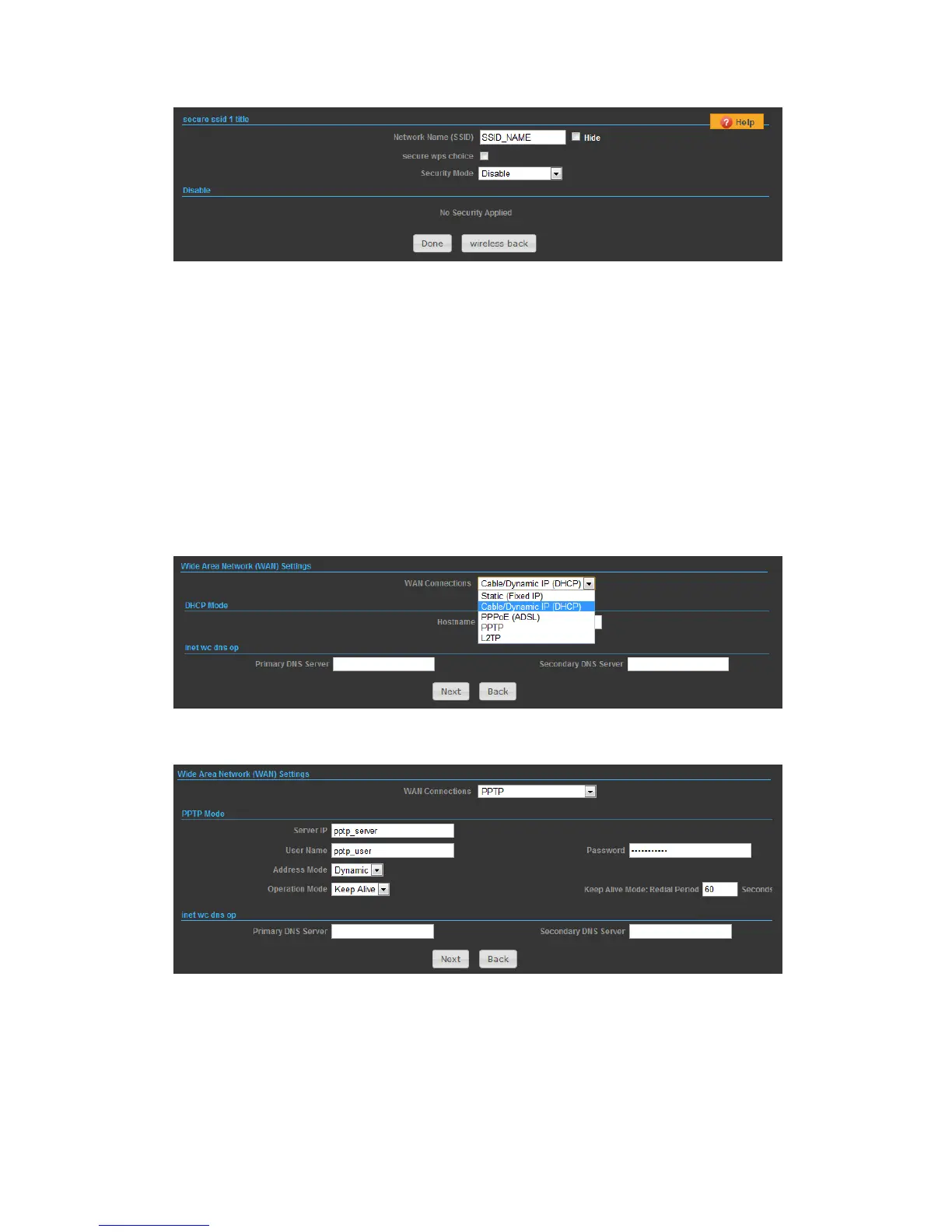
Network Name (SSID) — SSID (Service Set Identification) must be assigned to all
wireless devices in your network. Considering your wireless network security.
Security Mode — Select the security method and then configure the required
parameters. (Options: Disabled, WEP-AUTO, WPA-PSK, WPA2-PSK, WPA-Auto-PSK,
WPA, WPA2, WPA-Auto, 802.1X; Default: Disabled)
SETTINGS – PPTP
1) Select PPTP, if you are using PPTP service to gain connection to the Internet.
2)
◆ Server IP — Sets the PPTP server IP Address. (Default: pptp_server)
◆ User Name — Sets the PPTP user name for the WAN port.
◆ Password — Sets a PPTP password for the WAN port.
◆ Address Mode — Sets a PPTP network mode. (Default: Dynamic IP)
◆ Operation Mode — Enables and configures the keep alive time.


 To Next Page