34
SECURITY
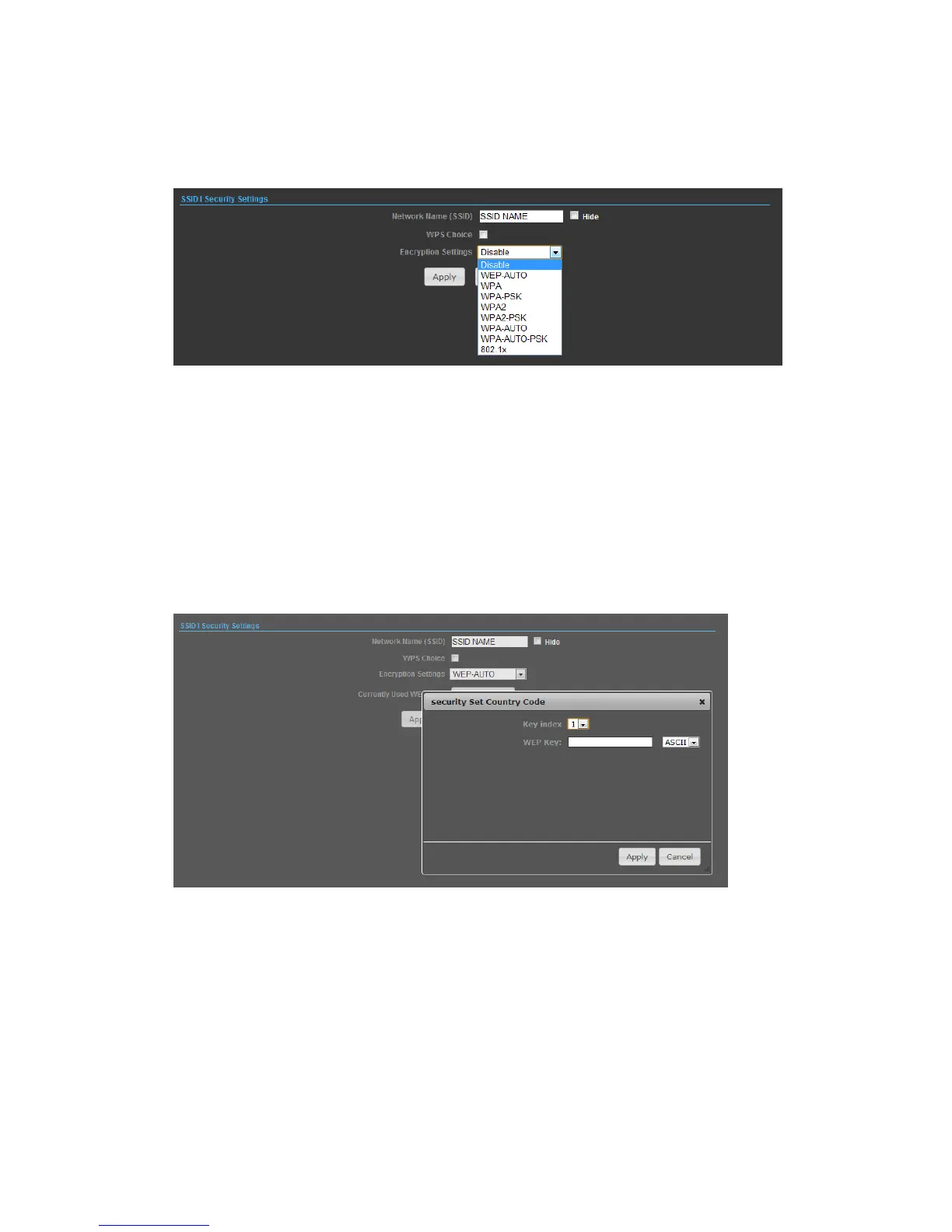
WIRED EQUIVALENT PRIVACY (WEP)
WEP provides a basic level of security, preventing unauthorized access to the
network, and encrypting data transmitted between wireless clients and an access
point. WEP uses static shared keys (fixed-length hexadecimal or alphanumeric
strings) that are manually distributed to all clients that want to use the network.
When you select to use WEP, be sure to define at least one static WEP key for user
authentication or data encryption. Also, be sure that the WEP shared keys are the
same for each client in the wireless network.
◆ WEP-AUTO — Allows wireless clients to connect to the network using
Open-WEP (uses WEP for encryption only) or Shared-WEP (uses WEP for
authentication and encryption).
◆ Encrypt Type — Selects WEP for data encryption (OPEN mode only).
◆ Security Key Index — Selects the WEP key number to use for authentication or
data encryption. If wireless clients have all four WEP keys configured to the same
values, you can change the encryption key to any of the settings without having to
update the client keys.


 To Next Page