9
wireless devices in your network. Considering your wireless network security.
Security Mode — Select the security method and then configure the required
parameters. (Options: Disabled, WEP-AUTO, WPA-PSK, WPA2-PSK, WPA-Auto-PSK,
WPA, WPA2, WPA-Auto, 802.1X; Default: Disabled)
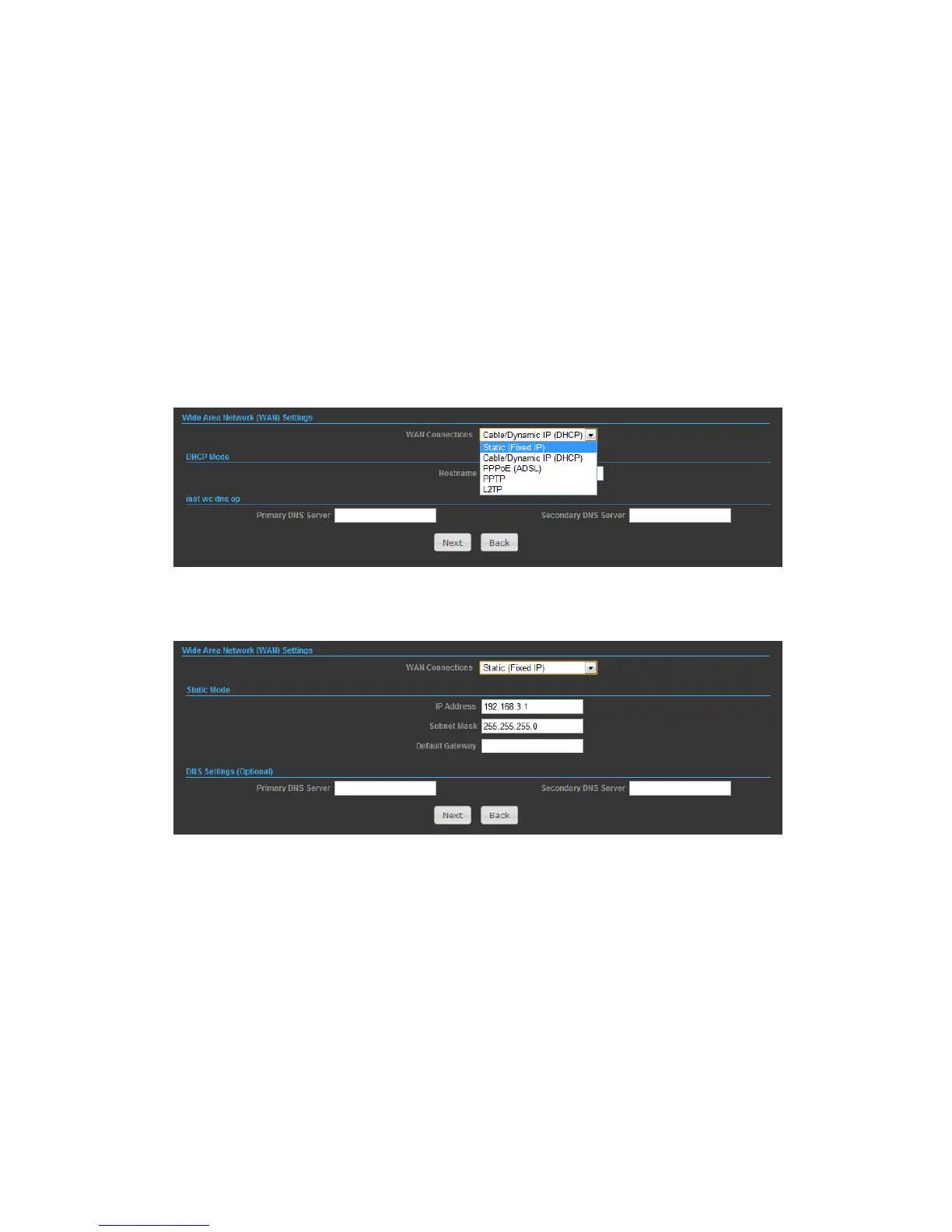
SETTINGS – STATIC (FIXED IP)
1) Select Static(Fixed IP), if your Internet service provider (ISP) to be permanent
address on the Internet. A Static IP address is a number (in the form of a dotted
quad)
2)
◆ IP Address — Sets the static IP address.
◆ Subnet Mask — Sets the static IP subnet mask. (Default: 255.255.255.0)
◆ Default Gateway — The IP address of a router that is used when the requested
destination IP address is not on the local subnet.
◆ Primary DNS Server — The IP address of the Primary Domain Name Server. A
DNS maps numerical IP addresses to domain names and can be used to identify
network hosts by familiar names instead of the IP addresses. To specify a DNS
server, type the IP addresses in the text field provided. Otherwise, leave the text
field blank.
◆ Secondary DNS Server — The IP address of the Secondary Domain Name Server.


 To Next Page