27
CONTENT FILTERING
The N2 provides a variety of options for blocking Internet access based on content,
URL and host name.
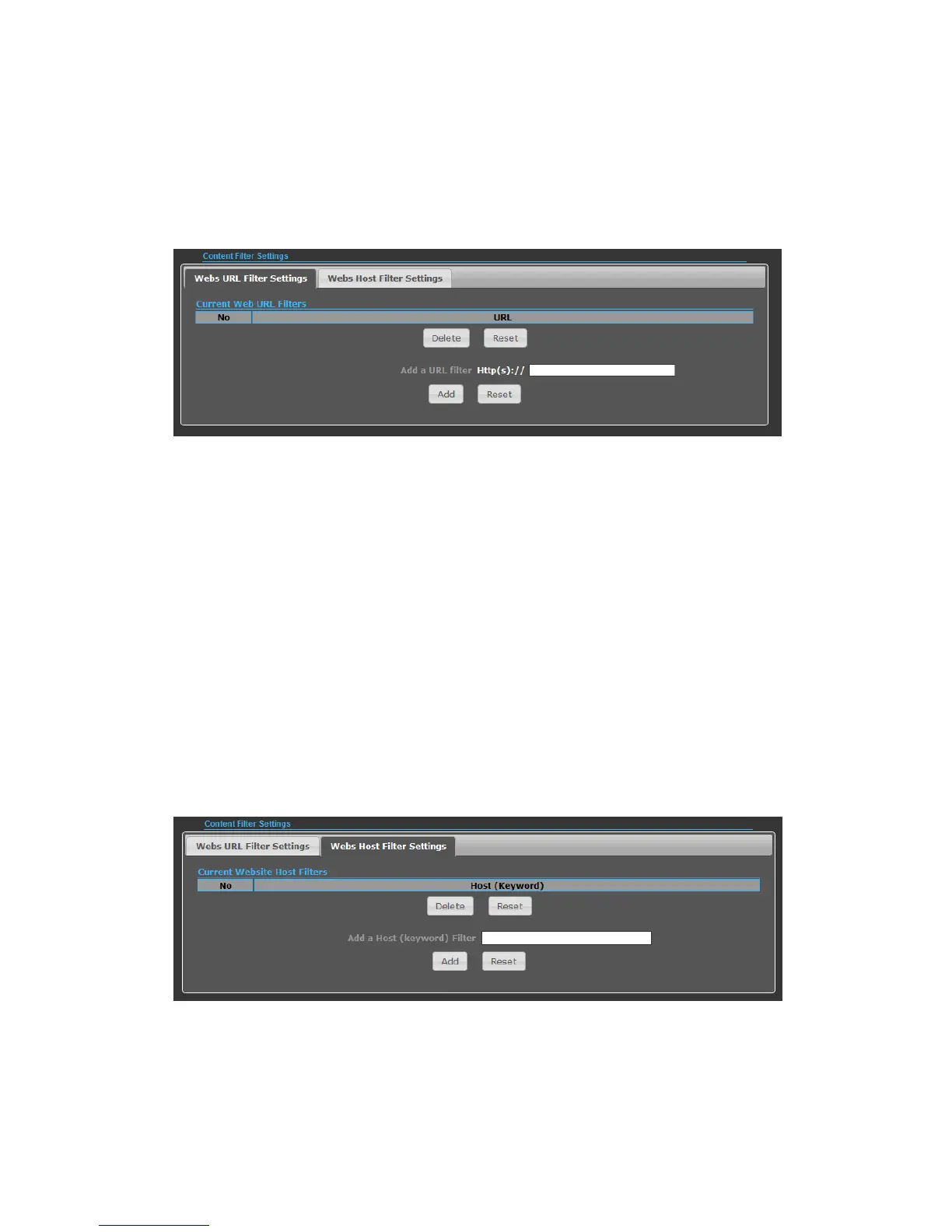
◆ Web URL Filter Settings — By filtering inbound Uniform Resource Locators (URLs)
the risk of compromising the network can be reduced. URLs are commonly used to
point to websites. By specifying a URL or a keyword contained in a URL traffic from
that site may be blocked.
◆ Current URL Filters — Displays current URL filter.
◆ Add a URL Filter — Adds a URL filter to the settings.
◆ Delete a URL Filter — Deletes a URL filter entry from the list.
◆ Web Host Filter Settings — Allows Internet content access to be restricted based
on web address keywords and web domains. A domain name is the name of a
particular web site. For example, for the address www.HOST.com, the domain name
is HOST.com. Enter the Keyword then click “Add.”
◆ Current Host Filters — Displays current Host filter.
◆ Add a Host Filter — Enters the keyword for a host filtering.
◆ Delete a Host Filter — Deletes a Host filter entry from the list.


 To Next Page