24
No. — The table entry number.
MAC Address — Displays a MAC address to filter.
Destination IP Address (DIP) — Displays the destination IP address.
Source IP Address (SIP) — Displays the source IP address.
Protocol — Displays the protocol type.
Destination Port Range (DPR) — Displays the destination port range.
Source Port Range (SPR) — Displays the source port range.
Action — Displays if the specified traffic is accepted or dropped.
Comment — Displays a useful comment to identify the filter rules.
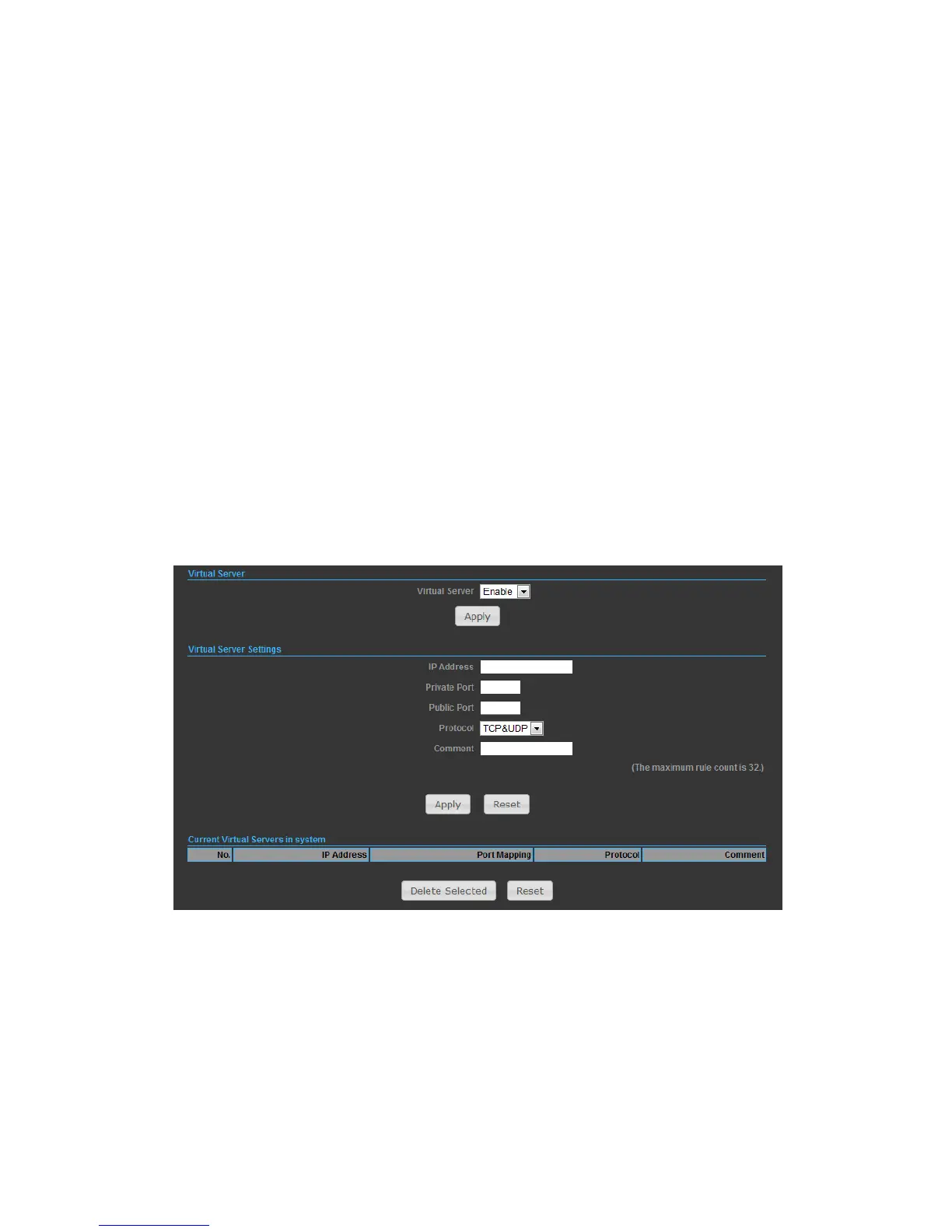
VIRTUAL SERVER SETTINGS
Virtual Server (sometimes referred to as Port Forwarding) is the act of forwarding
traffic from one network node to another based on received protocol port number.
This technique can allow an external user to reach a port on a private IP address
(inside a LAN) from the outside through a NAT enabled router.
◆ Virtual Server — Selects between enabling or disabling port forwarding the
virtual server. (Default: Disable)
◆ IP Address — Specifies the IP address of a server on the local network to allow
external access.
◆ Private Port — The protocol port number on the local server.
◆ Public Port — The protocol port number on the router’s WAN interface.
◆ Protocol — Specifies the protocol to forward, either TCP, UDP, or TCP&UDP.


 To Next Page