32
◆ IP Address — The IP address of N2 on the local area network.
( Default: 192.168.2.1 )
◆ Subnet Mask — The subnet mask of N2 on the local area network
◆ DHCP Server — The DHCP Server is to assign private IP address to the N2 in your
local area network(LAN). The default LAN IP address is 192.168.2.1, changing IP
address will also change the DHCP server’s IP subnet.
ADVANCED ROUTING
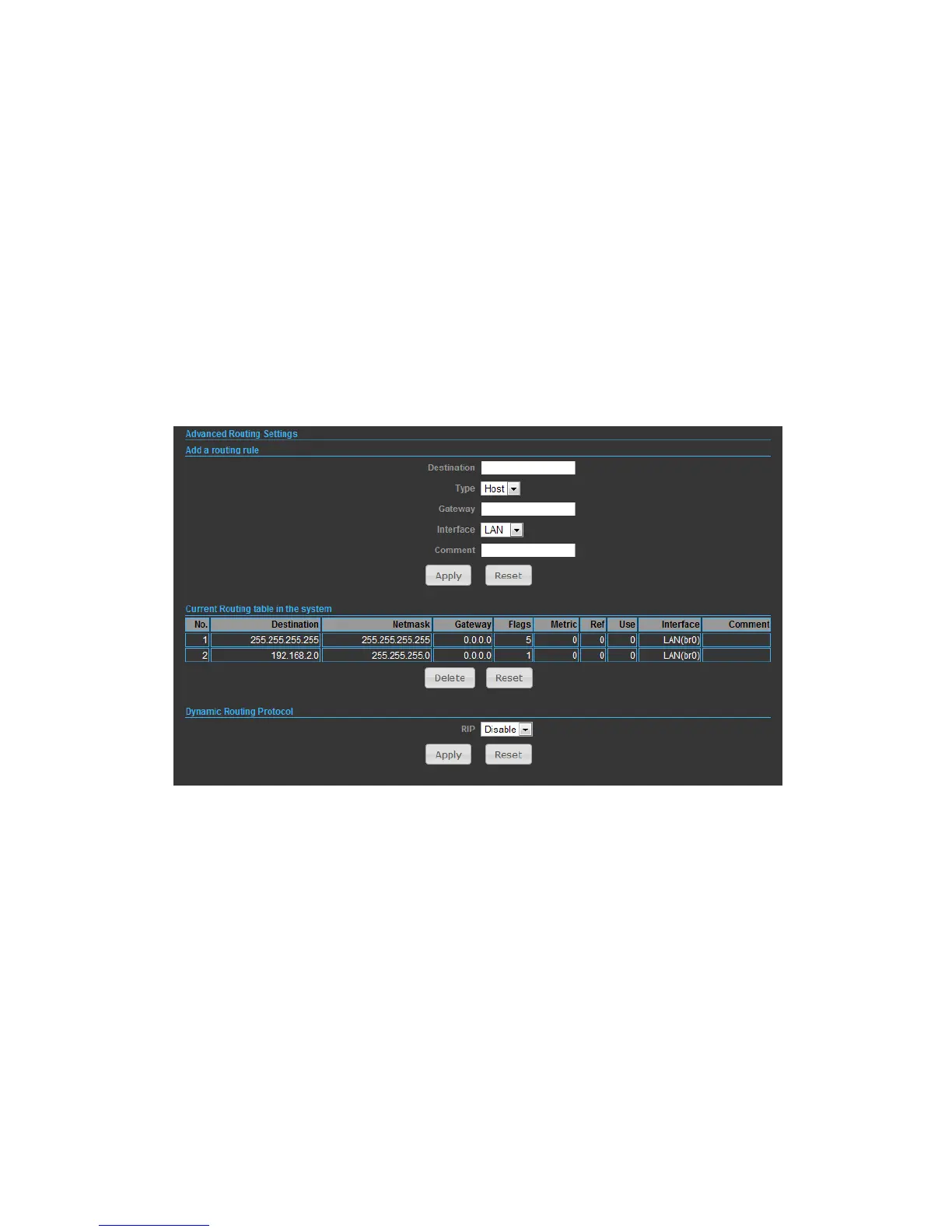
In this section, allow to configure routing feature in the N2.
◆ Destination — The IP address of packets that can be routed.
◆ Type — Defines the type of destination. ( Host: Signal IP address / Net: Portion
of Network )
◆ Netmask — Displays the subnetwork associated with the destination.
◆ Gateway — Defines the packets destination next hop
◆ Interface — Select interface to which a static routing subnet is to be applied
◆ Comment — Help identify the routing
◆ RIP — Enable or disable the RIP(Routing Information Protocol) for the WAN or
LAN interface.


 To Next Page