Manual
Timy3 - General
-19-
6 Timy3 Update
Please visit our website www.alge-timing.com for a free update for your Timy3 software.
6.1 Update Firmware with USB cable
• If not done yet, the Timy3 USB driver has to be installed. An instruction for this can be
found on our website
https://alge-timing.com/download/Software/Driver/TimyUSBDriver.exe
• log into the internet
• start your web browser
• input the following link: https://alge-timing.com/alge/download/software/IM.exe
• download the file and start the install manager “IM.exe”
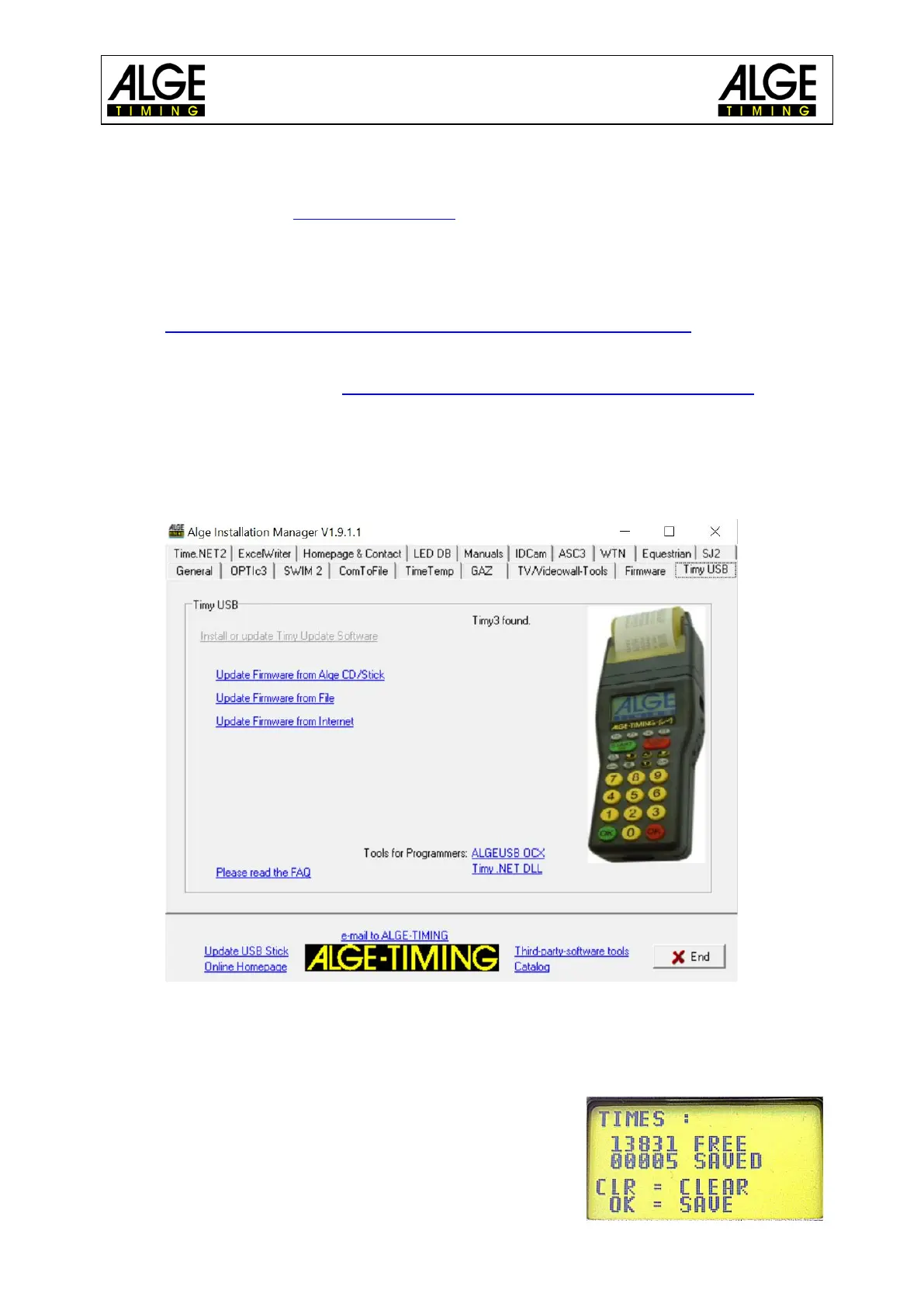
• click on the folder “Timy USB”
• connect Timy3 with the USB cable to the PC
• start Timy3 – the program automatically searches for the Timy3
• As soon as the firmware recognizes the Timy3, the following is displayed
• Choose a method of updating the Timy3. Recommendable is an internet update as the
latest version is always available
•
7 Memory
The memory of the Timy3 can store approx. 30,000 times.
When switching on, the memory can either be saved or de-
leted. The free and saved space is indicated.



 To Next Page