Manual
Timy3 - General
-24-
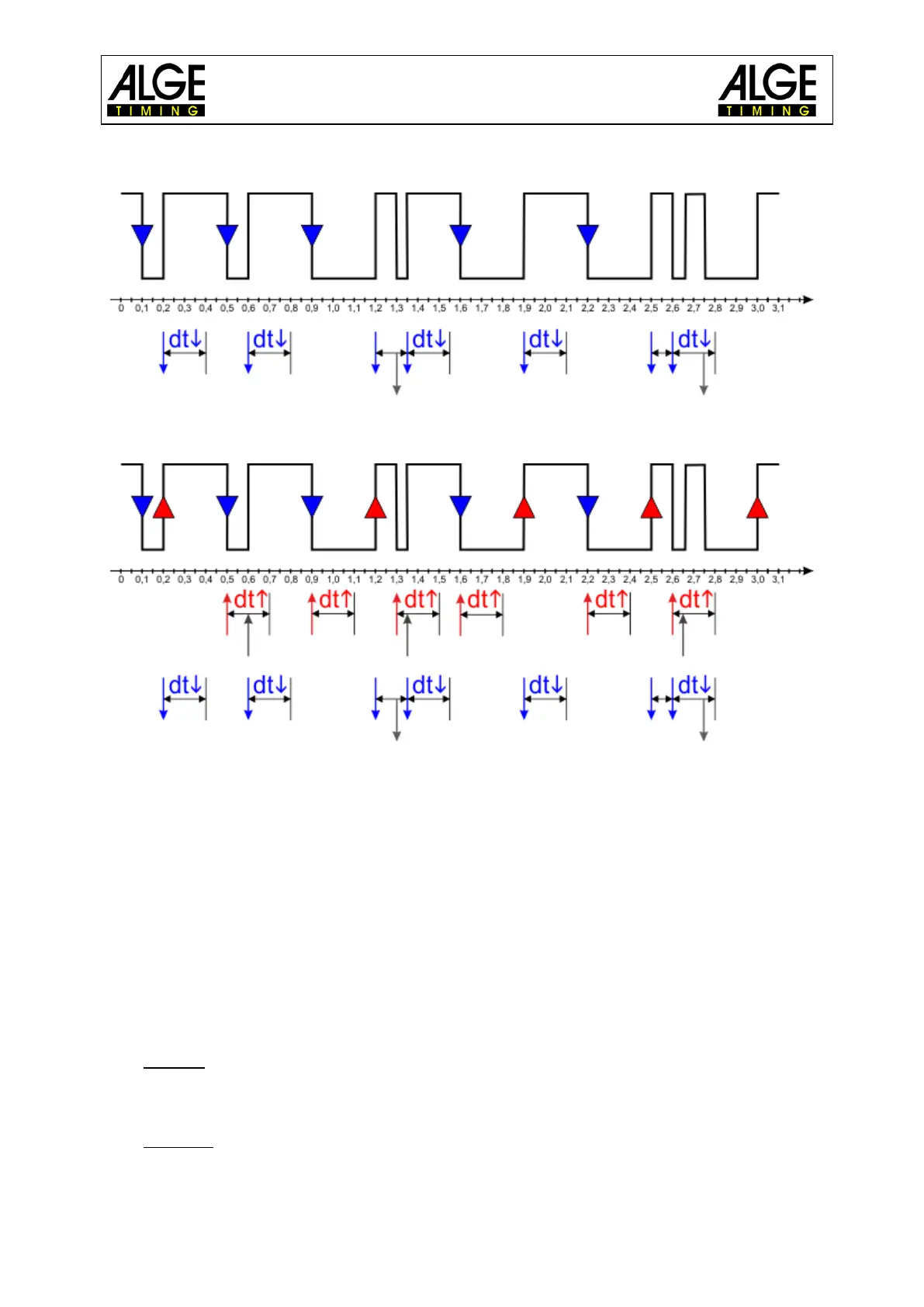
Example for falling edge EDGE1:
In the following diagram is dt the delay time for the falling edge (blue).
Example for rising EDGE2:
In the following diagram is dt the delay time of the falling edge (blue) and dt the delay time
of the rising edge (red).
9.3.2 BEEP
This switches the channel beep on or off.
• <OFF>
• <ON> Factory default
9.3.3 TED-RX
This activates the multichannel reception by the TED-RX.
• <OFF> Factory default
• <ON>
ATTENTION! If this function is activated the serial interface is occupied by the TED.
9.3.4 CHANNEL-PATTERN
In this menu each single channel can be permanently activated or deactivated. This is effected
by selecting the channels with the arrow buttons.
At the bottom of the display, the function keys are labelled as follows:
• F0 „ON“
o activates the selected channel
o If a second Timy is connected via RS232 or GSM, the channel of the other Timy is
activated.
• F1 „OFF“
o deactivates the selected channel
o If a second Timy is connected via RS232 or GSM, the channel of the other Timy is
deactivated.



 To Next Page