1 - 10 System Map: Left View
Quick Start Guide
1
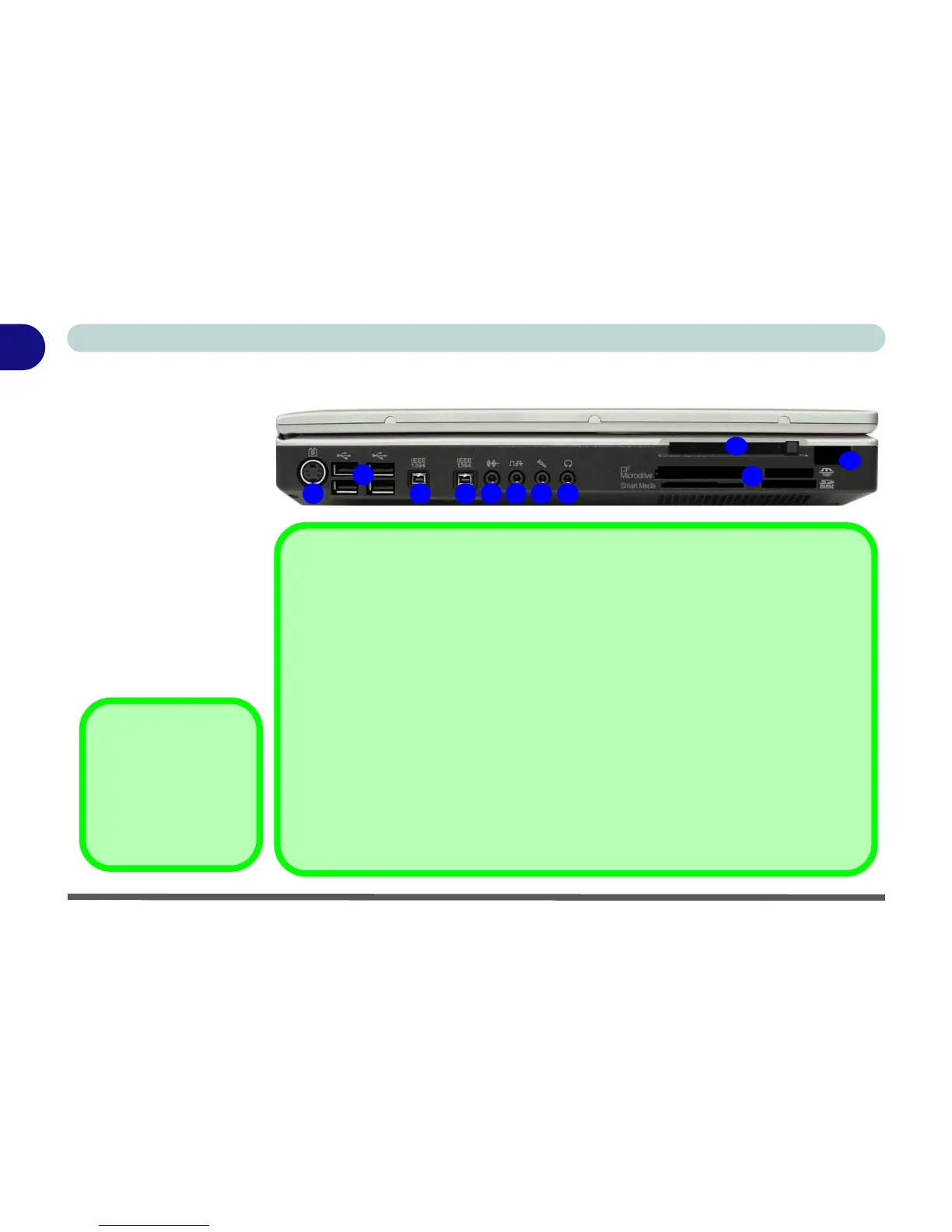
System Map: Left View
Figure 1 - 5
Left View
1. S-Video-Out Jack
2. 4 * USB 2.0 Ports
3. 2 * Mini-IEEE 1394a
Port
4. Line-In Jack
5. S/PDIF-Out Jack
6. Microphone-In Jack
7. Headphone-Out Jack
8. 10-in-1 Card Reader
9. PC Card Slot
10. Infrared Transceiver
(see page 2 - 9)
3 31 5
2
4 6 7
8
10
9
10-in-1 Card Reader Formats
The card reader allows you to use the most popular digital storage card formats:
• MMC (MultiMedia Card)
• SD (Secure Digital)
• MS (Memory Stick)
• MS (Memory Stick Pro)
• SM (SmartMedia Card)
• CF (Compact Flash)
• IBM Microdrive
• MS Duo (requires PC adapter)
• Mini SD (requires PC adapter)
• RS MMC (requires PC adapter)
Note: If you are installing an operating system (e.g. Windows XP) you will need to disable
the card reader in the BIOS (see “Card Reader: (Advanced Menu)” on page 5 - 10).
Mini-IEEE 1394a
Both Mini-IEEE 1394a
ports only support
SELF POWERED
IEEE 1394a devices.















 To Next Page