36 | Setting up the monitor
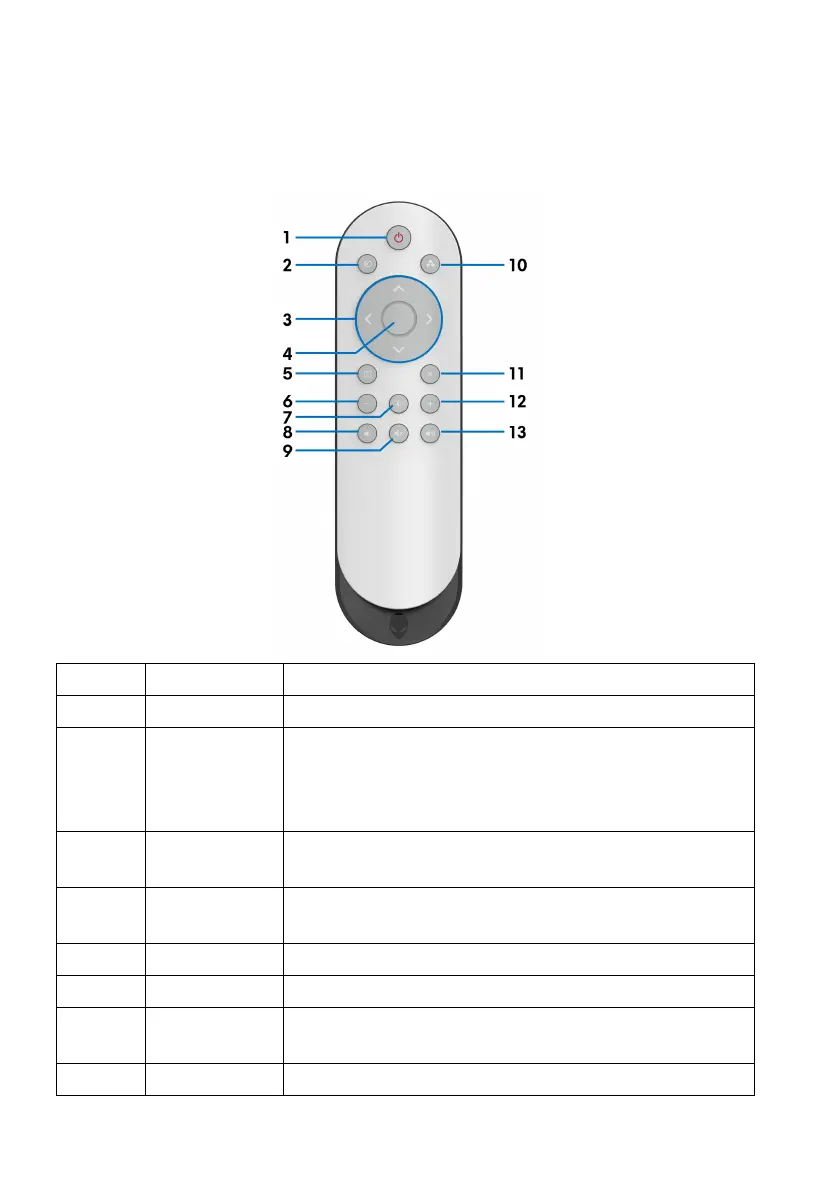
Remote control
You may use the buttons on the remote control to access the On-Screen Display
(OSD) menu and adjust menu settings.
Label Button Description
1 Power on/off To turn this monitor on or off.
2 Input Source To launch the Input Source menu. Use
the directional
buttons to select between the different video signals
that are connected to your monitor. Then press the
OK button to confirm the selection and exit.
3 Directional
buttons
Use the buttons (up/down/left/right) to move
bet
ween the setting options in the OSD menu.
4 OK To confirm your selection. When the
OSD menu is off,
selecting this button may launch the OSD menu.
5 Menu To launch the OSD menu.
6 - To decrease the adjustment levels.
7 Brightness/
Co
ntrast
To directly access the Brightness/Contrast
adjustment sliders.
8 Volume - To decrease the volume level.















 To Next Page