Setting up the monitor | 37
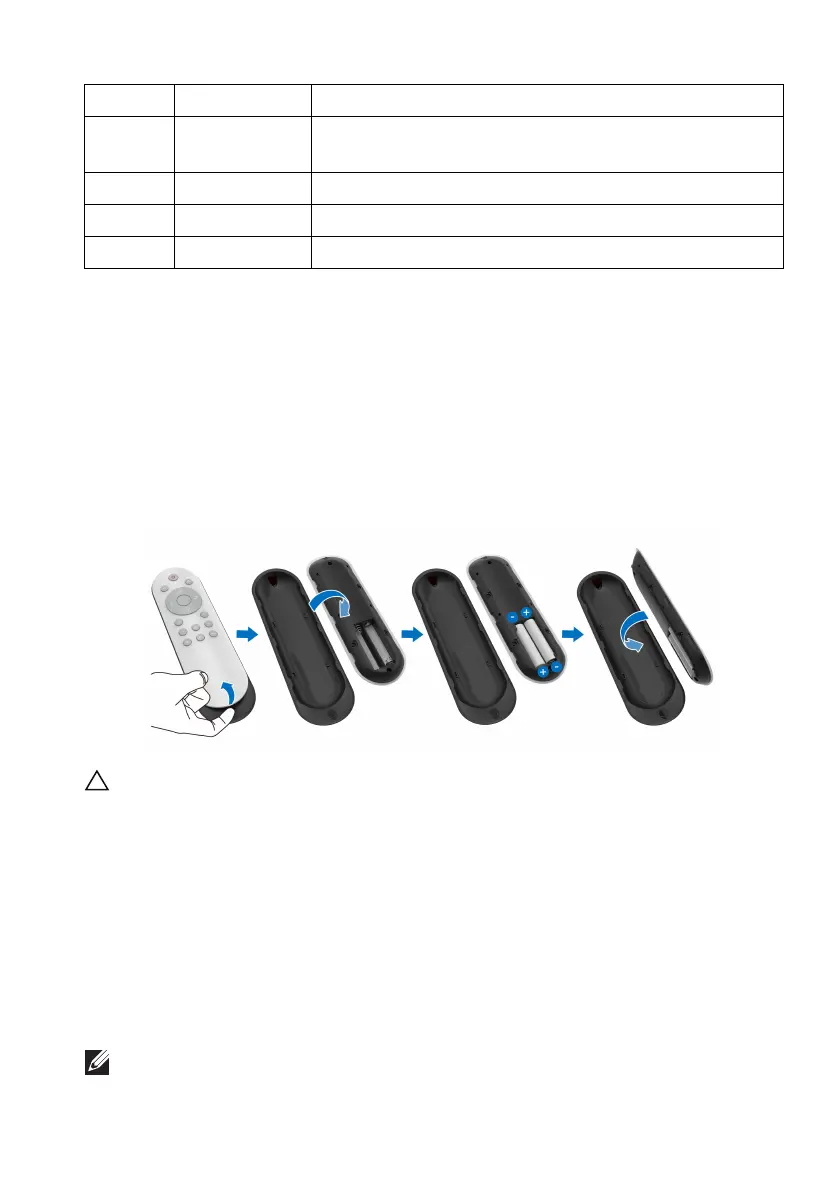
Inserting the batteries into the remote control
The remote control is powered by two 1.5V AAA batteries.
To install or replace batteries:
1. Remove
the battery cover by lifting the bottom edge of the remote
control.
2. Al
ign the batteries according to the (+) and (–) indications inside the
battery compartment.
3. Re
place the battery cover.
CAUTION: The incorrect use of batteries can result in leaks or bursting.
Be sure to follow these instructions:
• Place “AAA” batteries matching the (+) and (–) signs on each battery to
t
he (+) and (–) signs of the battery compartment.
• Do not mix battery types.
• Do not combine a new battery with the used one. It causes shorter life
or
leakage of batteries.
• Remove the dead batteries immediately to prevent them from liquid
leaking
in the battery compartment. Do not touch exposed battery acid, as
it can damage your skin.
NOTE: If you do not intend to use the remote control for a long period,
remove the batteries.
9 Mute To turn off the volume.
10
Preset Modes To specify a desired color mode from a preset list. For
details, see Preset Modes.
11
Exit To exit the OSD main menu.
12 +
To increase the adjustment levels.
13 Volume +
To increase the volume level.















 To Next Page