EasyManua.ls Logo

Alinco DR-510E - CALL Priority Scan; Tone and Squelch Settings; Tone Frequency Selection

Alinco DR-510E
16 pages
Print Icon
To Next Page IconTo Next Page
To Previous Page IconTo Previous Page
Loading...
C.
CALL
PRIORITY
SCAN
1.
Store
the
desired
frequency
for
Operation
in
Memory
Channel
"C".
2.
Press
the
CALL
key
and
then
the
PRI
key.
3.
The
tranceiver
will
scan
the
VFO
for
1
second
and
the
CALL
Channel
for
5
seconds
alter-
nately.
TONE
FREQUENCY
SELECTION
To
select
a
Tone
(CTCSS)
Frequen
cy,
press
the
VFO/M
key
and
select
the
VFO
mode,
then
press
the
TONE
key.
The
display
will
indicate
a
Tone
Frequency
in
Hz.
Select
the
desired
Tone
Frequency
using
the
microphone
UP/DOWN
buttons
or
the
Main
Dial.
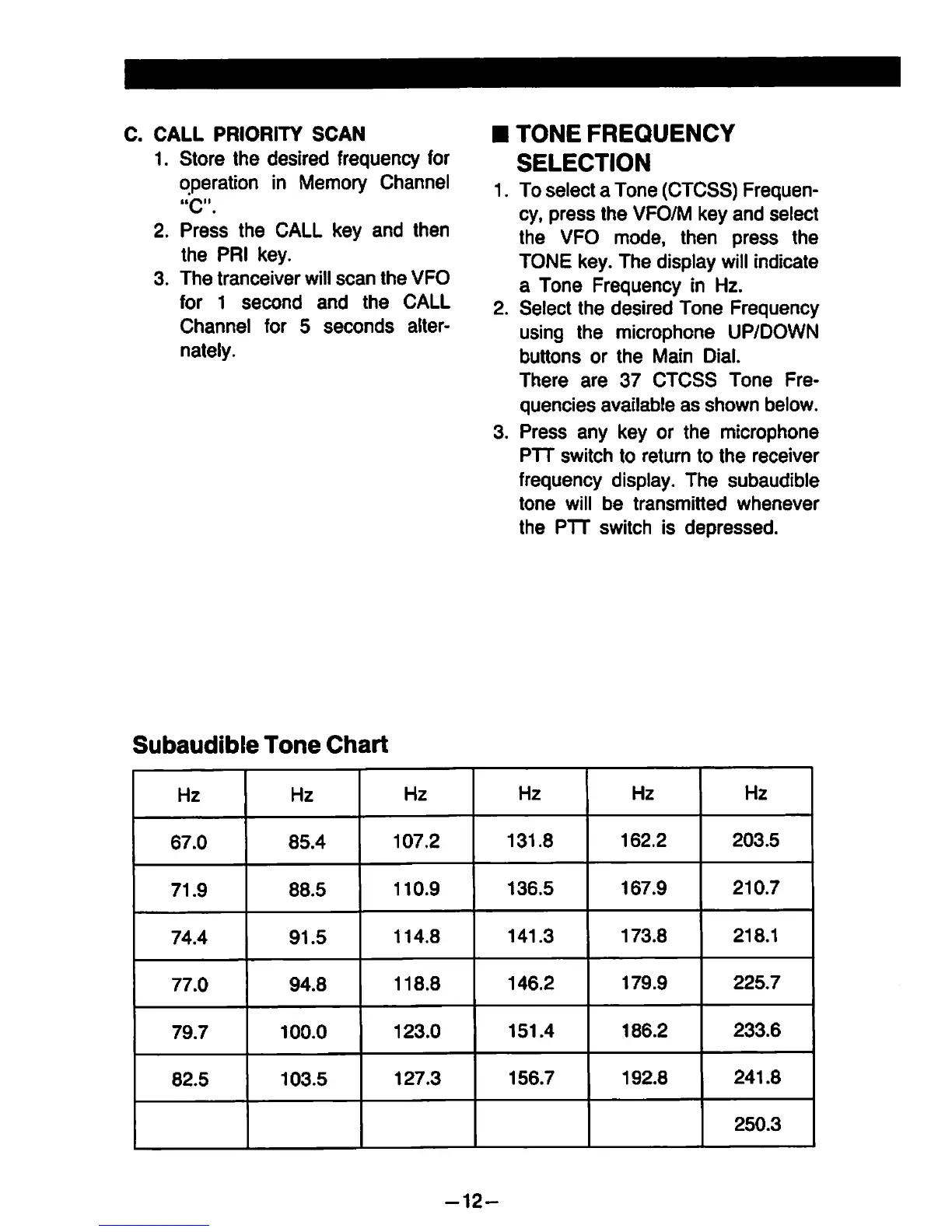
There
are
37
CTCSS
Tone
Fre-
quencies
available
as
shown
below.
Press
any
key
or
the
microphone
PTT
Switch
to
retum
to
the
receiver
frequency
display.
The
subaudible
tone
will
be
transmitted
whenever
the
PTT
switch
is
depressed.
Subaudible
Tone
Chart
Hz
Hz
Hz
Hz
Hz
Hz
67.0
85.4
107.2
131.8
162.2
203.5
71.9
88.5
110.9
136.5
167.9
210.7
74.4
91.5
114.8
141.3
173.8
218.1
77.0
94.8
118.8
146.2
179.9
225.7
79.7
100.0
123.0
151.4
186.2
233.6
82.5
103.5
127.3
156.7
192.8
241.8
250.3
-12-

Other manuals for Alinco DR-510E

Related product manuals