EasyManua.ls Logo

Alinco DR-510E - Operation and Controls; Front Panel Layout; Power and Function Keys

Alinco DR-510E
16 pages
Print Icon
To Next Page IconTo Next Page
To Previous Page IconTo Previous Page
Loading...
OPERATIONI
CONTROL
FUNCTIONS
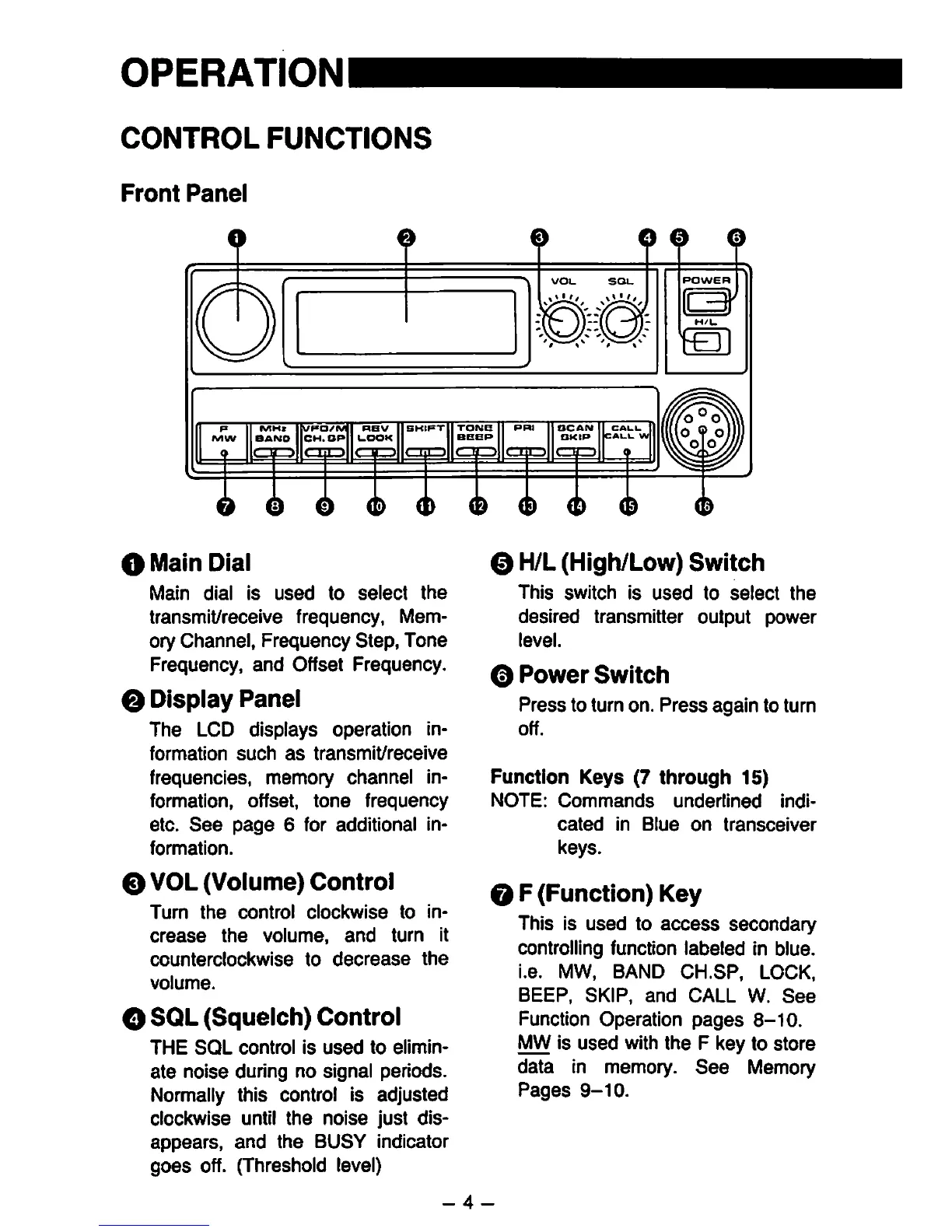
O
Front
Panel
O
0
0
o
VOl_
SOL.
o
m]
O
0
©
O
<P
0
O
Main
Dia!
Main
dial
Is
used
to
select
the
transmit/recelve
frequency,
Mem
ory
Channel,
Frequency
Step,
Tone
Frequency,
and
Offset
Frequency.
0
Display
Panel
The
LCD
displays
Operation
in-
formation
such
as
transmit/receive
frequencies,
memory
Channel
In
formation,
Offset,
tone
frequency
etc.
See
page
6
for
additional
in-
formation.
O
VOL
(Volume)
Control
Tum
the
control
clockwise
to
in-
crease
the
volume,
and
turn
it
counterclockwise
to
decrease
the
volume.
O
SQL
(Squelch)
Control
THE
SQL
control
Is
used
to
ellmln-
ate
nolse
during
no
Signal
periods.
Normally
this
control
Is
adjusted
clockwise
until
the
noise
just
dls-
appears,
and
the
BUSY
Indicator
goes
off.
(Threshold
level)
0
H/L
(High/Low)
Switch
ThIs
Switch
Is
used
to
select
the
desired
transmitter
Output
power
level.
O
Power
Switch
Press
to
turn
on.
Press
again
to
turn
off.
Function
Keys
(7
through
15)
NOTE:
Commands
underlined
Indi-
cated
In
Blue
on
transcelver
keys.
O
F
(Function)
Key
ThIs
Is
used
to
access
secondary
Controlling
function
labeied
in
blue.
i.e.
MW,
BAND
CH.SP,
LOCK,
BEEP,
SKIP,
and
CALL
W.
See
Function
Operation
pages
8-10.
MW
is
used
with
the
F
key
to
störe
data
in
memory.
See
Memory
Pages
9-10.
-
4
-

Other manuals for Alinco DR-510E

Related product manuals