1413
IMPORTANT NOTICE
MMSI and DSC related programming are explained in this section. GPS
receiver is required and programming is necessary before start oper-
ating. Please consult your dealer for proper programmig if you are not
familiar with these functions.
■
MMSI Code Programming
IMPORTANT: The 9-digit MMSI (Maritime Mobile Service Identity: DSC
self ID) code is programmable only twice, and not available when the
MMSI code has been preprogrammed by your dealer already.
1.
Rotate [VOL] to turn OFF. While pressing and holding [DSC], ro-
tate [VOL] to turn ON .
2.
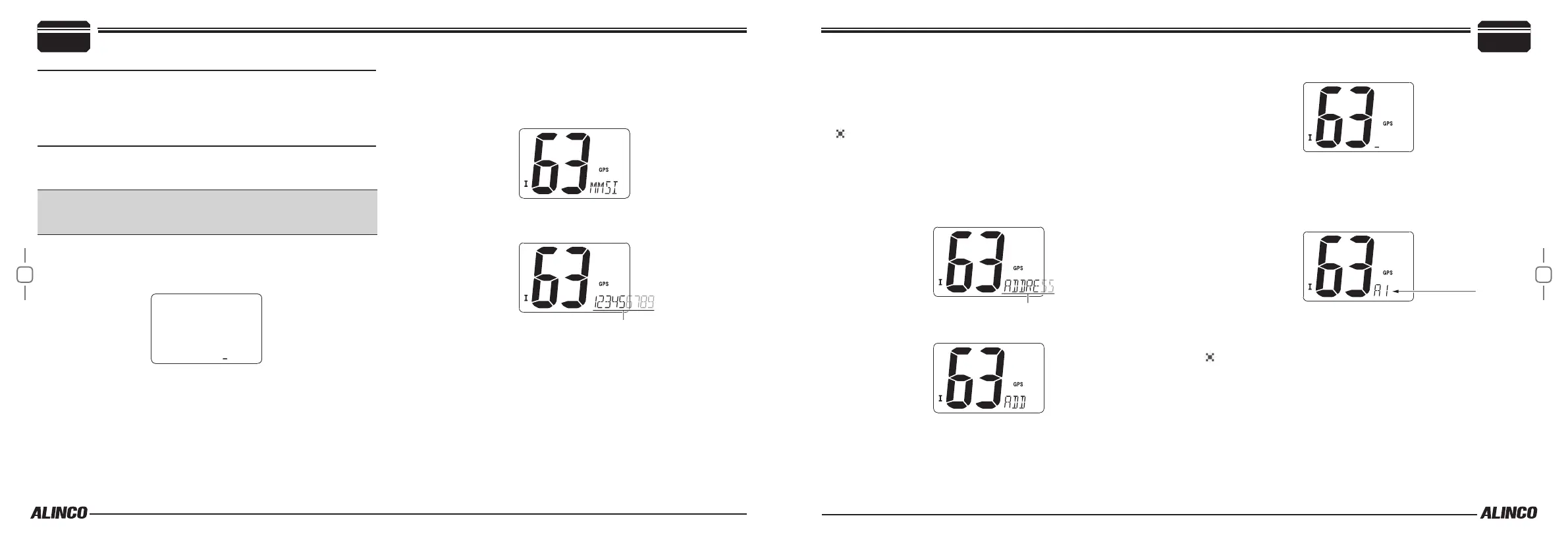
Release [DSC]. A blinking cursor appears on the display.
3.
Use [U/I/C] keys to enter the 9-digit MMSI code.
• Press [16] or [CH/WX] to move the cursor forward or backward.
4.
After being completed, press [DSC] to set and exit from MMSI pro-
gramming.
■
To display your MMSI code
To display your MMSI (DSC self ID) code:
5.
Press [DSC] to enter DSC mode. Press [U/I/C] keys to select
MMSI displaying.
6.
Press [DSC], 9-digit MMSI (DSC self ID) code scrolls on the right
bottom of the display.
7.
Press [DSC] to complete.
■
DSC Address ID
DSC (Digital Selective Calling) is used for calling specic vessels. Up to
30 DSC address IDs can be stored with up to 5 digit alphanumeric name
labels. Follow this procedure to set both INDIVIDUAL and GROUP IDs.
Programming DSC ADDRESS ID
To make Individual calls (to call an individual vessel), you need to
store their DSC address ID (9-digit MMSI code) in advance.
To program DCS Address ID:
1.
Press [DSC] to enter DSC mode.
2.
Press [U/I/C] keys to select “ADDRESS” and press [DSC].
3.
Press [U/I/C] to select “ADD” and Press [DSC].
4.
Press [U/I/C] to enter 9-digit address ID (MMSI ID of a specic ves-
sel).
• Press [16] or [CH/WX] to move the cursor forward or backward.
• Press [SCAN] to cancel and exit the setting mode.
After 9-digit code is correctly entered, press [DSC].
5.
A cursor appears. Enter the the desired DSC ID name up to 5 al-
phanumeric characters.
• Use [U/I/C] keys to select characters.
• Press [16] or [CH/WX] to move the cursor forward or backward.
DSC ID name
After characters are correctly entered, press [DSC] to complete, or
press [SCAN] to cancel and exit the DSC mode.
PROGRAMMING GROUP ID
Programming procedures are the same as progamming DSC address
ID.
Group address ID is NOT MMSI codes of vessels, but are ANY 9-digit
codes starting with zero “0”. When you input 1st digit ‘0’ followed by
other 8 digits (e.g.012345678), the ID is automatically registered as a
group ID and a group ID name will be listed in the group call list.
To make Group calls (all vessels in a group), all members in the group
should store the same Group ID address in advance.
Basic Operations
4
4
Basic Operations


 To Next Page