2019
sent, the display turns automatically to the intership channel speci-
ed by your calling station.
7.
When “UNABL” is selected, display moves to previous channel be-
fore receiving the call.
To receive an Individual call
While monitoring Channel 70 through DSC WATCH function and an
individual call for you is received:
1.
The alarm or beeps sound depending on the category of the call.
• Alarm sounds in case of DISTRESS or URGENCY.
• Beep sounds for others.
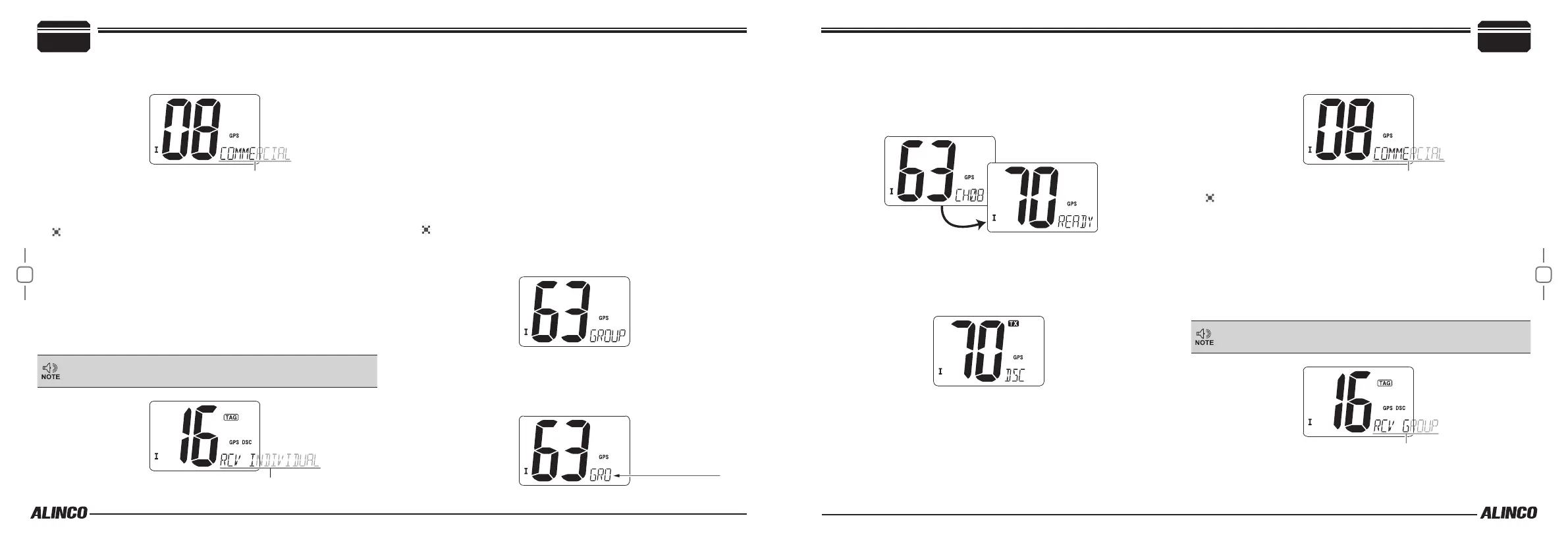
DSC and scrolling“RCV INDIVIDUAL”are displayed.
2.
Press any key to stop the alarm or beeps.
DSC and scrolling “RCV INDIVIDUAL” dissapears when any key
is pressed or power o the radio.
3.
Press any key other than [DSC] to ignore the call.
To reply on the call.
Press [DSC], at right bottom of display appears “ABLE”, then press
[DSC] a beep sounds and radio sends the “Able to comply” ACK
via CH70 (CH70 is automatically selected). The display moves
to the intership channel specied by calling station. Press PTT to
communicate to the station that called in the intership channel.
■
GROUP DSC calling
This function is used to transmit DSC signals to all vessels in a specic
group. All members in the group should store the same Group ID ad-
dress, and DSC WATCH must be enabled in the SET mode in advance.
To transmit a group call
1.
Press [DSC] to enter the DSC mode.
2.
Use [U/I/C] keys to select “GROUP”. Press [DSC].
3.
Select a desired preprogrammed group address by pressing [U/I/C]
keys. The group DSC ID name is shown on the right bottom of the
display. Press [DSC] to set. If there is no group DSC address ID is
stored it shows “NO ID”.
Group DSC ID name
4.
Press [U/I/C] keys to select a desired INTERSHIP channel and
Press [DSC]. Intership channels are displayed on the right bottom,
and sorted in recommended order.
5.
Press [DSC]. Channel 70 is automatically selected and displays
“READY”.
6.
Press [DSC] to transmit the group call.
• A beep sounds and TX icon is displyed while transmitting.
• If CH70 is busy, it holds and waits until CH70 is clear .
• Only Routine category is available.
7.
The display moves to the intership channel after the group call is
made. Communicate to the responding station by pressing PTT.
To receive a Group call
While monitoring Channel 70 through DSC WATCH function and a
group call for you is received:
1.
The alarm or beeps sound depending on the category of the call.
• Alarm sounds in case of DISTRESS or URGENCY.
• Beep sounds for others.
DSC and scrolling “RCV GROUP”are displayed.
2.
Press any key to stop the alarm or beeps.
DSC and scrolling “RCV GROUP” dissapears when any key is
pressed or power o the radio.
3.
Press [DSC] to reply on the intership channel specied by calling
station, or press any key other than [DSC] to ignore the call.
Basic Operations
4
4
Basic Operations


 To Next Page