65
3
Getting Acquainted
■
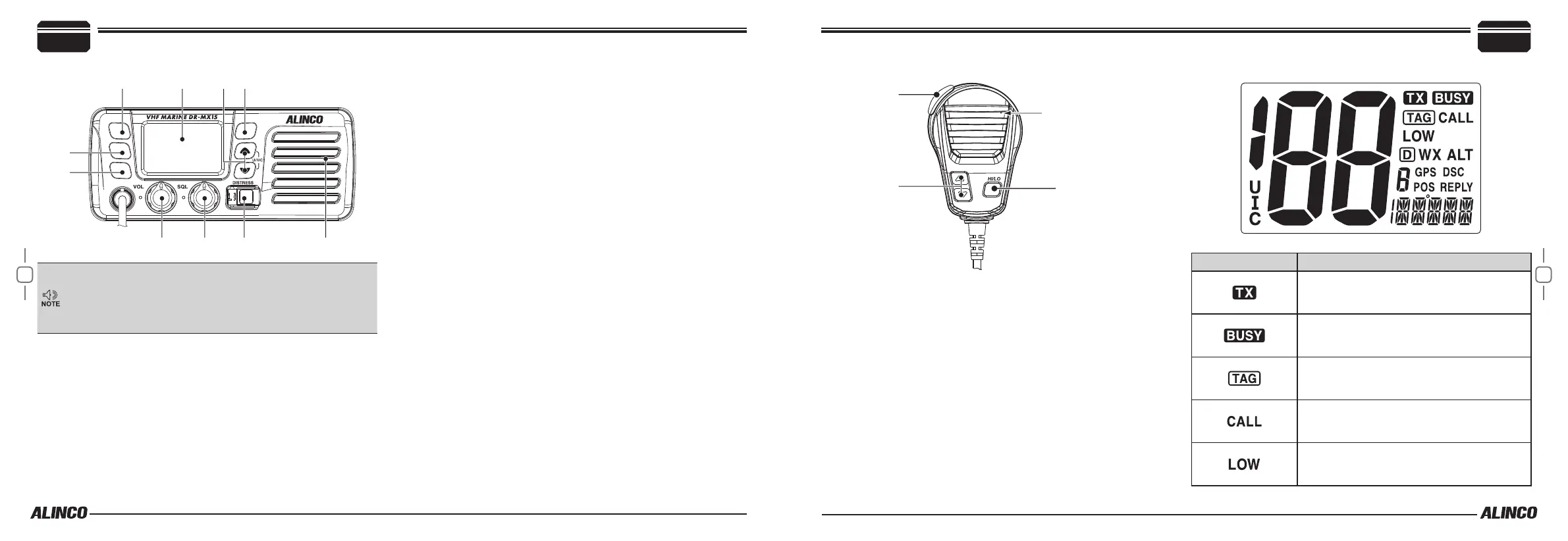
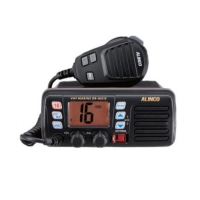
Front panel
SCAN
DSC
CH
WX
16
r t y
• In this manual, “Press” means you press the key securely once
and release immediately. Pressing too long may activate dier-
ent functions.
• Explanations herein may be abbreviated and details are ex-
plained in following chapters.
q
Channel 16 / Call Channel Key [16]
Press to select Channel 16.
Press and hold for 1 sec. to select call channel.
• “CALL” appears when the call channel is selected.
This key is also used for Set mode operation and channel name pro-
gramming.
w
Channel / Weather Channel Key
Press to select regular marine or weather channels.
This key is also used to operate Dual and Tri-watch functions.
e
DSC / Position Key
Press to enter DSC menu.
Press and hold for 1 sec. to show the current position from a GPS re-
ceiver. (Optional GPS receiver required)
r
Power / Volume Control [VOL]
Rotate to turn the power ON and OFF and adjust the audio level.
t
Squelch Control [SQL]
Rotate to set the squelch level.
y
Distress Key [DISTRESS]
Press and hold for 5 sec. to transmit a Distress call.
u
Scan Key [SCAN]
This key is also used for TAG (favorite) channel setting.
i
[
Y
][
Z
] / [U/I/C]
Select the operating channels, set mode settings, etc.
While Pressing and holding [SCAN], Press [
Y
] or [
Z
] to adjust the
brightness of the LCD and key backlight.
Select one of three channel groups in sequence when both keys are
pressed.
3
Getting Acquainted
■
Microphone
e
q
Press-To-Talk key [PTT]
Press and hold to transmit; release to receive.
w
UP/DOWN KEYS [
Y
]/[
Z
]
Press either key to change the operating channel, Set mode settings, etc.
There are other triangle keys on the radio so these keys are refered to
as UP/DOWN keys hereafter.
Select OFF for the FAVORITE CH menu in the SET mode to operate
all channels. The default is ON, and only TAG channels can be select-
ed by pressing UP/DOWN keys.
e
TRANSMIT POWER KEY [HI/LO]
Press to select high and low output power.
• Some marine channels are fixed to low power only due to inter-
national regulations. Turn on with [HI/LO] key pressed to lock UP/
DOWN keys.
■
Display AND ICONS
Icon Description
Appears while transmitting.
Appears when receiving a signal or when the
squelch opens.
Appears when a TAG channel is selected.
Appears when the call channel is selected.
Appears when low power is selected.


 To Next Page