2221
■
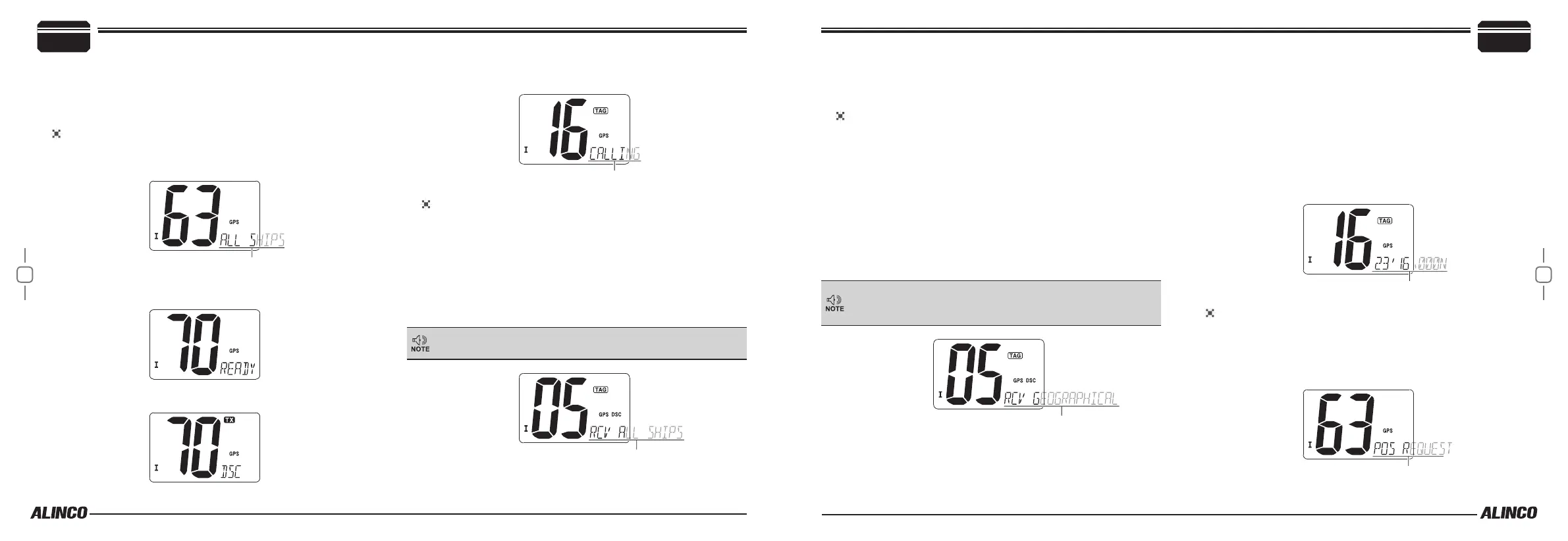
ALL SHIPS calling
Large vessels monitors CH70. This function is used to transmit DSC sig-
nals to all stations. DSC WATCH must be activated in the SET mode in
advance.
To transmit an ALL SHIP call
1.
Press [DSC] to enter the DSC mode.
2.
Use [U/I/C] keys to select “ALL SHIP”.
3.
Press [DSC]. Channel 70 is automatically selected and displays
“READY”.
4.
Press [DSC] to transmit the All Ships call.
5.
The display changes to CH16 automatically and CALLING scrolls
after the signal has been sent.
To receive an ALL SHIP call
When an ALL Ship Call is being received while monitoring CH 70
through DSC WATCH function:
1.
The alarm or beeps sound depending on the category of the call.
• Alarm sounds in case of DISTRESS or URGENCY.
• Beep sounds for others.
DSC and scrolling “RCV ALL SHIPS” are displayed.
2.
Press any key to stop the alarm or beeps.
DSC and scrolling “RCV ALL SHIPS” dissapears when any key
is pressed or power o the radio.
3.
Press [DSC] the display changes to CH16 automatically and mon-
itor the message, or press any key other than [DSC] to ignore the
call.
To receive a Geographical Area Call
When a Geographical Area Call (where your vessel is located at) is
being received while monitoring CH 70:
1.
The alarm or beeps sound depending on the category of the call.
• Alarm sounds in case of DISTRESS or URGENCY.
• Beep sounds for others.
DSC and scrolling “RCV GEOGRAPHICAL” are displayed.
2.
Press any key to stop the alarm or beeps.
3.
Press [DSC] to move to the channel specied by the calling station
and monitor the message or communicate. Press any key other
than [DSC] to ignore the call.
If your GPS receiver connected to the radio is not properly func-
tioning, you may receive ALL geographical calls regardless of
your location.
■
Position Indication
A compatible GPS receiver must be installed in advance to use this func-
tion. (NMEA0183 ver. 2.0 or 3.01 RMC,GGA, GNS, GLL)
Press [DSC] for a second to display the current position.
• The Latitude and Longitude information is displayed on the bottom
right corner. “NO POSITION” is displayed when the GPS receiver is
not in use.
• The priority of sentence formats is in order of RMC, GGA, GNS and GLL.
• GPS icon blinks when GPS data is invalid.
To transmit Position Request Call
Position Request call is used to inquire the current position of specic
ships.
1.
Press [DSC] to enter DSC mode.
2.
Press [U/I/C] keys to select “POS REQUEST”. Press [DSC].
Basic Operations
4
4
Basic Operations


 To Next Page