2423
3.
Press [U/I/C] keys to select an individual address to make the call.
Preprogramming of addresses are required in advance just like
other DSC calling functions.
4.
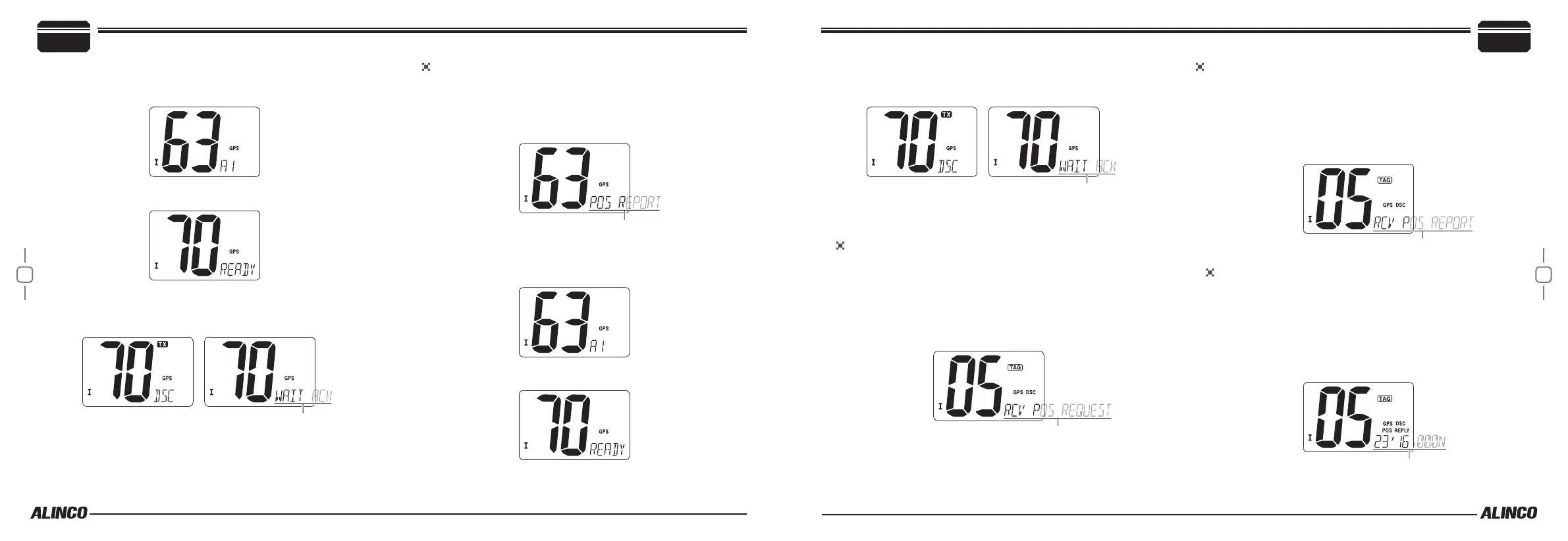
Press [DSC] to display CH70 and “READY”.
5.
Press [DSC] to make a Potition Request call. A beep sounds, TX
is displayed while transmitting and WAIT ACK is displayed when
completing the call.
6.
Press any key to return to regular operation, or wait until the ACK
signal is being received.
To transmit Position Report Call
Position Report call is used to acknowledge your current position to a
specic vessel.
1.
Press [DSC] to enter DSC mode.
2.
Press [U/I/C] keys to select “POS REPORT”. Press [DSC].
3.
Press [U/I/C] keys to select an individual address to make the call.
Preprogramming of addresses are required in advance just like
other DSC calling functions.
4.
Press [DSC] to display CH70 and “READY”.
5.
Press [DSC] to make a Potition Report call. A beep sounds, TX
is displayed while transmitting and WAIT ACK is displayed when
completing the call.
6.
Press any key to return to regular operation, or wait until the ACK
signal is being received.
To receive a Position Request Call
When a Position Request call is being received while monitoring CH
70 :
1.
A beep sounds, DSC and scrolling “RCV POS REQUEST” are dis-
played.
2.
Press any key to stop the beep.
3.
Press [DSC] to reply the call or press any key to ignore the call.
To receive a Position Report Call
When a Position Report call is being received while monitoring CH 70:
1.
A beep sounds, DSC and scrolling “RCV POS REPORT” are dis-
played.
2.
Press any key to stop the beep.
3.
Press [DSC] to reply the call or press any key to ignore the call.
To receive a Position Request Reply Call
When a Position Reply call is being received while monitoring CH 70:
1.
DSC and scrolling“POS REPLY” are displayed.
2.
Press any key to stop the beep.
The position from the called station is displayed in order of latitude
and longutitude.
• Select AUTO ACK in the setmode to automatically reply to this call.
Basic Operations
4
4
Basic Operations



 To Next Page