87
3
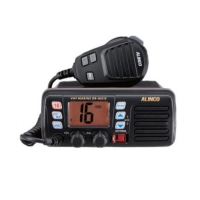
Getting Acquainted
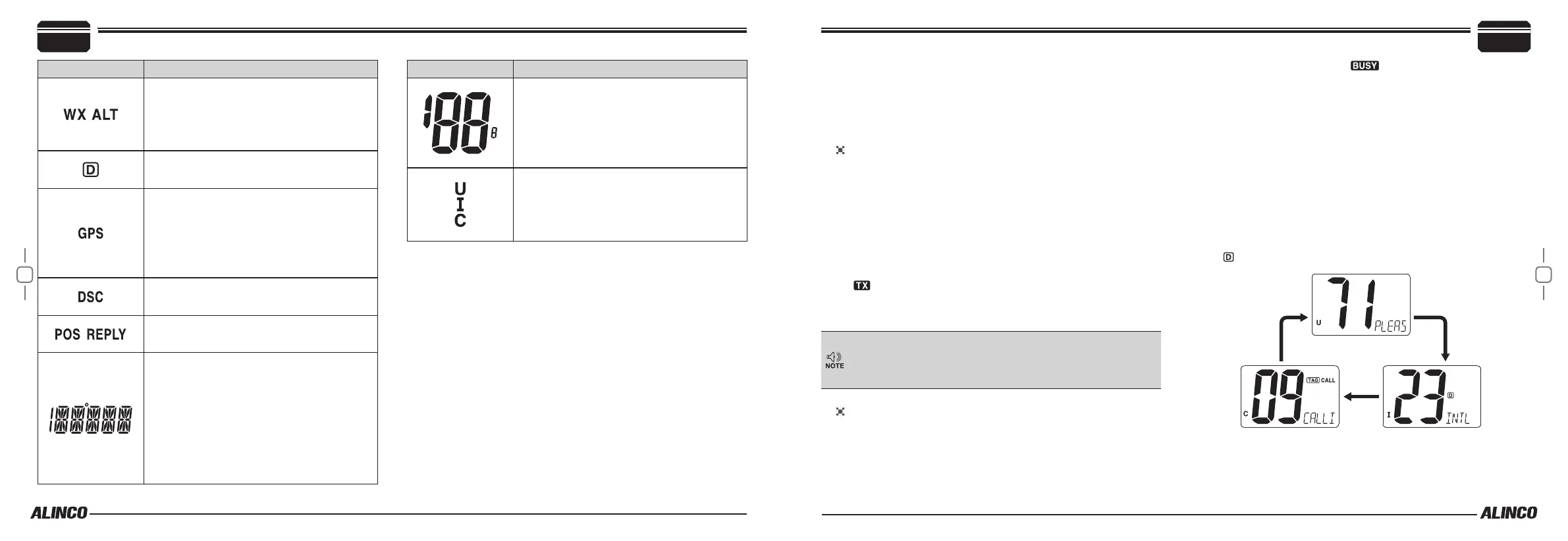
Icon Description
• “WX” appears when a weather channel is
selected.
• “WX ALT” appears when the weather alert
function is in use; blinks when an alert tone
is received.
Appears when a duplex channel is selected.
• Appears while valid position data is re-
ceived.
• Blinks when invalid position data is re-
ceived.
• Disappears when no GPS receiver is con-
nected.
Appears while operating DSC.
Appears while operating Position functions.
• Alphanumeric channel information appears
if programmed.
• “LOW BATTERY” scrolls when the DC
voltage is close to the lower limit of normal
operations.
• “SC” blinks during priority scan; “SCAN”
blinks during normal scan.
• “DW” blinks during Dualwatch; “TW” blinks
during Tri-watch.
Icon Description
• Indicates the selected operating channel
number. (Refer to channel list)
• In set mode, indicate the menu and param-
eters.
Indicates whether U.S.A. “U”, International “I”
or Canadian “C” channel group is in use.
4
Basic Operations
■
Power ON / OFF
• Rotate [VOL] clockwise to turn power on;
• Rotate [VOL] counter-clockwise to turn power o.
■
Receiving and Transmitting
Transmitting
1.
Press [HI/LO] on the microphone to select the output power if nec-
essary.
• “LOW” appears when low power is selected.
• Choose low power for short range communication, choose high
power for longer distance communication.
• Some channels are for low power only. See appendix for channel
restrictions.
2.
Press and hold [PTT] to transmit, then speak into the microphone.
• “
” is displayed while transmitting.
• Channel 70 cannot be used for transmission other than DSC.
3.
Release [PTT] to receive.
Activate Time out timer (TOT) in SET mode to prohibit a contin-
uous transmission exceeding 5 minutes. After being time-out, it
automatically returns to receive and prohibitys transmission for
10 seconds as a TOT penalty.
Receiving
1.
Set the audio and squelch levels.
2.
Rotate [SQL] fully counterclockwise in advance.
3.
Rotate [VOL] to adjust the audio output level.
4.
Rotate [SQL] clockwise until the noise disappears.
• “When receiving a signal, “
” appears and audio is emitted
from the speaker.
■
Channel Group Selection
This radio is pre-programmed with 59 U.S.A., 59 international and 63
Canadian channels, Select channel group according to the int’l rules to
operate properly.
1.
Press [CH/WX] to select a marine channel.
• If a weather channel appears, Press [CH/WX] again.
2.
Press [U/I/C] (both [
Y
] and [
Z
]) keys to change the channel group.
• U.S.A., International and Canadian channel groups can be select-
ed in sequence. Observe the display for U.I and C icons.
3.
Press [▲] or [▼] to select a channel.
• “
” appears for duplex channels.


 To Next Page