Chapter 5 Detailed Function Introductions
PF.00
Menu
level 3
display
Func.
code
PF.00
Go into
user
password
setting,
initialv
alue is
0
Shift
cursor
to
right
Shift
cursor
to
right
Enter to
save
user
password
.
Shift
cursor
to
right
0000
1000 1000
1200
1200
1230 1230
1234
PF.00
Turn
right 1
times
to set
the
value
to 1
>>
>>
>>
ENTER
ENTER
+
+ + +
-PF-
Menu
level 2
display
group
PF
LED
Display
Key
operation
ENTER
Turn
right 2
times,
to set
the
value
to 2.
Turn
right 3
times,
to set
the
value
to 3.
Turn
right 4
times,
to set
the
value
to 4.
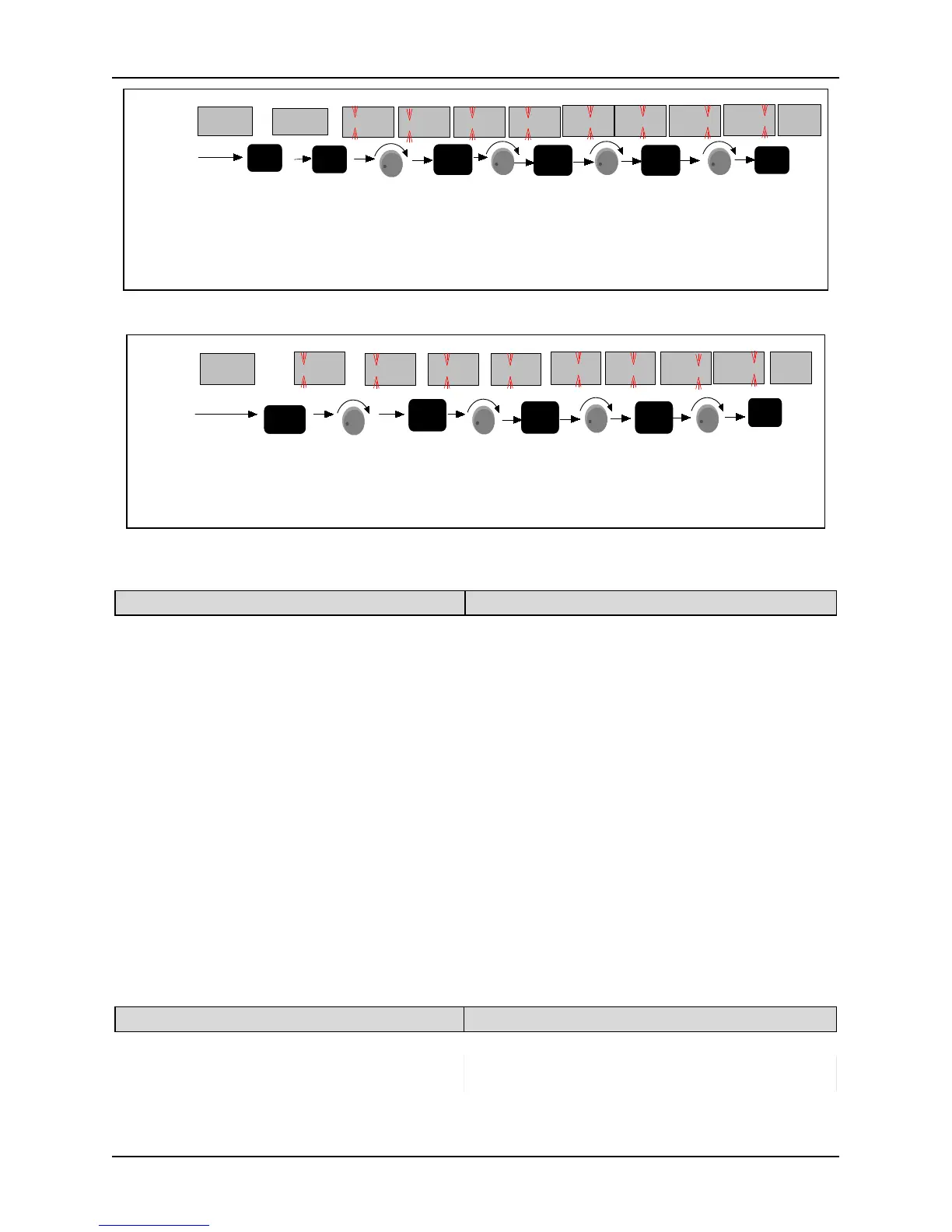
Figure. 5-16-1Flow chart of user password setting
-PF-
Menu
level 2,
display
PF group
Go into user
password
verification
Shift
cursor
to
right
Shift
cursor
to
right
LED
Display
Key
Operation
Enter to pass
password
verification,
go into edit
state
Shift
cursor
to
right
Turn
right
3
times
0000
1000 1000
1200
1200
1230 1230
1234
PF.00
Turn
right
4
times
turn
right
2
times
High bit
bliniking
turn
right 1
times
>>
>>
>>
ENTER
ENTER
+
+
+ +
Figure. 5-152 Flow chart of user password unlocking
PF. 01 Parameter write-in protection Setting range: 0~2 [0]
0: All parameters are allowed changing;
1: Except the set frequency (P0.02) and this function code, other function codes are not allowed to be revised.
2: Except the function code, the rest are not allowed to be revised.
Notes:
PF.01 is set to 0: All parameters are allowed to be changed But only the parameters, which are marked “○” in
function table, can be changed no matter what the inverter is running or not. The parameters, which are
marked “×”can be only changed when the inverter is in stop state. Other parameters cannot be changed.
About the changeable of parameters, refer to Chapter 4 for details. In addition, you can examine the
parameters display on keypad. If any digit of the parameter is flashing, the parameter is allowed to change. If
none digit of the parameter is flashing, it cannot be changed.
PF.01set as 1: except the set frequency (P0.02) and this function code, other function codes are not allowed to
PF.01set as 2: except the function code, the rest are not allowed to be revised.
In the state of startup parameter monitoring, when PF.01 is set as 0, all parameters are allowed to be revised,
and the set frequency, speed PID giving and analog PID digital giving can be adjusted and saved on line.
When PF.01 is set as 1, only the set frequency can be adjusted and saved. When PF.01 is set as 2, all on-line
adjustments are invalid.
PF.02 Parameter initialization Setting range: 0~3 [0]
0: No operation 1: Clear fault history
2: reset the ex-factory value(except the
record\password\motor parameters)
3: reset the ex-factory value(except the
record\password)
When PF.02 is set as 0, there is no operation.



 To Next Page