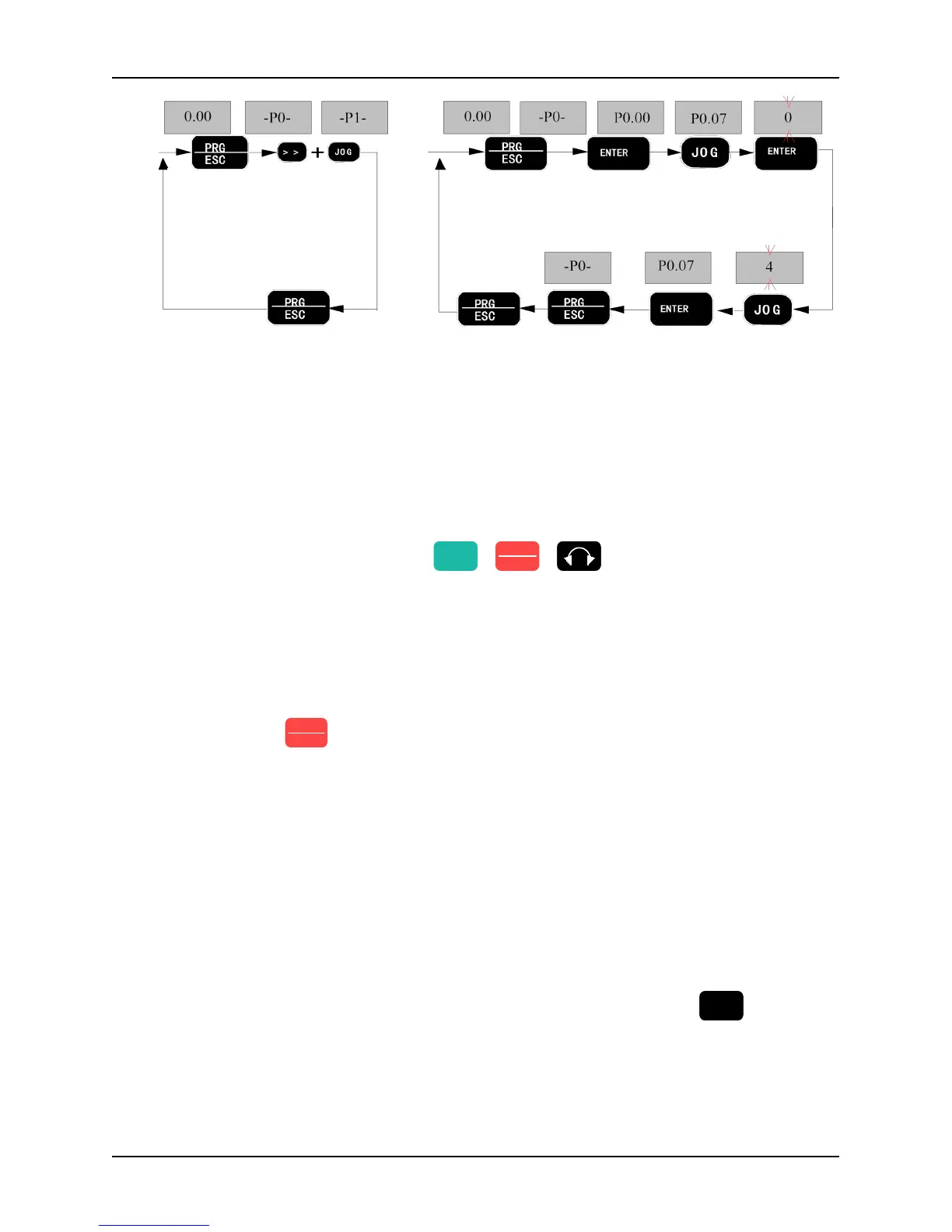
Fig. 3-8 Operation illustration of UP/DN activation Fig. 3-9 Operation illustration of key parameter editing
3.2 Run command mode select
The run command modes determine the methods of the inverter running and stop. The inverter has three run
command modes:
● Run command from the keypad: press the key
to control the inverter.
● Run command from the control circuit terminals: by using the terminal defined as FWD, REV, COM (2-wire
control mode) : FWD, REV, Xi ( 3-wire control mode ) to control the inverter.
● Run command from serial communication: Use a PC or PLC to control the inverter to run or stop.
Change P0.07 to select serial communication mode. The default setting is Keypad control mode (The default
value P0.07 is 0) , If terminal control mode is needed, please change the value to 1 or 2. If we want to keep the
“STOP/RESET” key
active in terminal control mode, we must set the value to 2.
If we need to control the inverter by PC or PLC serial communication, we should set P0.07 to 3 or 4.
If the indicator REMOTE is off, it tells that the inverter is controlled by the keypad. If the indicator REMOTE is
on, it tells that the inverter is controlled by the terminals. In addition, if the indicator is flickering, it tells the
inverter is controlled by serial communication.
3.3 Trial Operation
3.3.1 Operation mode of inverter
This series of inverter have five operation modes: JOG operation, PID closed loop operation, Wobble frequency
operation, PLC programmed operation and common operation.
JOG operation: If the inverter received a jog operation command (For example, press
state, the inverter will jog running at the jog frequency reference set by function code P2.00~P2.02
PID closed loop operation: If PID close loop operation is selected by P0.03 (set the value to 11) , the inverter
will chose PID closed loop operation mode. In other word, it will come into PID adjustment as the PID feed
and PID feedback. (See parameter group P7)
Wobble frequency operation: If Wobble frequency operation mode is active (set value of parameter code
While pressing the
Shift key and JOG
key at the same
time continuously
for 5s, function
group P1 will be
displayed
Enter editing
mode, display
the first-level
menu
Stop parameter display state
Confirm
function code
and enter the
second-level
menu
JOG key acts
as UP key,
press JOG key
for four times
to enter P0.04
Press ENTER
key to enter
display of
parameter
P0.04
Go back
to the
first-level
menu
Save the
modified value
and go back to
second-level
menu
Press the JOG
key for four
times to set
parameter P0.04
from 0
→
4



 To Next Page