EasyManua.ls Logo

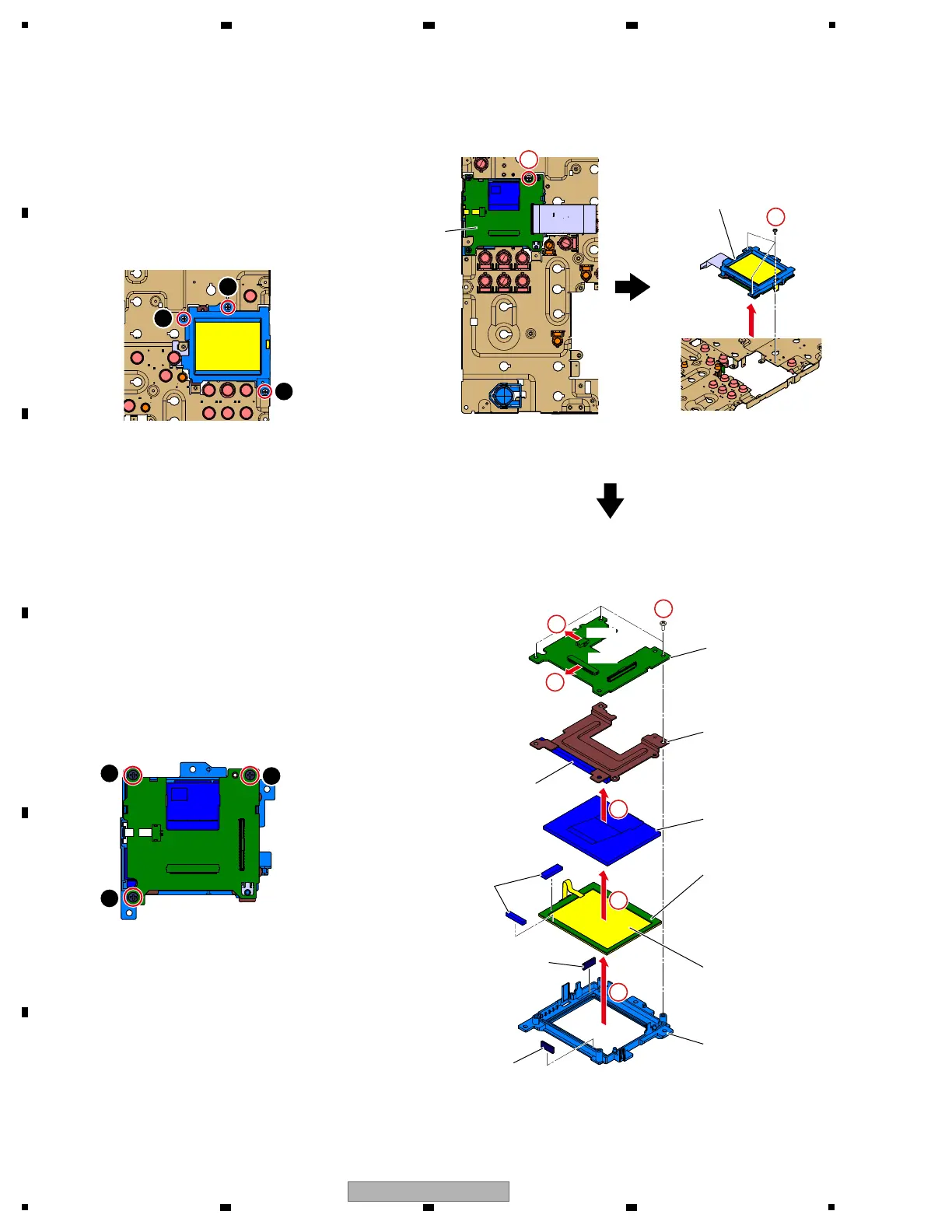
AlphaTheta DJM-V10 - LCDB Assy

AlphaTheta DJM-V10
124 pages
Print Icon
To Next Page IconTo Next Page
To Previous Page IconTo Previous Page
Loading...
104
DJM-V10
1
2 3 4
A
B
C
D
E
F
1
2 3 4
LCD
Section
LCD Section
LCDB Assy
Stay
TFT LCD
Touch panel
Cushion
Panel
Cushion
Cushion
Cushion
Cushion
[4-12] LCDB Assy
" LCD Section
1 Remove the one screw.
(BBZ30P060FTC)
2 Remove the 3 screws and then remove the
LCD Section.
(BBZ30P060FTC)
" LCDB Assy, TFT LCD and Touch panel
1 Disconnect the 2 FPCs.
(CN8901, 8902)
2 Remove the 3 screws and then remove the
LCDB Assy.
(BPZ30P100FTB)
3 Remove the Stay.
4 Remove the TFT LCD.
5 Remove the Touch panel.
CN8901CN8901
CN8902
CN8902
1
1
1
• Bottom view
• Bottom view
1
2
1
3
2
3
Screw tightening order
2
×3×3
2
3
×3×3
4
5
+
+
+
+
+
Note + :
Nonreusable to fix it with DS tape.