12
12
34 1 234
34
234
4
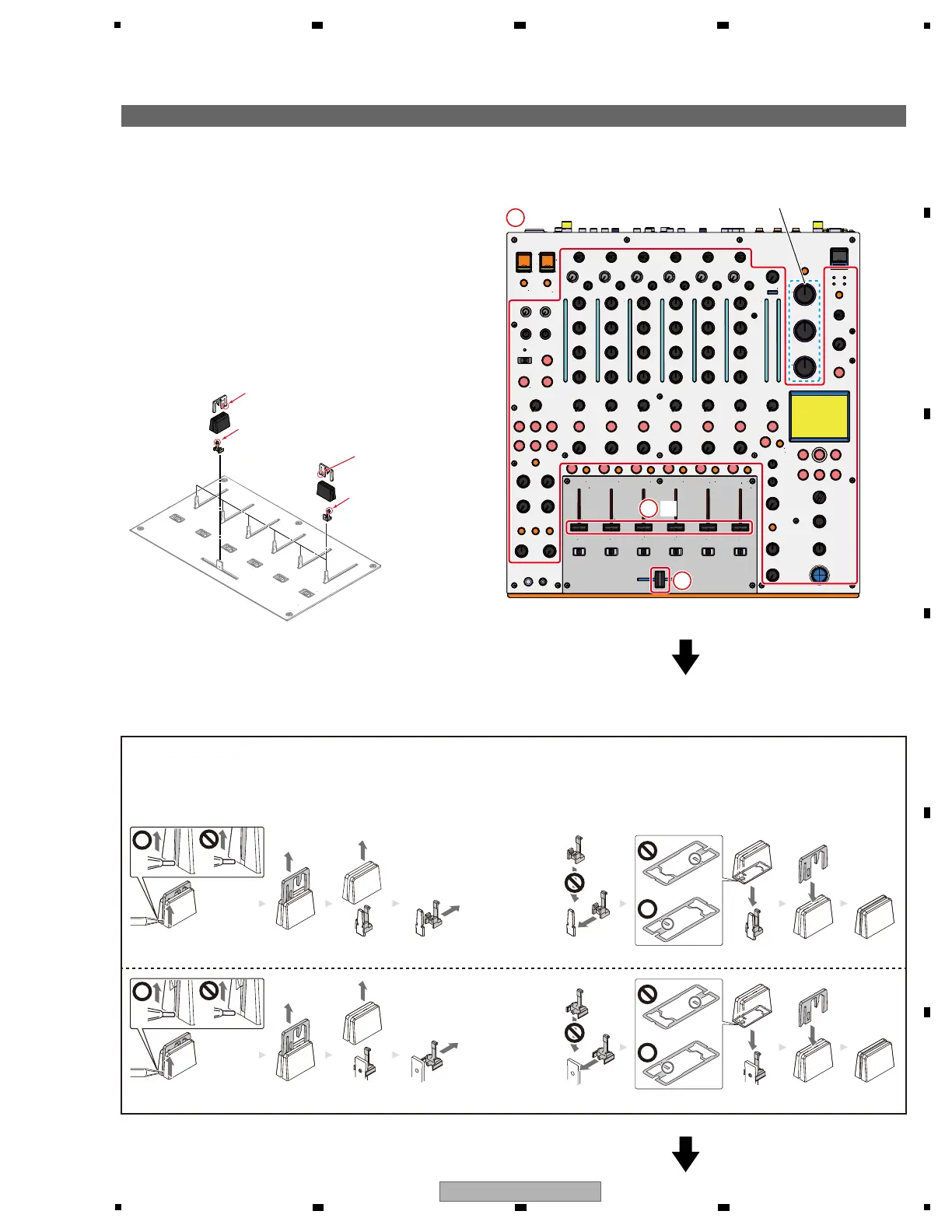
[1] Control Panel Section
[1-1] Knobs
1 Remove the 77 knobs.
2 Remove the 6 Slider knobs 2, 6 Knobs,
6 Slider Knob Stoppers.
(See below.)
3 Remove the Slider knob 2, Knob, Stopper.
(See below.)
1
×77×77
2
×6×6
3
Except these knobs
g Assembly / Reassembly of the Slider Knob 2, Knob and Slider Knob Stopper (Stopper)
g The reference of the direction
Stopper
(right direction)
Stopper
(front direction)
Side on which
the line reaches the bottom
Side on which
the line reaches
the bottom
-Disassembly- -Reassembly-
1 Lift the lower end of the Slider knob 2, using a pointed tool.
2 Pull the Slider knob 2 out upward.
3 Pull the Knob out upward.
4 Pull the Slider Knob Stopper (Stopper) out horizontally.
1 Insert the Slider Knob Stopper (Stopper) horizontally.
2 Insert the Knob, paying attention to its orientation.
3 Insert the Slider knob 2, paying attention to its orientation.



 To Next Page