DLM-600 installer & user manual Rev. 1.3 16-11-2011 33 / 39
APPENDIX A: INSTALLING THE FLASH TOOL SOFTWARE
To flash new firmware into the DLM-600 a (free) flash tool is available. This flash tool is provided by the
manufacturer of the microprocessor (Renesas).
Installing the flash tool is very simple. Install the fdt_3_06 file (an EXE file) on your computer / laptop.
Use the default values supplied by the manufacturer and complete the full installation. During installation
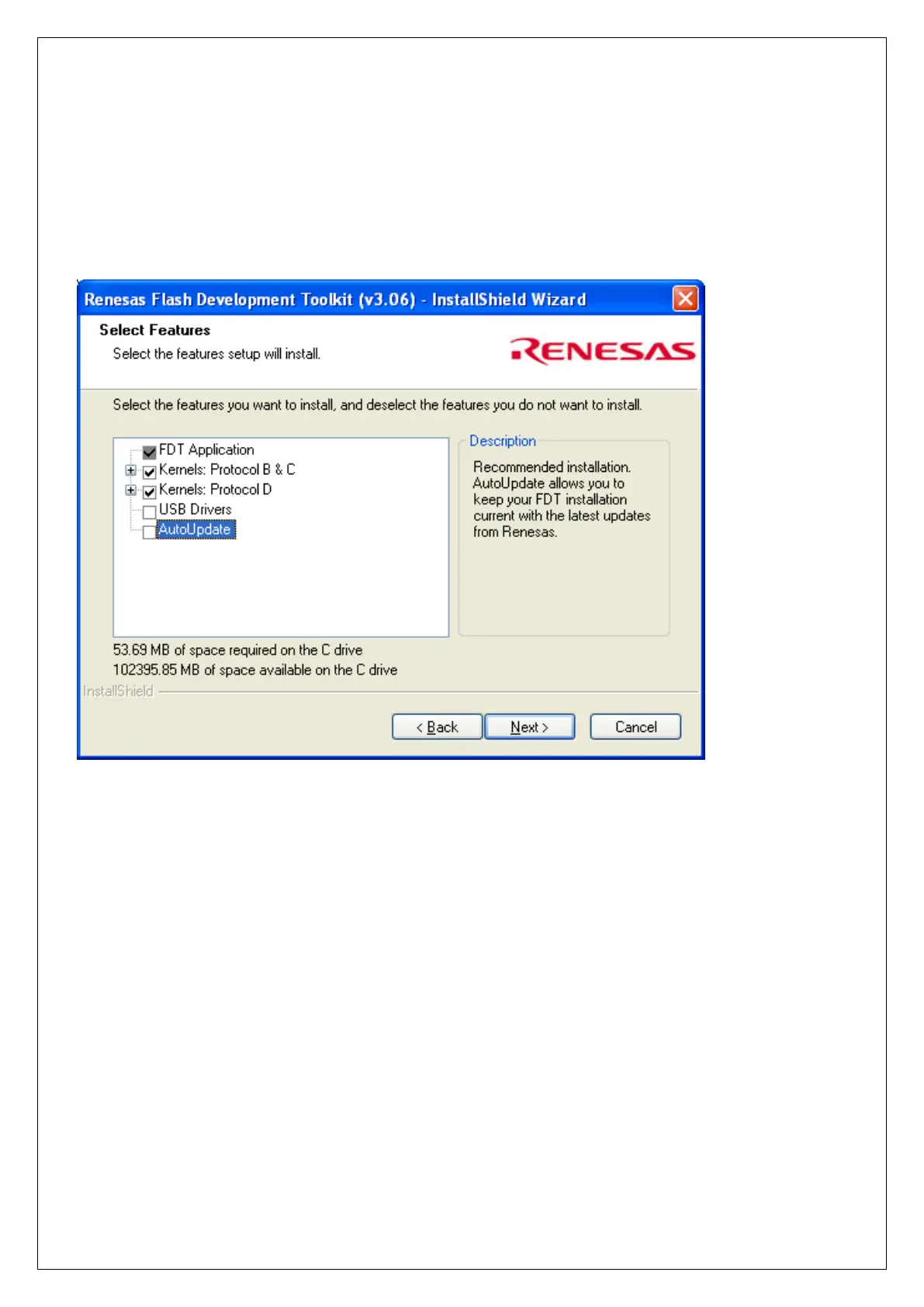
choose the ‘create a desktop icon’ option. Uncheck the ‘USB drivers’ and ‘AutoUpdate’ when the
following screen appears.
After the software installation has been completed successfully start the Flash Development Toolkit 3.06
Basic. If no desktop icon is created, the program can be found from in Programs / Renesas etc.
The following procedure is only necessary if the start the program for the first time. The next time you run
the program all the settings made will be remembered from the last session. After starting the following
screen will appear:


 To Next Page