DLM-600 installer & user manual Rev. 1.3 16-11-2011 13 / 39
PROGRAMMING
LOCAL PROGRAMMING WITH A COMPUTER OR LAPTOP
The DLM-600 is programmed locally using a programming cable (art. 003 834) and a computer / laptop
with the Alpha Tool software (art.code 004 255) version 2.4 or higher.
First connect the DLM-600 to the PC / laptop using the programming cable. The programming cable has
a Sub-D connector 9-pin female that is connected to the serial port of the computer (RS232), the 10-pin
ribbon cable connector is connected to the DLM-600 dialer.
Start the AlphaTool software and make sure that AlphaTool is ready to connect to the DLM-600 dialer.
Now connect the power supply to the DLM-600 and AlphaTool will now automatically connect to the
DLM-600.
For the correct operation of the DLM-600 dialer is important that the programming cable is unplugged.
This is only connected during programming and disconnected immediately afterwards.
For a complete description of the AlphaTool softwarepackage, see ‘AlphaTool manual’
STATUS SCREEN
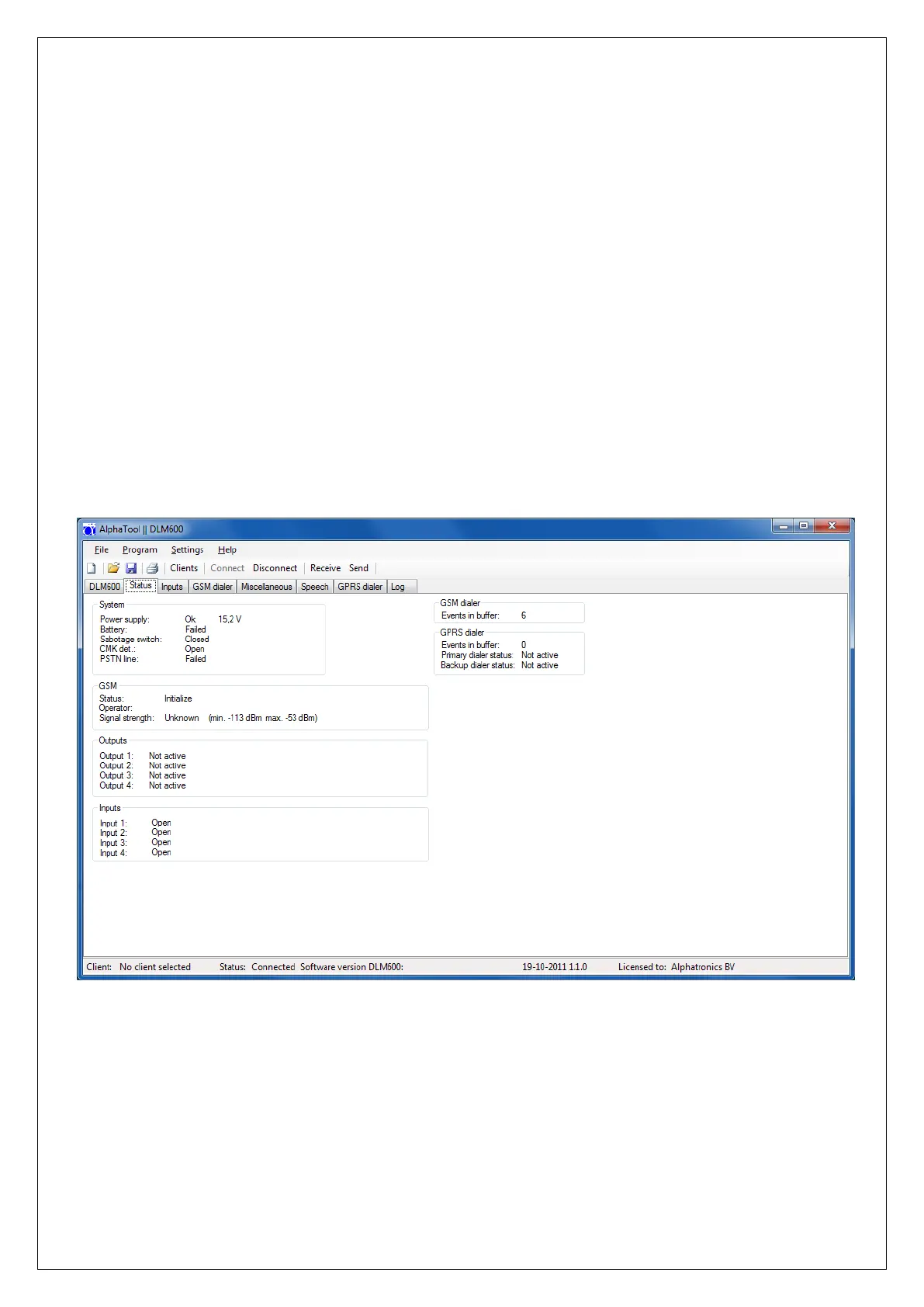
When there is a connection between the DLM-600 and AlphaTool then the following status screen will be
displayed.
figure 4. Status screen


 To Next Page