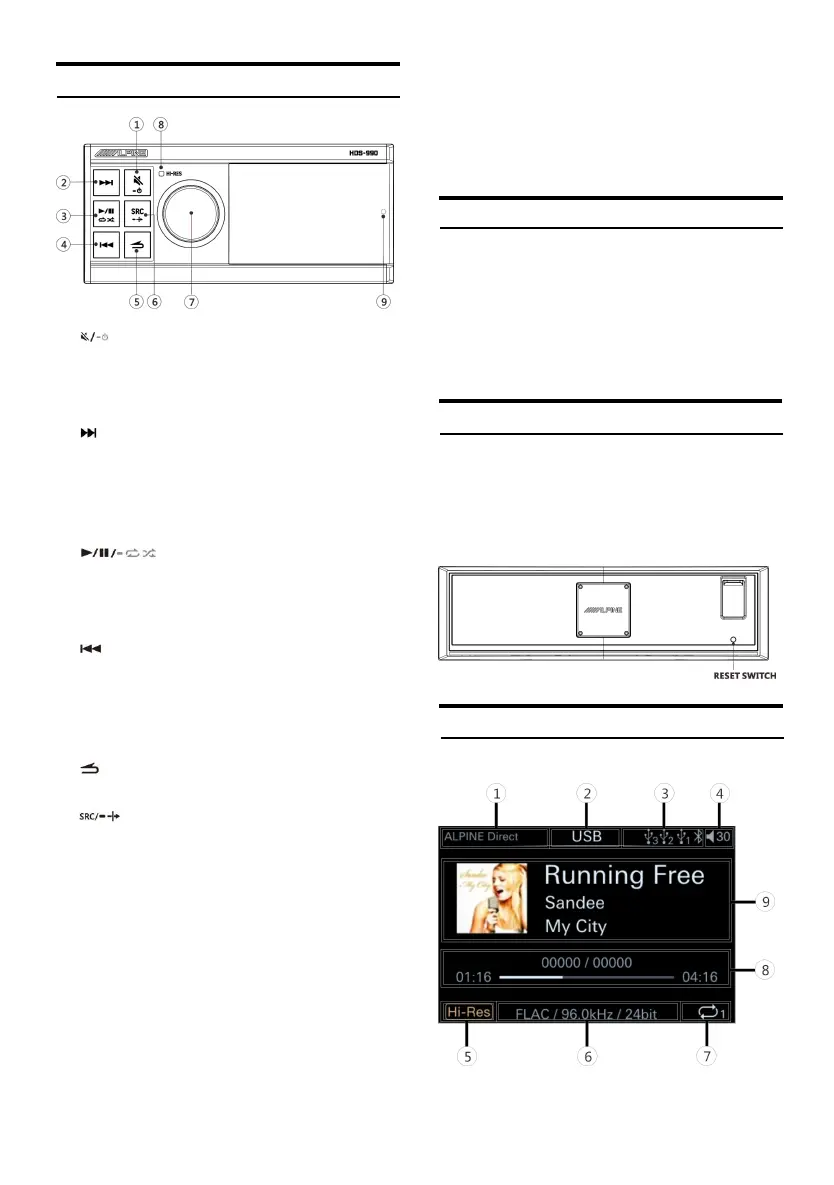
Location of Button
① Key
Short press to mute; long press for more
than 2 seconds to shut down.
*You can press any key to boot.
② Key
USB: Short press to select the next song;
long press for more than 2 seconds to fast
forward.
Bluetooth audio: select the n ext song.
③ Key
Short press to switch pause/play; long press
for more than 2 seconds to switch random
play/single cycle.
④ Key
USB: Short press to select the previo us son g;
long press for more than 2 seconds to
rewind.
Bluetooth audio: select the previous song
⑤ Key
Return to t he previous level.
⑥ Key
Short press to select the main audio source:
USB, Bluetooth audio, high level , AUX or
USB Audio ( Default USB ) ; long press for
more than 2 seconds to turn on/off the
mixing mode.
⑦ K nob K ey
Main in terface: Rotate left and right to
adjust t he volume; s hort press to enter the
song list; long press for more than 2 seconds
to enter t he Set up mode.
Song list or Setup mode: Short press to
confirm the selection.
⑧ H i-Res in dicator
The light is only on when th e Hi-Res format
song is current ly playing, and th e light is not
on in other formats.
⑨ Re mote cont rol sens or
Power On or Off
Press any button on the controller to turn on
the unit .
Press an d hold for at least 2 seconds to t urn off
the unit .
When the power is turned on for the first
time, t he volum e starts from level 12.
Starting the System for the First Time
Press and hold the RESET switch for 3 seconds
to restart t he h ost.
1 Turn off t he powe r of th is unit.
2 Press RESET with a ballpoint pen or similar
pointed object.
Controller Display
USB source screen
① Displa y th e status of Mix source.



 To Next Page