After the factory settings are restored, a ll the
setting i tems will be restored to the factory
default settings except for the debu gged
"Dealer S ettings" mode.
Setting items:
In th e setting interface, long press, long press
the knob, and long press to call out th e DIAG
mode.
Setting content:
Firmware update: Ent er th e firmware update
interface, select the firmware update file,
and t hen sh ort press to confirm to update th e
version.
Dealer setting: Sh ort press to save dealer
settings.
Serial number: You can view the serial
number of th e mac hine.
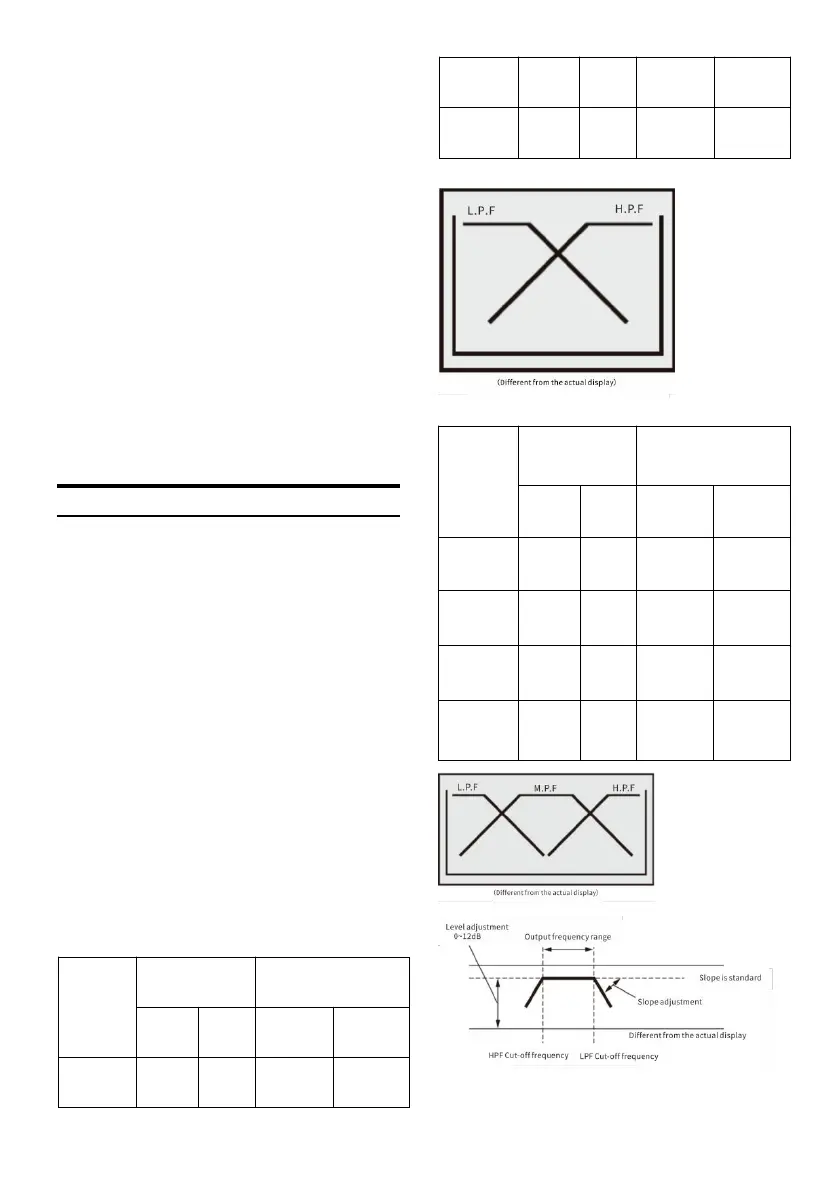
About t he X-Over
Frequency divider (X-Over):
This machine is equipped with an active
frequency divider. The frequency divider can
limit the frequenc y that reaches each output .
Each chann el can be controlled individually.
Therefore, each pair of speakers can be driven
with a n optimized frequency.
The frequency divider can adjust the HPF (high
pass filter) or LPF (low pass filter) of each band,
and the slope (the speed of the filter to the high
point or low point).
Should be adjusted according to the
reproduction characteristics of th e speaker.
Depending on the speakers, it may not be
necessary to use a pa ssive network. If you are
not sure about t his, please consult an
authorized Alpine dealer.
Active 2-way:



 To Next Page