1 Turn the encoder to the left to select [<]
operation, a nd t urn th e encoder to the right
to s elect [>] ope ration.
Setting item: left and right balance
Setting content: L15 ~0~R15 (init ial value: 0)
Front an d Rear Balance S ettings of
Speaker Output
Select [Balance] from th e sound setting page.
Refer to step 1 of "Sound Settings" (page 11).
Front and back balance page
1 Turn the encoder to the left to select [<]
operation, an d turn the kn ob to the right to
select [>] operation.
Setting item: front and back balance
Setting content: L15 ~0~R15 (init ial value: 0)
Input Sou rce Vol. S etting
Select [Input s ource vol.] from the sound
setting page. Refer to step 1 of "Sound
Settings" (page 11).
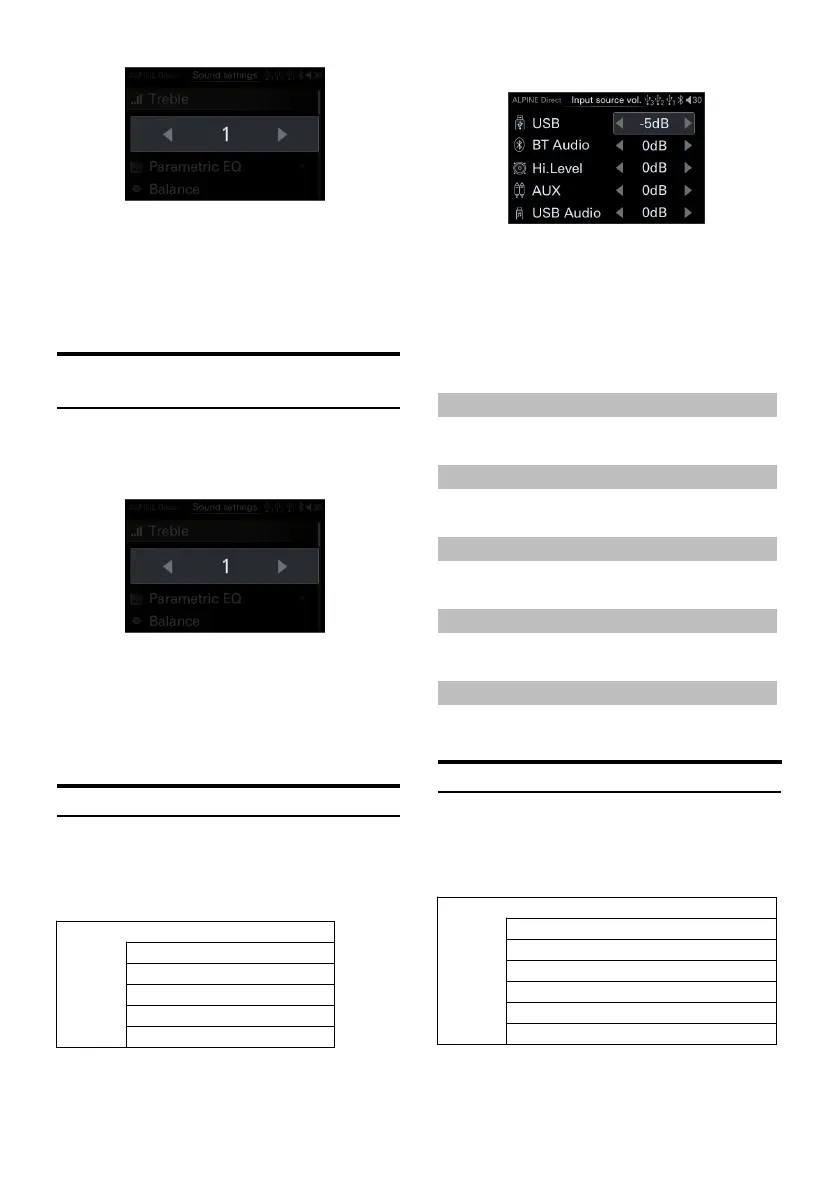
<Setting item>
Input audio source volume page
1 Rotate the encoder to select the target item,
then short press the encoder to select the
target item to adjust.
2 Urn t he en coder to the left to select [<]
operation, and turn the encoder to the right
to select [>] operation.
Select USB Audio
Setting content:-60dB~0dB(in itial value: 0d B)
Select BT Audio
Setting content:-60dB~0dB(in itial value: 0d B)
Select Hi-Level Audio
Setting content:-60dB~0dB(in itial value: 0d B)
Select AUX
Setting content:-60dB~0dB(in itial value: 0d B)
Select USB Audio
Setting content:-60dB~0dB(in itial value: 0d B)
Time Correction Settings
Select [Tim e Correction] from the sound
setting page. Refer to step 1 of "Sound
Settings" (page 12).
<Setting item>



 To Next Page