Steering wheel control
Select [Steering wheel control] from the
general page. Refer to step 1 of "General
Settings" (page 18).
<Setting item>
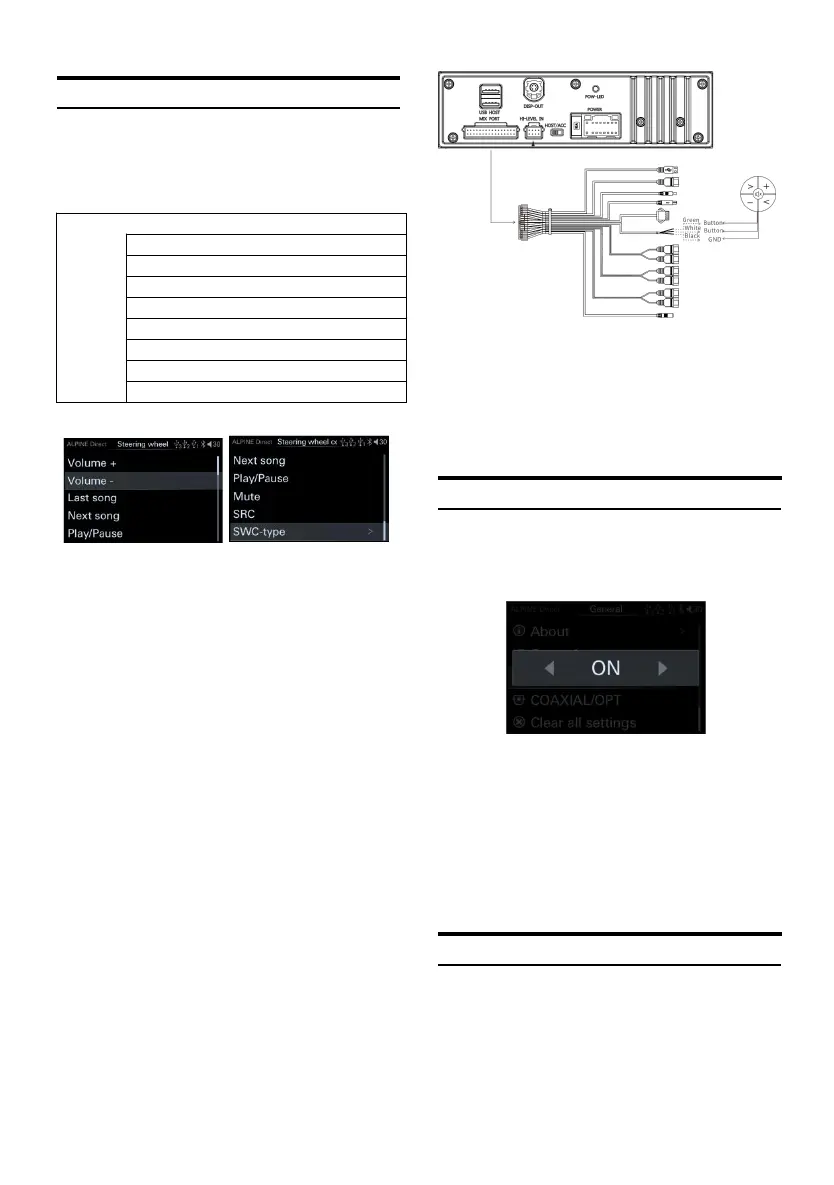
Steering wheel control page
1 Rotate the encoder to select th e target item,
then short press theencoder to select the
target item to adjust.
Setting content:
According to the actual wiring of different car
models, after connecting the host, learn t he
steering wheel of the car through the
controller, short press "vol ume +", "volume -",
"Last s ong", "Next song", "play/pause" ",
"Mute", etc., wait for the car steering whee l
button to be pressed to complete th e
learning and realize the controller's control
of the car steering wheel.
Steering wheel control connection page:
Green and white are connected to the button
line of the car steering wheel, and black is
connected to the ground. Please connect
according to the actual model. For details,
please contact your A lpine dealer.
Built-in AMP
Select [Built-in AMP] from the general page.
Refer to step 1 of "General Settings" (page 18).
Built-in AMP switch page
1 Turn t he encoder to the left to select [<]
operation, and turn the encoder to the right
to select [>] operation.
Setting items: Built-in power amplifier switch
Setting content: OFF/ON (Initial setting)
When "Built-in AMP" is set to "OFF", the
system will not output sound.
SPDIF/Opt Settings
Select [SPDIF/Opt] from the general page. Refer
to step 1 of "General Settings" (page 18).



 To Next Page