EasyManua.ls Logo

Alpine HDS-990 - Page 43

Alpine HDS-990
48 pages
Print Icon
To Next Page IconTo Next Page
To Previous Page IconTo Previous Page
Loading...
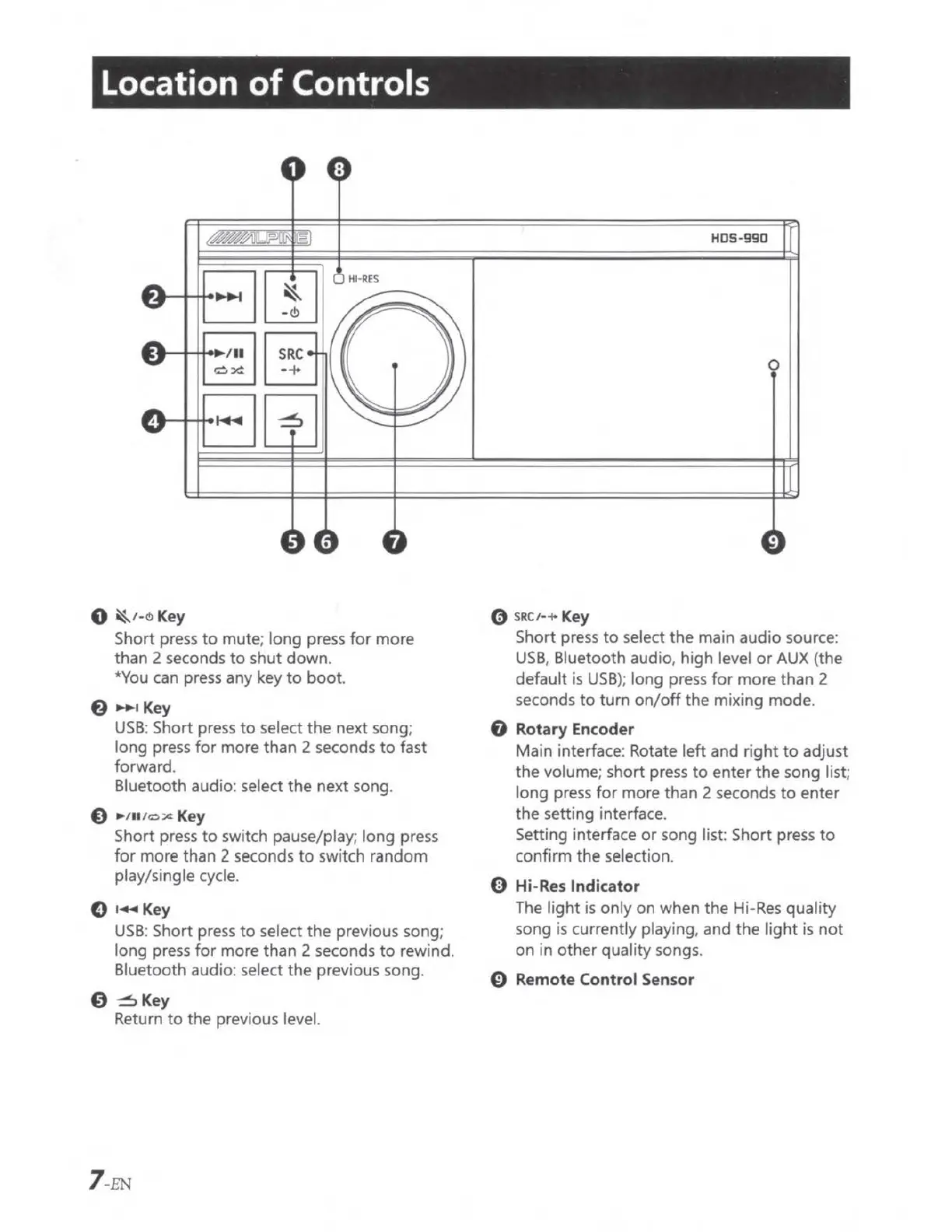
Location
of
Controls
a:tt-
~ ~ /
11
__
.......
0
~1-<!>
Key
SRC
.....
H
RE
S
Short press
to
mute; long press
for
more
than 2 seconds
to
shut
down
.
*You can press any key
to
boot.
f)
~ Key
USB:
Short press
to
select
the
next song;
long press
for
more than 2 seconds
to
fast
forward.
Bluetooth audio: select
the
next song.
€,
1
11
1
0::c
Key
Short press
to
switch pause/play; long press
for
more
than
2
seconds
to
switch
random
play/single cycle.
0 ,
..
Key
USB
: Short press
to
select the previous song;
long press
for
more than 2 seconds
to
rewind.
Bluetooth audio: select
the
previous song.
0 ~ Key
Return
to
the
previous level.
7
-EN
HD
S-
99
0
0
0
SRCI·+
Key
Short press
to
select
the
main audio source:
USB
, Bluetooth audio, high level
or
AUX (the
default
is
USB
);
long press
for
more than 2
seconds
to
turn
on/off
the
mixing mode.
0 Rotary Encoder
Main interface: Rotate
left
and
right
to
adjust
the volume; short press
to
enter
the
song list;
long press
for
more than 2 seconds
to
enter
the setting interface.
Setting interface
or
song
list
Short press
to
confirm the
se
lection.
0
Hi
-
Res
Indicator
The
light is only
on
when
the
Hi-
Res
quality
song is currently playing, and
the
light
is
not
on
in
other
quality songs.
0 Remote Control Sensor

Table of Contents

Related product manuals