35
4.2.5 Calibration
Users can calibrate the sensor by tapping the “Calibrate” command in the sensor page. When a sensor is
first added to an account, the app will automatically bring the user to the Calibrate page, after the WiFi
is set up successfully. The usage is already given in Sec. 4.1.4.
4.2.6 Region of Interest (ROI)
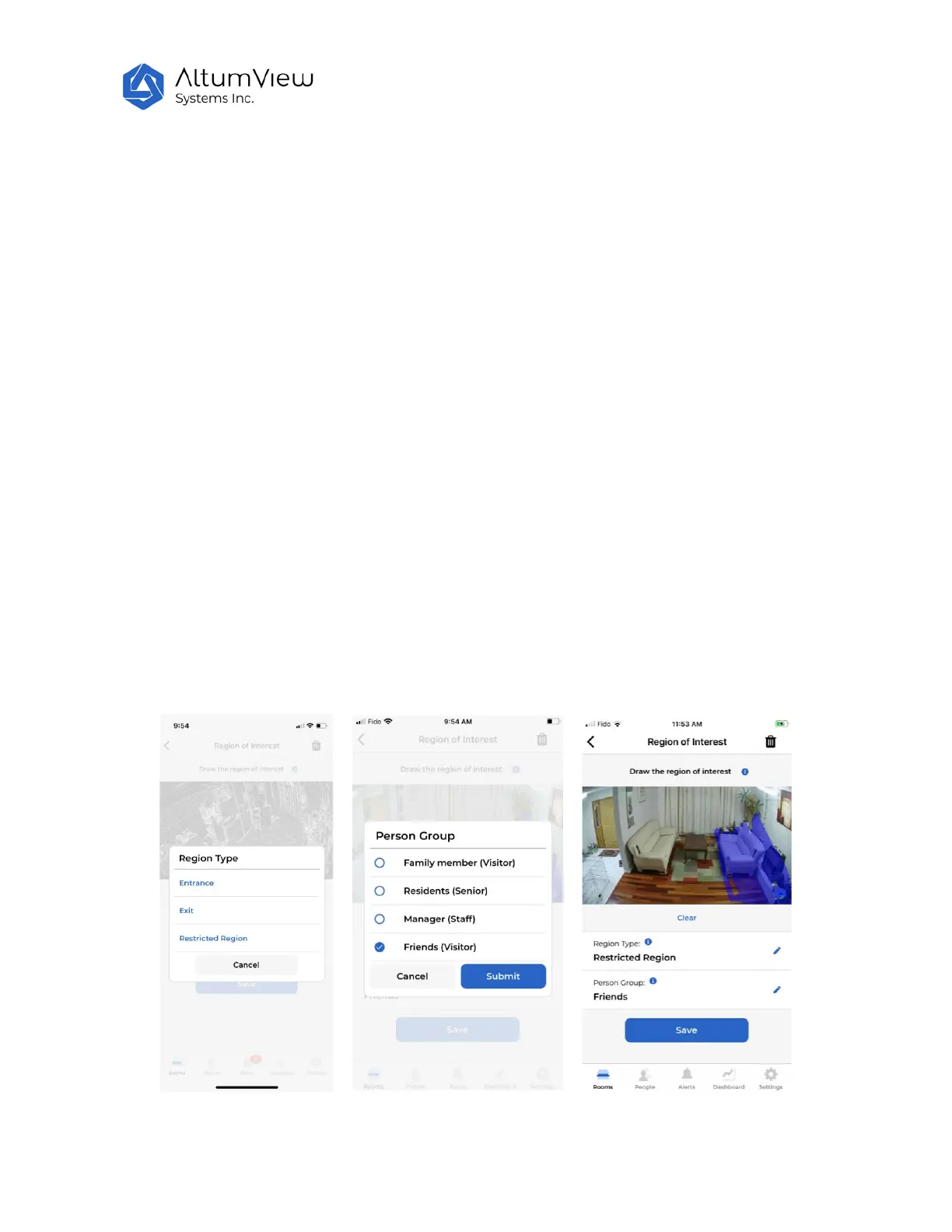
A region of interest (ROI) can be set in the device setting page. Currently three types of ROI are
supported:
• Entrance
• Exit
• Restrict Region
To use the ROI, users need to specify both the region types and person group (explained in Sec. 5).
To define the ROI, tap the "Region of Interest" button to go to the Region of Interest page, where users
need to choose the region type, people groups that will be monitored in the region, and draw and fill
the region of interest on the screen with finger and save it, as shown below. The ROI should be large
enough to include the person’s face when the person enters the ROI.
To remove a previously defined ROI, which can be any type listed above, navigate to the Region of
Interest page, and tap the garbage bin icon at the upper right corner.



 To Next Page