53
6.Alerts
6.1 Alerts
When the device detects abnormal events such as falls, waving hands, and people with wandering risk
entering a restricted region, it will automatically send an alarm to the mobile APP via the cloud. If the
App is closed and notification is enabled, the phone will play a sound when the alert is received. If the
App is open, a pop-up window will be displayed.
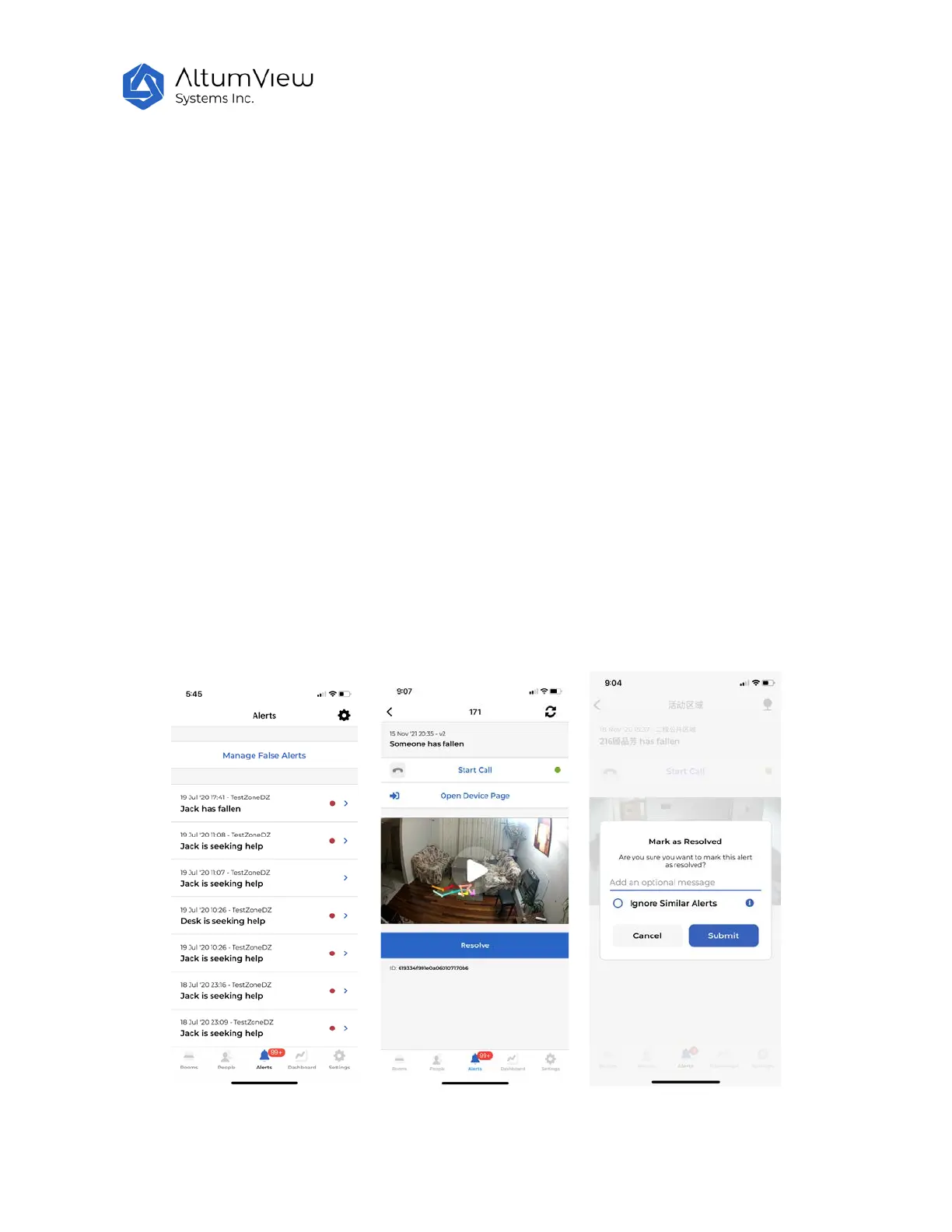
Tapping the Alerts button at the bottom of the page will show the list of all alerts. Each alert page will
show the time, room, and stick-figure animation of the corresponding event. Sometimes users need to
press and pull down the screen to refresh the list and display the latest alerts.
After an alert is received, users can use the Start Call command in the alert page to talk to the person, or
click the Open Device Page command to go to the streaming page of the sensor directly, to double check
what is going on.
To resolve an alert, tap on the "Resolve" button. In the next Mark as Resolved page, users can enter
some descriptions of the event, choose to ignore similar alerts in the future (see
Section 6.2), and submit it. After this, the state of the event in the alert record will become "Resolved"
with the red dot removed.



 To Next Page