GreenDrill 5.2 on-board computer
GreenDrill BAH0054-4 02.13
49
7.5.4.2 Calibration (working speed) by comparing the speedometer
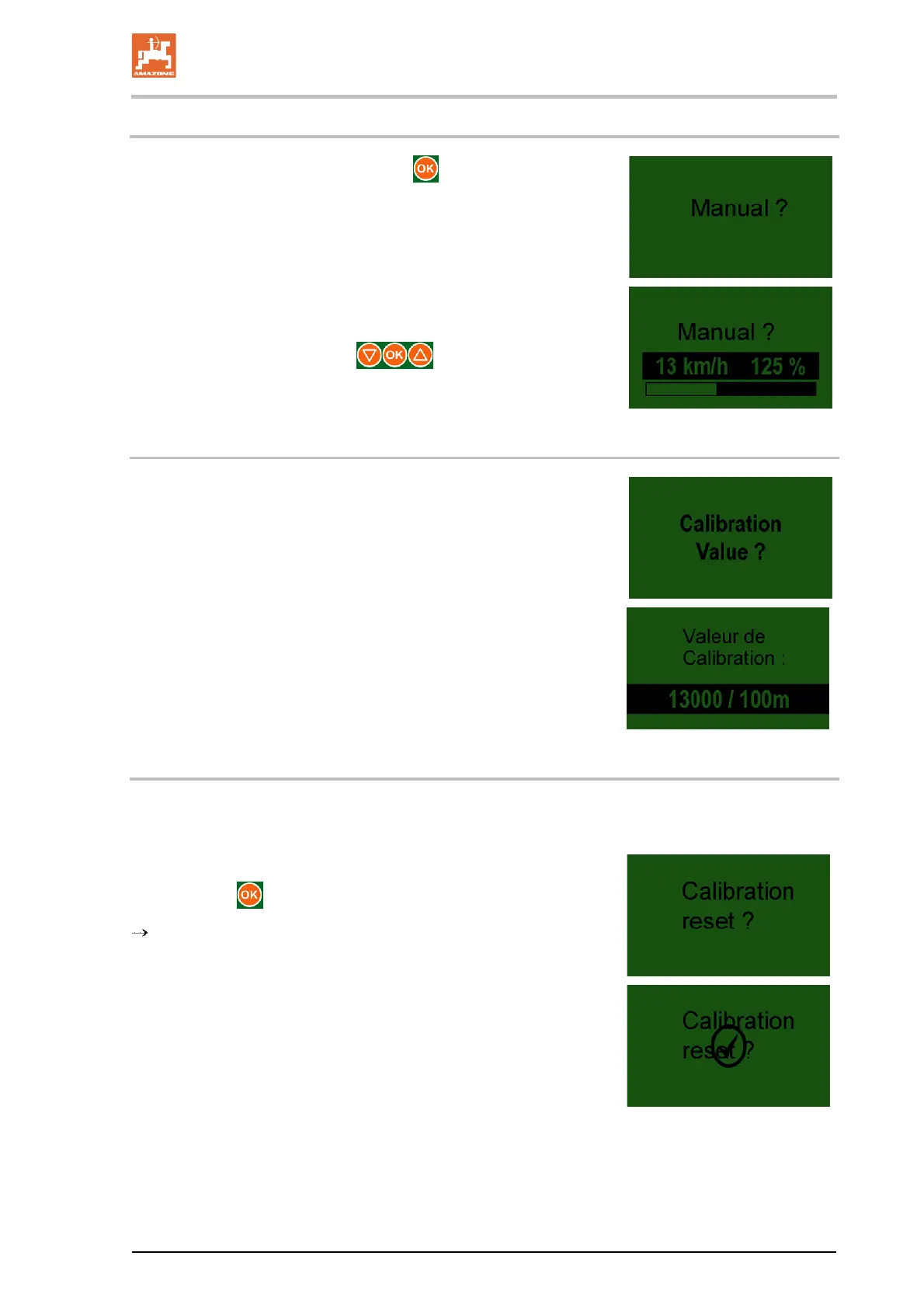
1. Confirm the screen display with the button.
2. Start the tractor for the calibration run.
During the calibration run, compare the speeds shown in the
tractor's display and speedometer.
Correct the value using the
buttons, until both val-
ues are the same.
7.5.4.3 Enter the calibration value manually
If you know the calibration value, the pulses / 100 mm can be set
manually.
1. Call up the Calibration test menu.
2. Enter the calibration value
(e.g. 13000/100 [pulses/100m]).
7.5.4.4 Calibration reset
Reset returns the calibration value to the factory setting.
1. Call up the menu
2. Press the
button
Calibration value is reset to the factory-set calibration value.
Display after reset is completed
(the display returns to the main menu after a few seconds).


 To Next Page