Configuring the Intellex
42 Intellex® Ultra
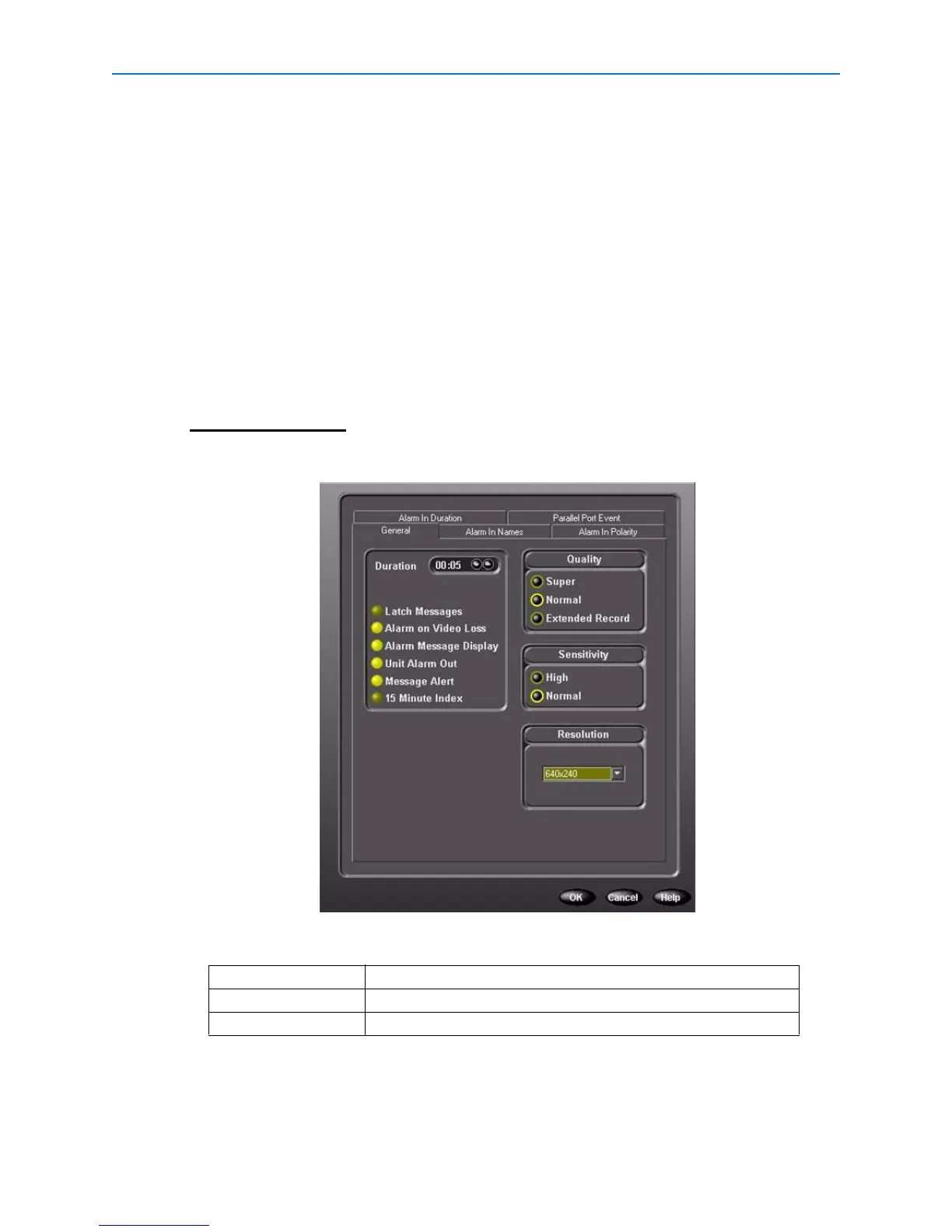
Setting Up Alarms
1 From the Setup Options screen, click Alarms.
2 From the General tab, set the alarm duration. Click the corresponding radio button to set:
• Latch Messages—to require the operator to clear alarm messages manually from screen
using Utility > Clear Latched
• Alarm on Video Loss—to generate an alarm when the unit stops receiving video signal from
any camera
• Alarm Message Display—to display the ALARM message on the camera’s image when an
alarm occurs
• Unit Alarm Out—to energize alarm output 16 when any alarm event occurs
• Message Alert—to energize alarm output 16 when the unit is in linear mode and a notification
screen appears or unit is background archiving and a notification screen appears
Note
15 Minute Index—to play back the video 15 minutes before an actual alarm. To use 15 Minute
Index, the camera must be actively recording and not in alarmed recording mode.
3 Select Quality:
4 Select the sensitivity and resolution. Higher sensitivity and resolution offer better quality but
less recording time.
5 From the Alarm In Names tab, name each physical alarm input. Use these names when
reviewing alarm images and searching the alarm database.
Super highest image quality
Normal mid-range quality
Extended Record highest compression



 To Next Page
 Loading...






