Configuring the Intellex
24 Intellex® Ultra
PTZ Cameras
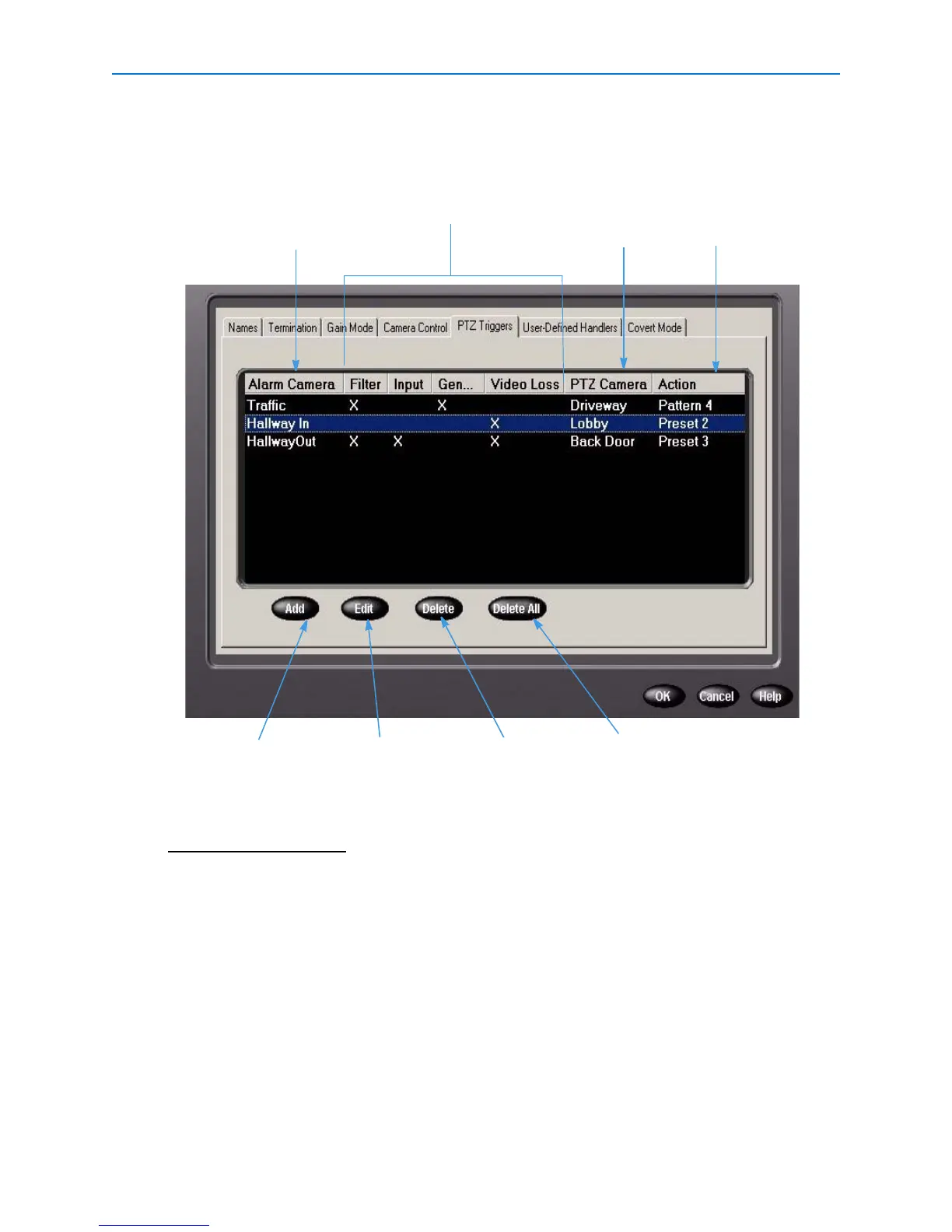
Use this feature to activate PTZ (pan, tilt, zoom) cameras based on an alarm event. The PTZ
Triggers tab displays a list of previously defined triggers.
Note
Clicking Add displays a dialog, where you can specify the trigger definition. Clicking Edit displays
the same dialog with the current trigger settings.
The alarm types that trigger a
PTZ action
Lists which camera is
triggered to activate when
the corresponding alarm
occurs
Indicates the PTZ
camera’s response to
a trigger
Highlight an existing
trigger, and click to
modify its settings.
Highlight an existing
trigger, and click to
remove it from the
list.
Lists the camera
that is alarmed to
trigger a PTZ action
Click to add a new
trigger to the
system.
Click to remove all
triggers from the list.



 To Next Page
 Loading...






