MANUAL FOR SYSTEM INTEGRATOR
14
Installing Procedures
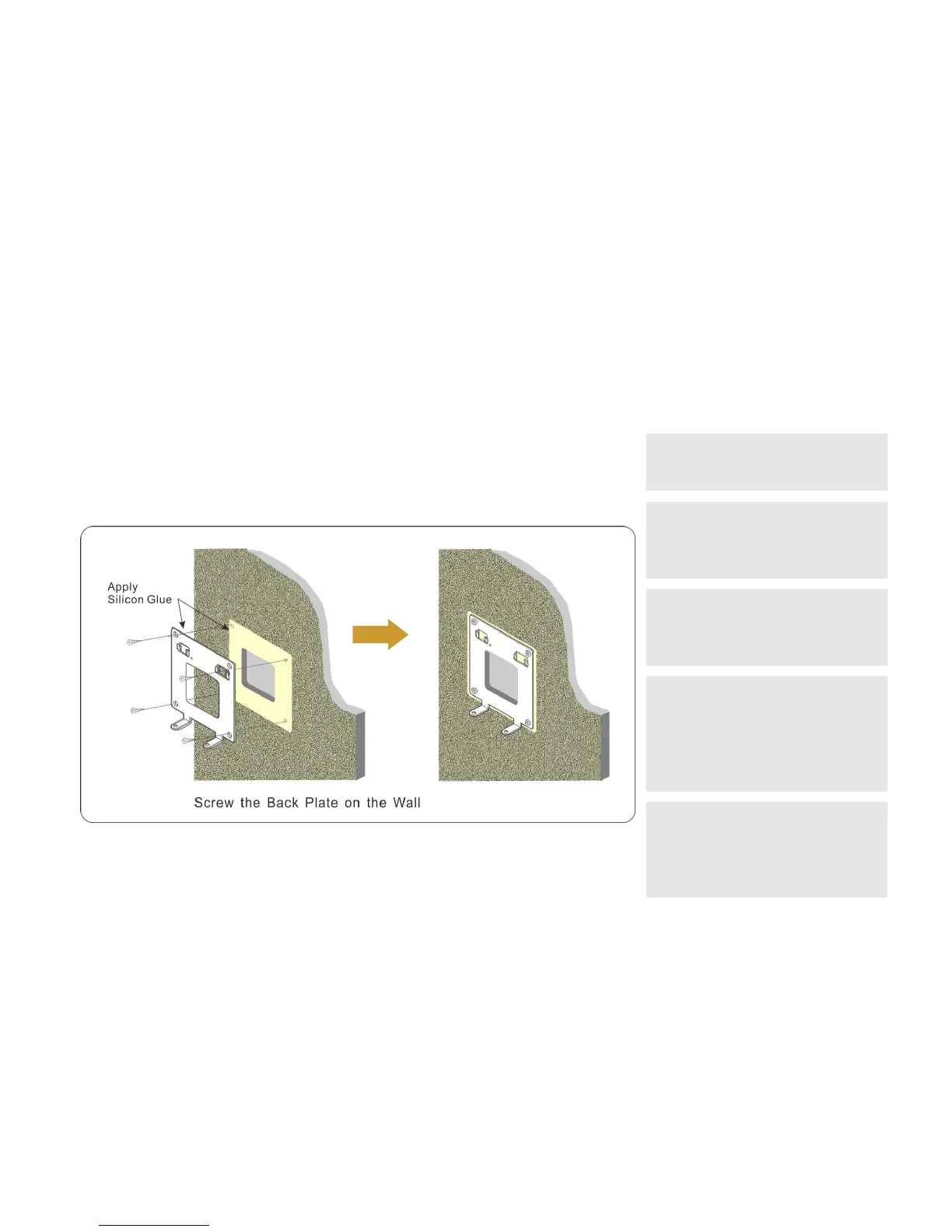
1. Screw the Back Plate on the wall
Drill a hole that is able to let the 12VDC wires and Ethernet c able pass through. While
installing Back Plate, apply Silicon Glue to the both sides between Back Plate and Wall to
prevent rain/water from leaking into this device.
NOTE:
1. Reserve the space for junction wiring in the
wall.
2. The protective film on the DP3210 should
not be torn up during DP3210 installation.
Do not tear up the protective film until
new residents move in the house.
3. While installing DP3210's back plate, you
need to check the vertical and
horizontal directions of the back plate
in order to have a good appearance.
4. To prevent power surge and lighting strike
from damaging DP3210, back plate should
be connected to the ground wire (earth
wire) of the building, and power switching
from junction box should also be
connected to the ground wire (earth wire).
5. To conform to IP55 Enclosure, while
installing Back Plate, apply Silicon Glue to
the surface between Back Plate and Wall
to prevent rain/water from leaking into
this device.
Figure 9: Screw the Back Plate on the Wall



 To Next Page