20
ME580 Series
User’s Manual
Operaon
Adjusng The Diaphragm (-2L Model Only)
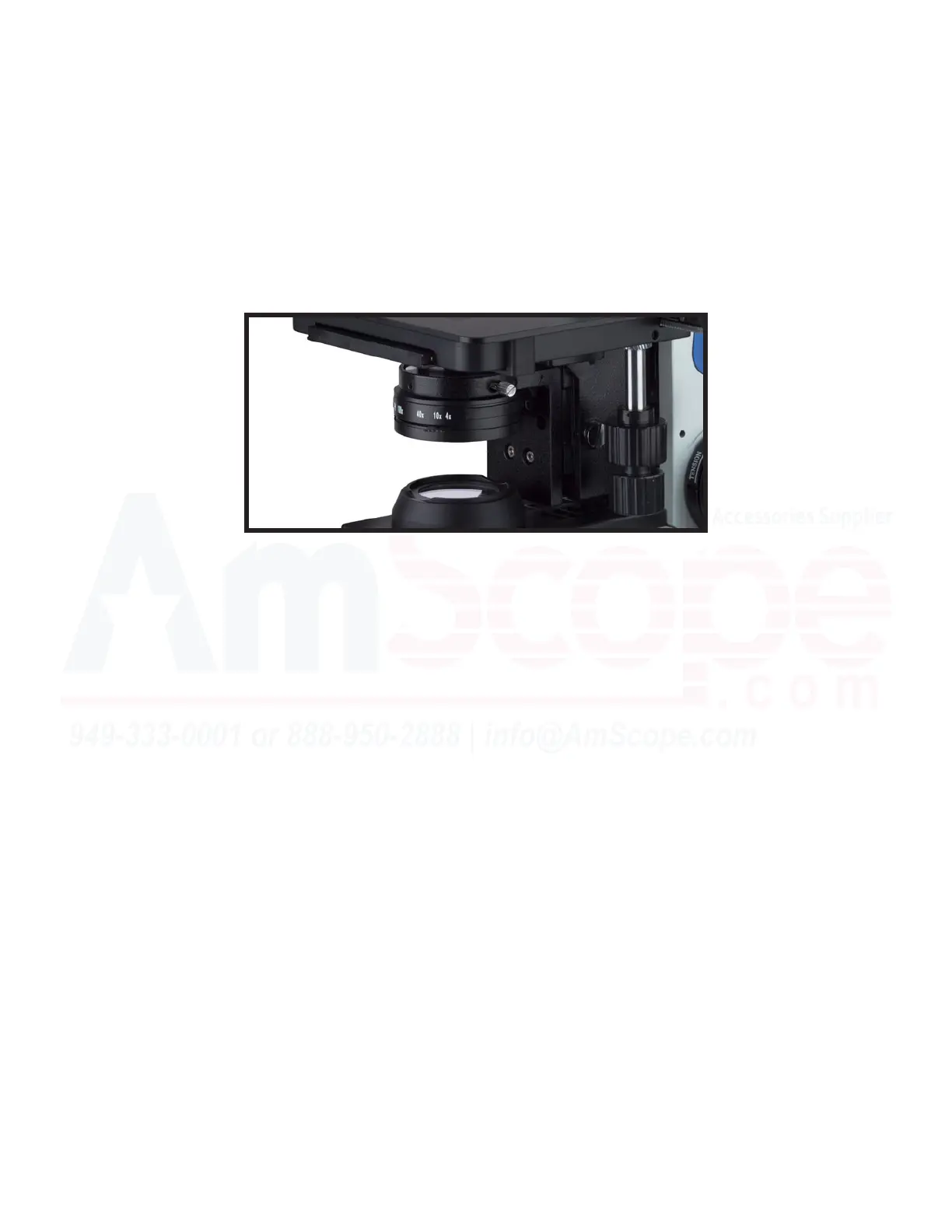
By changing the aperture (hole size) of the iris diaphragm, you can adjust the background brightness. Adjust
the aperture of the iris diaphragm by sliding the iris dial le or right unl the desired aperture is achieved
(where the numerical marking corresponds to the magnicaon of the objecve in use). Best results are
achieved by having the aperture slightly larger than the eld of view, or matching the numbers on the dial.
While looking into the microscope, adjust the aperture smaller than the eld of view to be seen, then enlarge
unl it touches the outer edge, and a lile further, if not simply matching it to the numerical value on the ad-
justment of the condenser.
Some color lters are included on some models as well, which are used to create addional contrast. These
are installed on a swing out arm underneath the condenser. And nally, the best results are typically seen
when the condenser is as close to the stage as possible, adjusted by the knob to the le of the condenser.
Note: -2L models are the only models with a substage condenser. Non -2L models do not have a hole in the
stage to allow light through it, nor a substage condenser, nor a boom illuminaon system.













 To Next Page