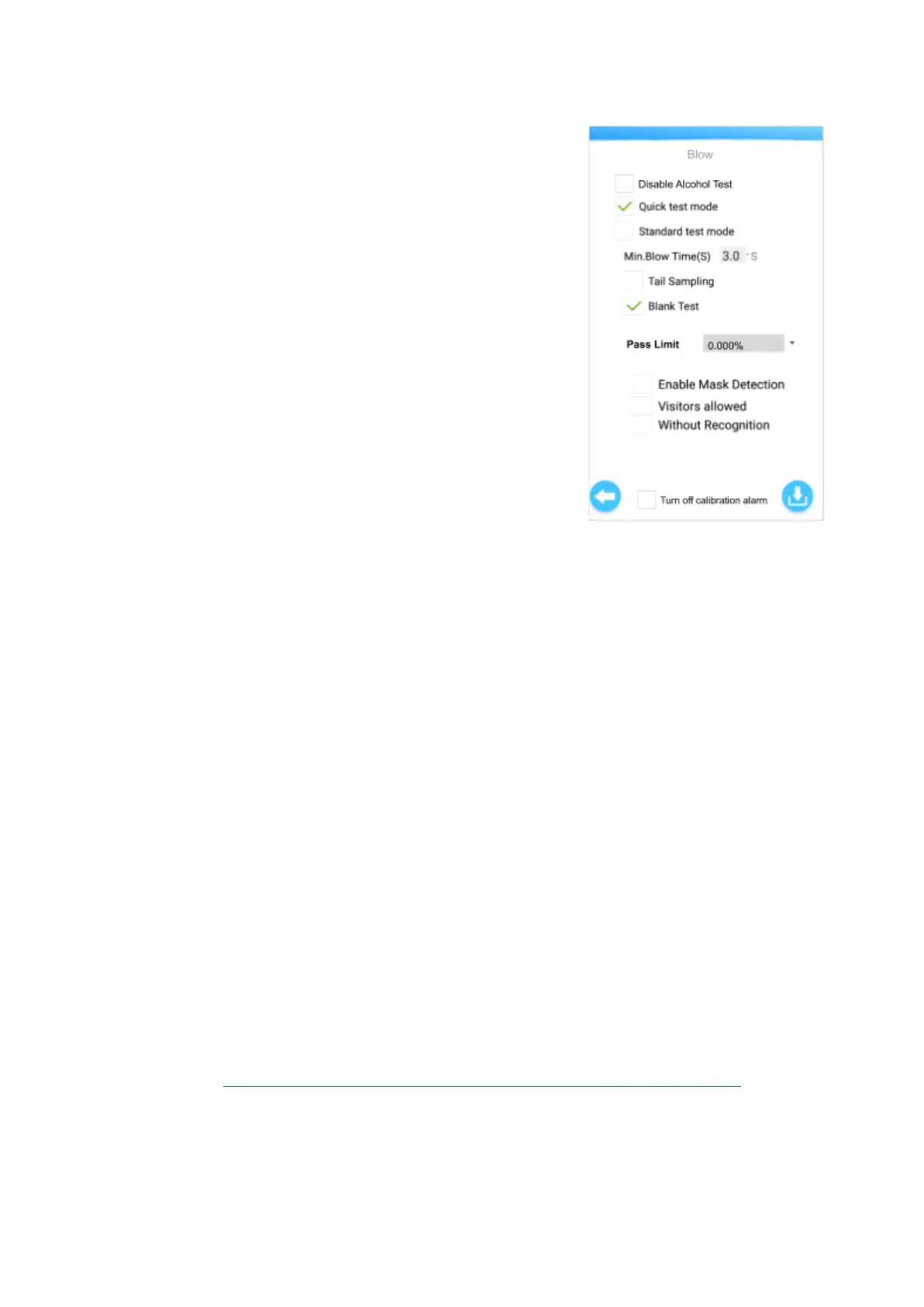
Recognition (Device screen will show ‘Blow’)
● Disable Alcohol Test - Tick this to disable alcohol testing
on the device. Untick to enable alcohol testing on the
device.
● Quick test mode - Tick this for fast testing using a
sampling cup. Only a short breath sample is required to get
a result. The provided sampling cup is recommended for
use with this mode.
● Standard test mode - Tick this for more accurate alcohol
testing. A longer breath sample is required to get a result.
The provided straw adaptor is recommended for use with
this mode, and users should be provided with clean,
regular drinking straws (not provided) for individual testing.
○ Min.blow time(s)
■ Set the minimum blow time required for
sampling (from 3.0s and above).
■ Applicable only for Standard test mode.
Note: In both Quick and Standard test modes, the alcohol test readings will be shown (e.g.
0.02%BAC) unless this setting is disabled under 'Show alcohol test reading' in the Settings
menu.
● Tail Sampling
Read the FAQs section for an explanation of Tail Sampling.
○ Tick to enable taking the test sample only from the last few seconds of the blow.
○ Untick to disable tail sampling.
● Blank Test
○ Tick to enable an air blank test before each new test. The device does this to ensure
the mouthpiece and sensor are clear of alcohol from any previous tests that may
affect the next reading results.
○ Untick to disable blank test.
● Pass Limit
○ Set the pass limit for the alcohol test result on this device. Any test result above this
set limit will be recorded as a “FAIL” in the device and Andalink.
○ Important: Please ensure that the limit is set the same in Andalink (see KB article:
Ensure set alcohol / temperature limits are the same in Andalink and device)
15


 To Next Page