TROUBLESHOOTING / WARNING DISPLAY
26
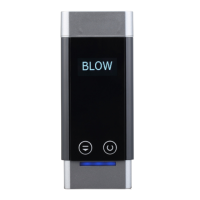
Blow interrupt, please
blow
User stopped blowing or did not blow
hard enough.
Please try blowing into the sampling hole
again using a strong, steady breath until
the screen displays 'Blow completed.
Please Wait'.
A user's face was recognised and
the Soberlive FRX was ready to take
a test, but the user failed to provide a
sample.
Face the Soberlive FRX camera again to
take a test.
User is not registered as staff and
‘Visitors Allowed’ is disabled.
Register user as staff in Andalink or
enable ‘Visitors Allowed’ under
‘Advanced Settings (Blow)’.
Please contact
calibration operator
and/or
Thermal Imaging
Display is orange
The device requires Temperature
Calibration.
Perform a temperature calibration
following the instructions under
‘Temperature Calibration Procedure’.
Body Temperature:
XX.X°C Fail!
The detected body temperature was
higher than the set limit.
Check and change the body temperature
limit (e.g. 38.0°C) under ‘Advanced
Settings (Temperature)’ if it is too low.
Body Temperature is
too high (e.g. 38.0°C)
but the user passed
No Body Temperature Limit was set
(default limit is 0°C - any
temperature will Pass) or was set too
low (e.g. 32.0°C).
Go to Advanced Settings (Temperature)’
and set a body temperature limit (e.g.
37.5°C).
Device not recognising
or detecting user or
face correctly
User’s face is not within the Facial
Recognition Frame.
Position user so that face is within the
Facial Recognition Frame.
User is not following Facial
Recognition Guidelines.
Ensure users are following Facial
Recognition Guidelines.
Also, ensure that the user's photo in
Andalink is following Facial Recognition
Guidelines.
User is not registered in Andalink or
device.
Register the user in Andalink or device.


 To Next Page