ANDALINK
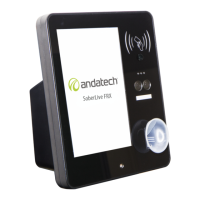
The Andalink is a secure, cloud-based software that bridges the Soberlive FRX with a complete data
management system. With Andalink, company and OH&S managers can register users and faces, as
well as view, download, and manage reports for their employees' alcohol and temperature results.
SETUP INSTRUCTIONS / ANDALINK MANUAL
For instructions on how to set up your Andalink account for your Soberlive FRX, please visit
andatech.com.au/andalink-manual to see the updated Andalink manual and log in with the
credentials provided in the letter with your device during purchase.
ADMIN SETUP
Important: Before operating the Soberlive FRX, please create at least one (1) staff that has the user
role Admin for each location/device.
By default, an Admin staff is required to conduct the Admin Temperature Calibration on the device
during startup.
You can disable this requirement or add a new Admin user on the device under Advanced Setting.
You can also add new Admin users online on Andalink (refer to Andalink manual above).
ANDALINK SYNC
Test results from the device are synced to Andalink immediately (as long as there is an active internet
connection on the device).
All other changes from Andalink to the device are synced every 10 minutes.
FORCE SYNC
To Force Sync the device with Andalink, connect a mouse to the device.
Then click and hold the cursor on the version number (displayed on the bottom right of
the device screen).
The server (cloud) icon will start rotating and display a downward arrow icon to indicate
that it is syncing.
The Force Sync is complete when the icon stops rotating. The number beside the icon will be updated
to show the updated number of registered faces synced from Andalink, and a pop-up message will
appear in the Notification Area that the Force Sync is complete.
8


 To Next Page