English - 40 -
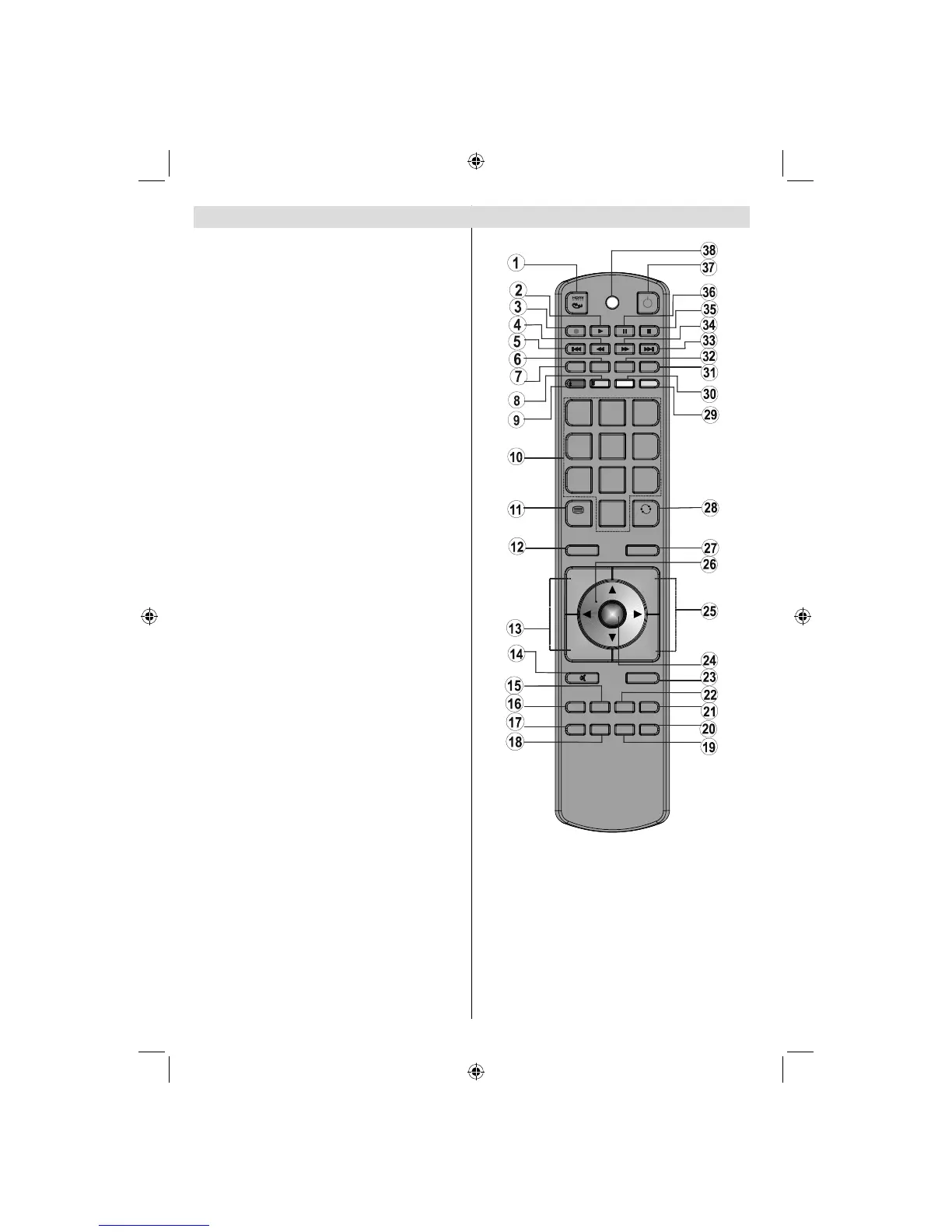
Overview of the Remote Control
REPEAT
ZOOM
TITLE
ROOT
TEXT
SWAP
1
2
3
4
5
6
7
8
9
SCREEN
0
LANG SUBTITLE PIP
OK
MENU
SOURCE
RETURN
INFO
FAV SLEEP EPG
SEARCH
ANGLE
DISPLAY
MODE
P+
PRESETS
P-
V+
V-
No function1.
Play (in Media Browser mode)2.
Record (in PVR DTV mode)3.
Rapid reverse4.
Skip back (optional)5.
Mono-Stereo / Dual I-II / Current language (in 6.
DTV mode)
Image size7.
Green / Picture / Subtitle on-off (in DTV mode) 8.
Red / Sound menu / Change channel list type 9.
(in DTV mode) (*)
Numeric buttons10.
Teletext / Mix / PAT11.
Info / Reveal (in TXT mode)12.
Programme up (Page down in DTV mode) / 13.
Programme down (Page up in DTV mode)
Mute14.
FAV (*) (Favourite Selection) (in DTV mode)15.
Return / Exit (in DTV mode) / Index page (in 16.
TXT mode)
No function17.
No function18.
No function19.
Picture mode selection20.
Electronic programme guide (in DTV mode)21.
Sleep timer22.
Menu on-off23.
OK / Channel list (in DTV mode) / Hold (in TXT 24.
mode)
Volume up / down25.
Navigation buttons26.
Source selection27.
Previous Programme 28.
Blue / Install menu / Favourite mode (*) (in DTV 29.
mode)
Yellow / Feature / Current language (in DTV 30.
mode) (*)
No function31.
Subtitle on-off (in DTV mode) / TXT Subtitle32.
Skip forward (optional)33.
Rapid advance (in Media Browser mode)34.
Stop (in Media Browser mode)35.
Pause (in DTV mode) / Timeshift recording (in 36.
PVR DTV mode)
Standby37.
Operation Led Light38.
(*) Only for EU country options.
02_MB45M_[GB]_5110UK_PVR_IDTV_SILVER8_(psm)_32843W_10071150_50180023.indd 502_MB45M_[GB]_5110UK_PVR_IDTV_SILVER8_(psm)_32843W_10071150_50180023.indd 5 25.11.2010 13:11:0225.11.2010 13:11:02



 To Next Page