ES
FR
DE
GB
IT
C13148123_GB.fIDM
English
-
12
-
Use and installation manual
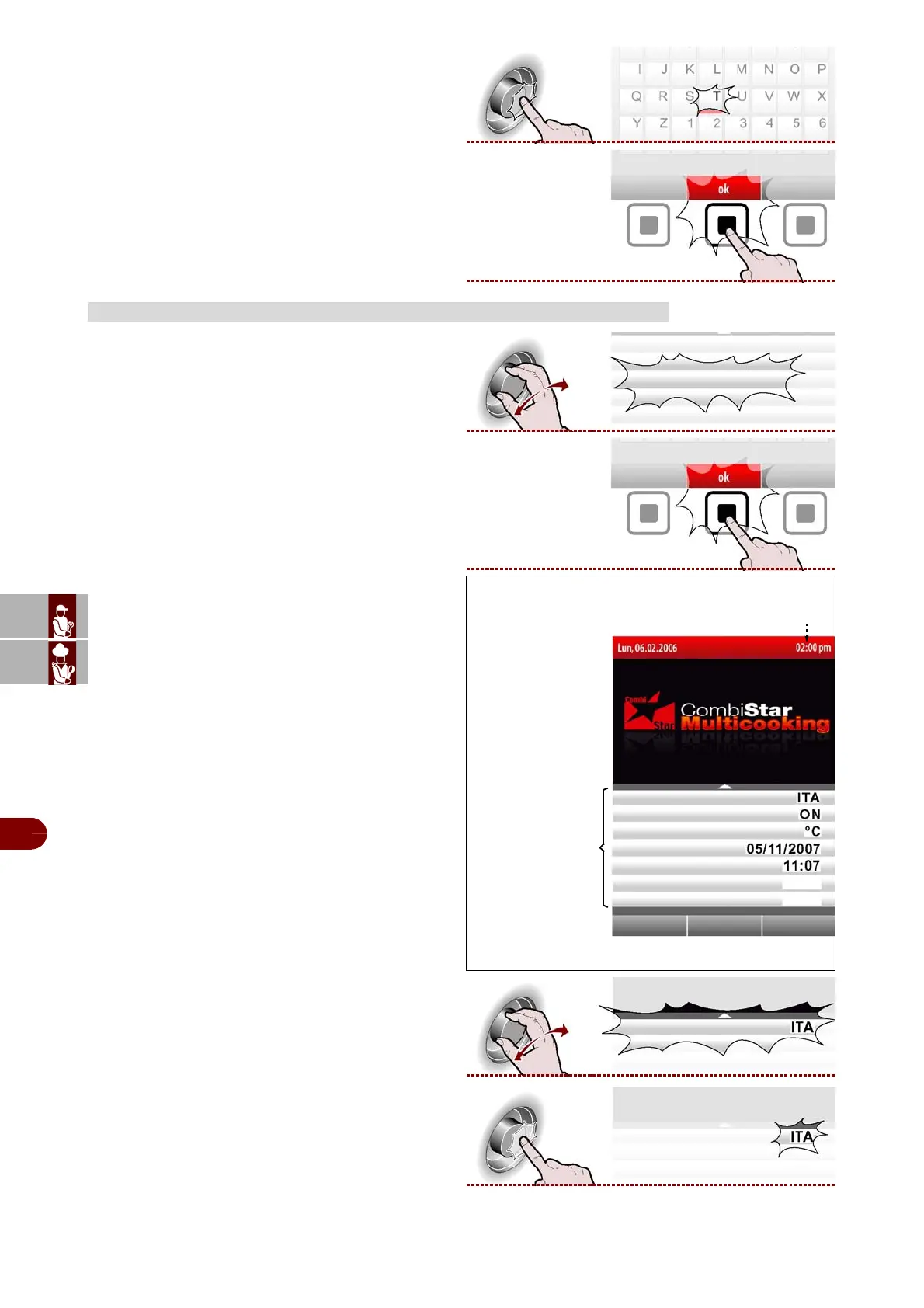
4–Press the knob to confirm the highlighted selec-
tion. >>>
5–Repeat the operation until the complete value or
parameter has been entered.
6–Press the button to confirm the value or descrip-
tion selected. >>>
Proceed as follows.
1–Select the "Settings" function using the knob.
>>>
2–Press the button to confirm the value or descrip-
tion selected. >>>
The display will show page. >>>
This page is used to set the appliance’s operating pa-
rameters.
Language
3–Select the "Current language" function using the
knob. >>>
4–Press the knob to confirm the selected function.
>>>
HOW TO MAKE GENERAL APPLIANCE SETTINGS
Time
language
preheating
date
clock
audio volume
Settings
IDM-39617706700.tif
HACCP acquisition interval 5 min.
External probe External



 To Next Page